Achieving a perfectly rectangular, crisp image from your projector is fundamental to any immersive viewing or presentation experience. Yet, when a projector isn’t perfectly aligned with the screen, the image can distort into an unappealing trapezoid, commonly known as the keystone effect. Fortunately, projectors offer features like digital keystone correction and optical lens shift to rectify this. But what exactly are these technologies, and which one delivers the superior result? Understanding their core differences is crucial for anyone looking to maximize their projector’s performance and ensure the highest possible image quality.
Understanding the Keystone Effect in Projectors
The keystone effect is a common optical phenomenon that occurs when a projector is positioned at an angle, rather than directly perpendicular, to the projection surface. This angular placement causes the projected image to appear wider at the top or bottom, or on one side, creating a trapezoidal shape instead of a true rectangle. This distortion is a natural consequence of how light travels through the lens and interacts with an angled screen. Without proper correction, the keystone effect can significantly detract from your viewing experience, making lines appear crooked and overall geometry skewed.
Beyond just the geometric distortion, angling a projector also presents a challenge to focus. A projector lens is designed to cast a single, flat plane of sharp focus. When the projector is tilted, maintaining uniform sharpness across the entire trapezoidal image becomes impossible, leading to parts of your image appearing softer than others.
Digital Keystone Correction: The Software Solution
Digital keystone correction is a widely available feature, especially in more affordable and portable projectors, designed to combat the keystone effect through software manipulation.
This method works by digitally processing the source image before it even reaches the projector’s imaging chip. The projector’s internal processor detects the distortion and applies an inverse trapezoidal transformation to the original image. When this pre-distorted image is then projected, the optical distortion caused by the projector’s angle is theoretically canceled out, making the image appear rectangular on your screen. This is akin to digitally “pre-warping” the image to compensate for the physical misalignment.
Pros of Digital Keystone Correction:
- Convenience: It offers a quick and easy way to correct image geometry, often with automatic features that detect and adjust the keystone effect.
- User-Friendly: Simple to activate and adjust, making it ideal for casual setups or situations where precise physical placement is challenging.
- Flexibility: Allows for more flexible projector placement, which is particularly beneficial for portable projectors used in various locations.
Cons of Digital Keystone Correction:
- Image Quality Degradation: This is the most significant drawback. Because the projector digitally rescales and remaps pixels, it compromises the original pixel structure. This process discards or resamples pixels, leading to a noticeable reduction in effective resolution, sharpness, and clarity, especially with fine details, text, and user interface elements. The more aggressive the correction, the more pronounced the loss in quality.
- Visual Artifacts: Digital scaling can introduce artifacts such as softness, blurring, and aliasing (jagged edges on smooth lines). A tell-tale sign is the “gray border” phenomenon, where a faint, trapezoidal glow might appear around the corrected image in a dark room. This glow comes from the light of unused, yet still illuminated, pixels.
- Reduced Brightness and Contrast: Digitally compressing some image areas can subtly diminish brightness uniformity and contrast, particularly at the edges of the projected picture.
Digital keystone correction is best reserved for situations where minor angular adjustments are needed, or when physical placement is absolutely constrained. It serves as a workaround, offering convenience at the expense of pure image fidelity.
Optical Lens Shift: The Physical Advantage
In contrast to digital keystone correction, optical lens shift offers a more sophisticated and image-preserving solution to projector placement challenges. This feature, typically found in mid-range to high-end projectors, involves a physical adjustment of the projector’s internal lens assembly.
Instead of digitally altering the image, optical lens shift physically moves the lens either vertically, horizontally, or both, to reposition the entire cone of projected light. This means the image is moved on the screen without any digital manipulation of the pixels. It’s a mechanical process that effectively redirects where the image lands, allowing you to fine-tune the projection’s position without compromising its integrity.
Pros of Optical Lens Shift:
- Preserves Image Quality: Crucially, optical lens shift maintains the projector’s native resolution, sharpness, and brightness. Since no pixels are digitally altered or resampled, the image retains its original clarity and detail.
- Precise Control: Offers far more precise control over image placement, making it ideal for dedicated home theater setups where exact alignment is paramount.
- Placement Flexibility: Provides significant flexibility in where you can install your projector. You can mount it higher, lower, or to the side of the screen and still achieve a perfectly rectangular image without tilting the projector itself.
- No Artifacts: Because it’s a physical adjustment, there are no digital artifacts, blurring, or “gray borders” associated with this method.
Cons of Optical Lens Shift:
- Higher Cost: Projectors equipped with optical lens shift typically feature a more complex optical design, which translates to a higher price point.
- Less Common: Not all projectors, especially entry-level or ultra-short throw (UST) models, include this feature.
- Physical Adjustment: While precise, it requires manual adjustment of knobs or levers on the projector itself, which can be less instantaneous than automatic digital keystone correction. Poorly implemented lens shift, though rare in quality projectors, could also potentially degrade image quality.
Optical lens shift is the preferred solution for anyone prioritizing pristine image quality and requiring flexibility in projector placement without sacrificing visual fidelity.
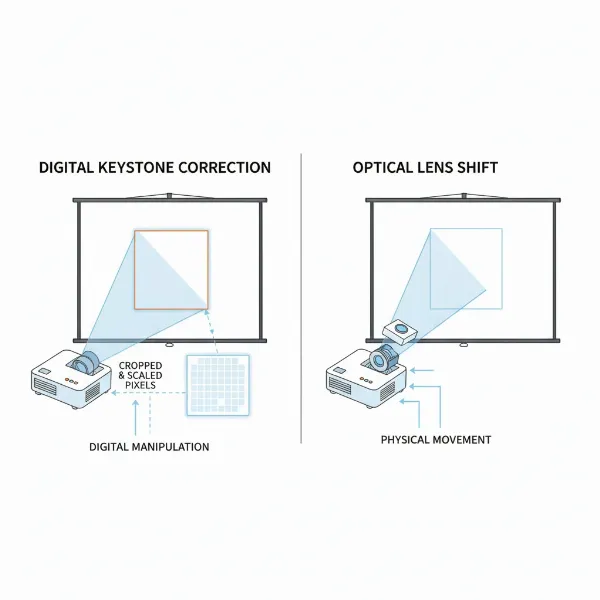 A diagram illustrating the difference between digital keystone correction and optical lens shift, showing how digital crops the image while optical shifts the entire projection cone.
Digital vs. Optical Lens Shift: A Head-to-Head Comparison
To truly grasp the distinction between these two image adjustment technologies, consider an analogy: optical lens shift is like the optical zoom on a camera, physically moving lens elements to magnify an image losslessly. Digital keystone correction, on the other hand, is akin to digital zoom, which crops a section of the sensor and digitally enlarges it, inevitably degrading quality.
| Feature | Digital Keystone Correction | Optical Lens Shift |
|---|---|---|
| Mechanism | Digital signal processing; pixel remapping/rescaling | Physical movement of the lens assembly |
| Image Quality Impact | Reduces resolution, sharpness, can introduce artifacts | Preserves native resolution, sharpness, and clarity |
| Primary Problem Solved | Projector angle causing trapezoidal distortion | Projector placement (off-center horizontally/vertically) |
| Flexibility | High; quick adjustments, good for portable/temporary | High; precise placement, ideal for permanent installations |
| Cost | Generally lower; widely available on all projector types | Generally higher; found on mid-to-high-end projectors |
| Ease of Use | Often automatic, very convenient | Manual knobs/levers, requires some finesse |
| Best For | Casual setups, presentations, last resort solutions | Home theaters, critical viewing, fixed installations |
The hierarchy for achieving a perfect image is clear:
- Ideal: Perfect physical alignment of the projector directly perpendicular to the screen.
- Best Compromise: Utilizing optical lens shift for precise positioning without image degradation.
- Last Resort: Employing digital keystone correction for minor angular adjustments when other options are unavailable.
“While digital keystone correction offers undeniable convenience, true cinephiles and discerning users understand that it’s a trade-off. For uncompromised visual fidelity, the mechanical precision of optical lens shift remains the gold standard.” – Johnathan Reed, Senior Projector Engineer at LuminaTech
Choosing the Right Feature for Your Projector Setup
Selecting between a projector with robust optical lens shift or one relying solely on digital keystone correction depends heavily on your specific needs, environment, and priorities.
- Consider Your Setup:
- Permanent Home Theater/Installation: If you’re setting up a dedicated home theater or a fixed installation where image quality is paramount, investing in a projector with optical lens shift is highly recommended. It allows for flexible placement (e.g., ceiling mount or off-center shelf) while maintaining the pristine quality of your content.
- Portable or Flexible Use: For portable projectors that are frequently moved between locations (e.g., business presentations, outdoor movie nights, temporary setups), digital keystone correction offers unmatched convenience. While it compromises quality, the ease of quick setup often outweighs this for non-critical viewing.
- Budget Considerations: Projectors with optical lens shift typically fall into higher price brackets due to their more complex optical engineering. If your budget is tight, a projector with good digital keystone correction might be your only option, but be mindful of its limitations.
- Importance of Image Purity: If you are a stickler for razor-sharp images, accurate pixel-for-pixel representation, and vibrant, uniform color, then prioritize a projector with optical lens shift or, ideally, ensure perfect physical placement. For more casual viewing where minor imperfections are acceptable, digital keystone might suffice.
Remember, the goal is always to start with the best possible physical alignment. Even high-end projectors, like some Ultra-Short Throw models, emphasize precise physical unit movement over built-in optical lens shift, reinforcing that mechanical purity is the primary method for geometric accuracy.
Tips for Optimizing Your Projector Image
Maximizing your projector’s image quality involves more than just understanding features; it also requires best practices in setup and maintenance.
- Prioritize Physical Placement: Always aim to position your projector as directly perpendicular to your screen as possible. This minimizes the need for any correction features and ensures you start with the cleanest possible image. Use a tape measure and a level for the most accurate setup.
- Utilize Lens Shift First: If your projector has optical lens shift, use it to fine-tune the image position. This should be your go-to method for adjusting the image to fit your screen perfectly without any degradation.
- Minimize Digital Keystone Correction: If you must use digital keystone correction, use it sparingly and for the smallest adjustments possible. Excessive correction will significantly impact your image quality. If you find yourself needing extreme digital correction, reconsider your projector’s physical placement or explore a model with lens shift.
- Understand Auto Keystone: While convenient, remember that “auto keystone” simply automates the application of lossy digital keystone correction. It doesn’t magically make it an optical, lossless process.
- Regular Maintenance: Keep your projector’s lens clean and free of dust. Dust can scatter light and reduce image clarity, potentially exacerbating the perception of quality loss from digital corrections.
Conclusion
The pursuit of the perfect projected image often boils down to understanding the nuances of features like keystone correction and lens shift. While digital keystone correction offers a convenient, software-based solution for quickly rectifying trapezoidal distortions caused by an angled projector, it comes at the cost of image quality, sharpness, and resolution. Optical lens shift, on the other hand, provides a superior, physical method of adjusting image placement without any pixel manipulation, thereby preserving the projector’s native visual fidelity.
For home theater enthusiasts and those who demand uncompromised image purity, optical lens shift is the clear winner, allowing for flexible projector placement while maintaining a stunning picture. For casual users or highly portable setups where convenience is paramount and minor quality compromises are acceptable, digital keystone correction serves as a useful tool. Ultimately, the best practice is always to achieve the most precise physical alignment of your projector, minimizing the need for any digital corrections.
Which feature will you prioritize in your next projector setup for the ultimate viewing experience?
Frequently Asked Questions
Does keystone correction always degrade image quality?
|
Our Picks for the Best projector in 2026
As an Amazon Associate I earn from qualifying purchases.
|
||
| Num | Product | Action |
|---|---|---|
| 1 | HAPPRUN Native 1080P Bluetooth Mini Projector, Full HD Portable Outdoor Movie Projector with Built-in Speaker, Compatible with Smartphone, HDMI, USB, AV, Fire Stick, PS5 for Home, Bedroom, Outdoor Use |

|
| 2 | [Built-in Official Apps/4K Support] Smart Outdoor Projector with WiFi and Bluetooth, 800ANSI Movie Projector, DoIby Audio with Dual Speaker, Auto Focus w/ YouTube&PrimeVideo Proyector, Upgrad P62 Pro |
|
| 3 | Aurzen Roku TV Smart Projector with Wifi and Bluetooth, Roku Streaming Experience Built-in, 1080P FHD, DoIby Audio, Auto Focus & Keystone, Zoom, Movie Portable Outdoor Mini Projector, White |
|
| 4 | Epson Pro EX9270 Wireless 1080p 3LCD Projector 4,100 Lumens Color and White Brightness, Apple AirPlay, Miracast, Stream from Phone or Laptop, 2 HDMI Ports, 1.6x Optical Zoom, Built-In Speaker |
|
| 5 | 【Official Licensed Google TV】4K Smart Projector with WiFi and Bluetooth, VOPLLS Outdoor Projectors with Dolby/Auto Focus, Portable Movie Phone Wireless Gaming Wifi Proyector for Bedroom/Home/Celling |
|
| 6 | [3500 ANSI/ Official Apps/65W Audio] Outdoor 4K Projector with WiFi and Bluetooth, Auto Focus, Auto Keystone Smart Projector Support DoIby Audio, 2026 Upgrade GO2 Short Throw Projector with 360°Stand |
|
| 7 | 1500 ANSI Official Licensed Google TV Smart Projector, HAPPRUN 4K Full HD Home Theater with Auto Focus, Dolby Sound, Wi-Fi Bluetooth, Built-in Apps, Compatible with Phone & PC, Indoor & Outdoor Use |
|
| 8 | Projector-4K with WiFi and Bluetooth:[3500 ANSI/60W Dolby Audio/Official Licensed Apps], Outdoor-Projector with Smart OS 2.0 & AI Auto Focus,ONOAYO ONO5Pro 2.0 Smart Movie Projector for Indoor/Outdoor |
|
| 9 | Epson Pro EX11000 3-Chip 3LCD Full HD 1080p Wireless Laser Projector, 4,600 Lumens Color/White Brightness, Miracast, 2 HDMI Ports, USB Power for Streaming, Built-in 16W Speaker |
|
| 10 | 【Officially-Licensed APP & Native 1080P】Thinnest 1.81\" Smart Mini Projector with WiFi and Bluetooth, Auto Focus & Keystone Portable Outdoor Projector, VOPLLS 4K Support Home Movie Projector |
|
Yes, digital keystone correction inherently degrades image quality because it involves digitally rescaling and remapping pixels. This process discards or stretches pixels, leading to a reduction in native resolution, sharpness, and clarity. The extent of degradation is proportional to the amount of correction applied.
Can I use both keystone correction and lens shift?
While some projectors might offer both features, it’s generally advised to use optical lens shift first and, if absolutely necessary, apply minimal digital keystone correction. Using lens shift ensures the highest possible image quality by physically moving the projection, while digital keystone should be a last resort for very minor angular tweaks.
Is auto keystone correction better than manual digital keystone?
Auto keystone correction offers convenience by automatically detecting and applying digital keystone adjustments. However, it still uses the same lossy digital process as manual digital keystone. The “auto” aspect refers to the automation of the adjustment, not an improvement in the underlying image quality preservation.
What is a “gray border” in projection?
A “gray border” is a faint, trapezoidal glow that can appear around the corrected image when using digital keystone correction, especially in a dark room. It occurs because the projector still illuminates all its native pixels, even those outside the digitally “corrected” rectangular image, making the light from these unused pixels visible.