Are you on a quest to transform your living space into a cinematic sanctuary, where every frame comes alive with breathtaking detail and authentic color? The BenQ HT3560 4K HDR home theater projector emerges as a formidable contender, designed to satisfy the most discerning movie enthusiasts. Hailed for its exceptional out-of-the-box color accuracy and sharp 4K resolution, this projector promises a truly immersive experience, especially when viewed in a dedicated dark room environment. It’s not just a projector; it’s an Editors’ Choice, setting a high bar for performance within its price category.
Projector Overview: The BenQ HT3560 Unpacked
The BenQ HT3560 is a dedicated 4K UHD DLP home theater projector, meticulously engineered to bring the magic of the big screen into your home. It serves as the refined successor to the popular HT3550, boasting several key advancements that enhance the viewing experience. Users have noted significant improvements in brightness, image density, and a notably quieter operation, addressing some of the minor concerns of its predecessor.
At its core, the HT3560 utilizes a single-chip 0.47″ DLP Digital Micromirror Device (DMD) in conjunction with XPR pixel-shifting technology. This ingenious combination projects 8.3 million distinct pixels, delivering true 4K UHD resolution that far surpasses Full HD 1080p in clarity and detail. Powering this visual prowess is a traditional Ultra High Performance (UHP) lamp, providing a robust 2,200 ANSI Lumens of brightness, ideally suited for environments where ambient light can be controlled. The projector’s commitment to cinematic quality is further underscored by its CinematicColor technology, offering wide color gamut coverage with 95% DCI-P3 and 100% Rec.709, ensuring colors are rendered precisely as filmmakers intended.
Essential Features for a Superior Cinematic Experience
The BenQ HT3560 is packed with features designed to deliver an unparalleled home theater experience. Its technical specifications are carefully balanced to prioritize image fidelity and user convenience.
Image Quality and Color Accuracy
|
Our Picks for the Best projector in 2026
As an Amazon Associate I earn from qualifying purchases.
|
||
| Num | Product | Action |
|---|---|---|
| 1 | 1500 ANSI Official Licensed Google TV Smart Projector, HAPPRUN 4K Full HD Home Theater with Auto Focus, Dolby Sound, Wi-Fi Bluetooth, Built-in Apps, Compatible with Phone & PC, Indoor & Outdoor Use |

|
| 2 | [3500 ANSI/ Official Apps/65W Audio] Outdoor 4K Projector with WiFi and Bluetooth, Auto Focus, Auto Keystone Smart Projector Support DoIby Audio, 2026 Upgrade GO2 Short Throw Projector with 360°Stand |
|
| 3 | Epson Pro EX9270 Wireless 1080p 3LCD Projector 4,100 Lumens Color and White Brightness, Apple AirPlay, Miracast, Stream from Phone or Laptop, 2 HDMI Ports, 1.6x Optical Zoom, Built-In Speaker |
|
| 4 | [Built-in Official Apps/4K Support] Smart Outdoor Projector with WiFi and Bluetooth, 800ANSI Movie Projector, DoIby Audio with Dual Speaker, Auto Focus w/ YouTube&PrimeVideo Proyector, Upgrad P62 Pro |
|
| 5 | 【Officially-Licensed APP & Native 1080P】Thinnest 1.81\" Smart Mini Projector with WiFi and Bluetooth, Auto Focus & Keystone Portable Outdoor Projector, VOPLLS 4K Support Home Movie Projector |
|
| 6 | HAPPRUN Native 1080P Bluetooth Mini Projector, Full HD Portable Outdoor Movie Projector with Built-in Speaker, Compatible with Smartphone, HDMI, USB, AV, Fire Stick, PS5 for Home, Bedroom, Outdoor Use |
|
| 7 | 【Official Licensed Google TV】4K Smart Projector with WiFi and Bluetooth, VOPLLS Outdoor Projectors with Dolby/Auto Focus, Portable Movie Phone Wireless Gaming Wifi Proyector for Bedroom/Home/Celling |
|
| 8 | Projector-4K with WiFi and Bluetooth:[3500 ANSI/60W Dolby Audio/Official Licensed Apps], Outdoor-Projector with Smart OS 2.0 & AI Auto Focus,ONOAYO ONO5Pro 2.0 Smart Movie Projector for Indoor/Outdoor |
|
| 9 | Epson Pro EX11000 3-Chip 3LCD Full HD 1080p Wireless Laser Projector, 4,600 Lumens Color/White Brightness, Miracast, 2 HDMI Ports, USB Power for Streaming, Built-in 16W Speaker |
|
| 10 | Aurzen Roku TV Smart Projector with Wifi and Bluetooth, Roku Streaming Experience Built-in, 1080P FHD, DoIby Audio, Auto Focus & Keystone, Zoom, Movie Portable Outdoor Mini Projector, White |
|
The cornerstone of the HT3560’s appeal is its stunning image quality. It delivers a True 4K UHD resolution, achieved through advanced pixel shifting, ensuring crisp, detailed visuals without noticeable pixel blur. For color purists, the HT3560 is a dream come true, offering factory-calibrated color accuracy with a super-wide 95% DCI-P3 and 100% Rec.709 color space, often achieving a Delta E<2 right out of the box. This is largely thanks to its six-segment RGBRGB color wheel, which prioritizes color fidelity over sheer brightness.
When it comes to HDR performance, the projector shines with BenQ’s HDR-PRO technology. This system incorporates Local Contrast Enhancement, dividing images into over 1,000 distinct zones to independently analyze and adjust gamma for superior dark and bright detail. Complemented by Dynamic Black technology and support for both HDR10+ and HLG formats, the HT3560 utilizes dynamic tone mapping to optimize every frame. While no projector can perfectly replicate a direct-view TV’s HDR, the HT3560 remarkably preserves shadow detail and highlights, presenting images with enhanced brightness and color fidelity compared to its SDR output.
Advanced Video Processing and Sound
Beyond resolution and color, the HT3560 incorporates several video enhancement technologies. The 4K Pixel Enhancer sharpens edges, while Motion Enhancer inserts interpolated frames for smooth, vivid 60 frames-per-second video, minimizing laggy images and judder. Color Enhancer and Flesh Tone functions further refine the picture, ensuring natural skin tones and vibrant hues. Crucially, the Filmmaker Mode and 24P Playback support ensure that movies are displayed at their original frame rate without judder, preserving the director’s cinematic vision.
Projector audio often leaves much to be desired, but the BenQ HT3560 defies this expectation with its integrated treVolo 5Wx2 chambered speakers. These deliver surprisingly high-quality, well-rounded sound with deep bass and clear highs, making it a viable option for those without a dedicated external sound system.
Connectivity and Installation Flexibility
The HT3560 offers universal connectivity, featuring three HDMI 2.0b ports (HDCP 2.2 compliant), with one supporting 4K@120Hz. It also includes SPDIF and an eARC-enabled HDMI port for 7.1 channel and Dolby Atmos audio passthrough, simplifying integration with your existing sound system. USB 3.0 and USB 2.0 ports further expand media playback options.
For installation, the HT3560 provides considerable flexibility. It features a 1.3x zoom and manual focus rings for precise image sizing and clarity. A convenient ±10% vertical lens shift allows for image adjustment without tilting the projector, thus avoiding the need for digital keystone correction, which can degrade image quality. Should you need it, Aligned 2D Keystone (auto vertical and manual horizontal) is also available. Its short-throw capabilities mean you don’t need a vast room to project a large image, making it suitable for various home environments.
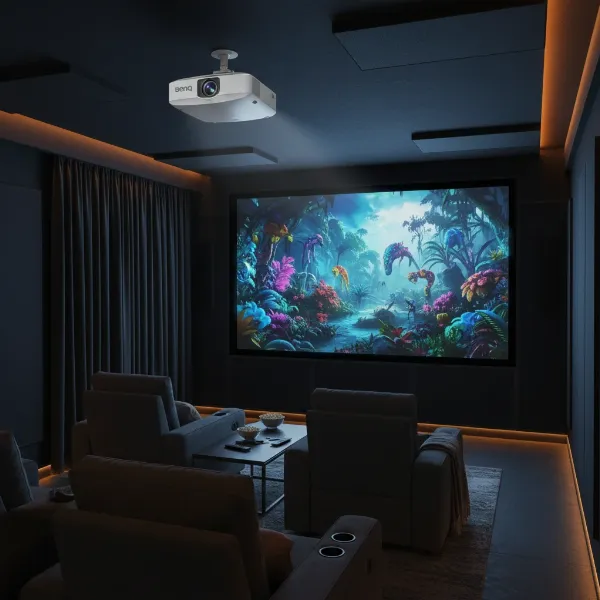 BenQ HT3560 4K home theater projector setup in a dedicated dark room, showcasing vivid colors and sharp image quality
Performance Deep Dive: Pros and Cons
Understanding the strengths and limitations of any projector is crucial before making a purchasing decision. The BenQ HT3560, while exceptional in many aspects, also comes with its own set of considerations.
The Strengths: Why the HT3560 Excels
- Exceptional Color Fidelity: The HT3560’s ability to reproduce colors with high accuracy, covering 95% of the DCI-P3 color space, is a standout feature, crucial for an authentic cinematic feel.
- Sharp 4K Image: With 8.3 million distinct pixels, the projector delivers crisp and detailed 4K images that rival the clarity of high-end LED or OLED televisions, enriching the viewing experience.
- Robust HDR Handling: HDR-PRO, coupled with Local Contrast Enhancement and support for HDR10+, ensures that both bright highlights and deep shadows are rendered with impressive detail.
- User-Friendly Setup: Features like optical zoom and a modest vertical lens shift significantly simplify the installation process, allowing for easier image alignment.
- Quiet Operation: Many users report the HT3560 to be noticeably quieter than its predecessor, contributing to a more immersive and less distracting movie-watching environment.
- Decent Built-in Audio: The integrated treVolo 5Wx2 speakers provide surprisingly high-quality sound, which can be a welcome bonus for setups without external audio systems.
- Gamer-Friendly: With impressively low input lag (18ms at 4K/1080p @ 60Hz, 8.9ms @ 240Hz), the HT3560 is a strong option for casual to serious gamers.
- Excellent Value: Praised by critics, including an AVS Top Choice for 2023 award, for offering top-tier performance within its competitive price category.
The Considerations: Points to Ponder
- Dark Room Dependent: While bright enough for some ambient light, its “okay” to “decent” brightness and contrast mean the HT3560 truly shines in a completely dark, dedicated home theater environment. Performance can diminish significantly with uncontrolled light.
- Rainbow Effect (RBE): As a single-chip DLP projector, some sensitive viewers may perceive the “rainbow effect” – brief flashes of red, green, and blue, particularly in high-contrast scenes. This is a common characteristic of DLP technology, though often fleeting and unnoticeable for most.
- Limited Lens Shift: Compared to some 3-chip LCD competitors (like certain Epson models), the HT3560 offers less extensive zoom and lens shift, potentially reducing installation flexibility in highly specific setups.
- Bulb-based Light Source: Utilizing a UHP lamp means bulb replacement will eventually be necessary, and it generates more heat than newer LED or laser light sources.
- Potential for Connectivity Quirks: One user review highlighted persistent issues with specific HDMI ports and devices, necessitating projector restarts. While not universal, it’s a point to be aware of.
- Greyish Border: A known artifact of 4K DLP pixel-shifting technology is a subtle, greyish border around the projected image, which might be noticeable without a properly masked screen.
- Fan Noise in HDR Mode: While generally quiet, the fan noise can become somewhat noticeable when operating in HDR mode, which demands more from the lamp.
- Slight Yellow Bias in 3D Mode: If 3D viewing is a priority, be aware of a reported slight yellow tint in the default 3D mode.
Comparing the BenQ HT3560 with Alternatives
The projector market is vibrant, with various options catering to different needs and budgets. The BenQ HT3560 holds its own, but understanding how it stacks up against key competitors can solidify your decision.
BenQ HT3560 vs. BenQ HT3550
The HT3560 is a clear upgrade over its well-regarded predecessor, the HT3550. Key improvements include a roughly 10% increase in brightness (from 2,000 to 2,200 ANSI Lumens), a denser and sharper image that better mimics a high-end 4K TV, and significantly quieter operation. While the HT3550 was a strong performer, the HT3560 refines the experience, offering a more polished cinematic journey.
BenQ HT3560 vs. BenQ TK860i
These two BenQ models are close cousins, but they cater to slightly different audiences. The HT3560 is built for dedicated dark room home theaters, prioritizing absolute color accuracy and contrast. The TK860i, on the other hand, is a home entertainment projector designed to better contend with ambient light, often at the expense of some color accuracy. The TK860i also typically includes a streaming dongle and an additional HDMI port, which the HT3560 lacks, making it more of an all-in-one smart projector. If peak cinematic quality in darkness is your goal, the HT3560 is the better choice.
BenQ HT3560 vs. Epson Pro Cinema 4050/4010/LS12000
Epson’s high-end home theater projectors, such as the Pro Cinema 4050, Home Cinema 4010, and the premium LS12000, represent a different technological approach: 3-chip LCD. A primary advantage of LCD projectors is their immunity to the rainbow effect that can affect single-chip DLPs. Epson models also typically offer more extensive zoom and lens shift capabilities, providing greater installation flexibility. However, these often come at a higher price point. The LS12000 further differentiates itself with a laser light source for extended lifespan and consistent brightness. The HT3560 offers a compelling value proposition if the rainbow effect isn’t an issue for you and you don’t require the most extreme installation flexibility.
Is the BenQ HT3560 Right for You? A Buying Guide
Choosing the right projector involves aligning its capabilities with your specific needs and environment. Here’s a practical guide to help you decide if the BenQ HT3560 is your ideal cinematic companion.
1. Identify Your Needs and Environment
The HT3560 truly shines in a dedicated dark room home theater. If your primary goal is to enjoy movies and TV shows with exceptional color accuracy and deep blacks in a controlled lighting environment, this projector is an outstanding choice. It can be used in rooms with some ambient light, but its performance will be significantly diminished, and brighter projectors might be more suitable. Consider if you prioritize absolute cinematic immersion over versatility in varied lighting conditions.
2. Determine Your Budget
With an MSRP of $1,699, the BenQ HT3560 sits in the mid-range for 4K home theater projectors. Keep an eye out for sales, as it can often be found for less, enhancing its value proposition. Factor in potential costs for a dedicated screen, mounting equipment, and possibly an external sound system, although its built-in speakers are commendable.
3. Delve into Technical Specifications
Beyond the “4K” label, pay close attention to the details. The HT3560’s 95% DCI-P3 color gamut coverage and HDR-PRO technology are key indicators of its color fidelity and HDR performance. Understand that its 2,200 ANSI Lumens are optimized for dark rooms, and its DLP technology means the potential for the “rainbow effect” for sensitive viewers. If low input lag is important for occasional gaming, the HT3560 performs well in this regard.
4. Read User Reviews and Expert Opinions
Gather a balanced perspective by reading both professional reviews and user feedback. While experts often highlight its impressive color accuracy and value, user reviews can shed light on real-world experiences, such as the reported connectivity quirks or the subtle grey border around the image, giving you a more complete picture.
5. Test Before Committing (If Possible)
Given the individual variability in perceiving the rainbow effect, if possible, try to experience the BenQ HT3560 firsthand before making a final purchase. Many reputable dealers offer return policies that allow for this crucial test.
6. Purchase from a Reputable Dealer
To ensure product authenticity, reliable customer support, and a straightforward return policy, always purchase your projector from an authorized and reputable retailer.
Maximizing Your Projector Experience: Tips & Maintenance
Owning a BenQ HT3560 is just the first step; optimizing its performance and longevity requires a few best practices.
- Optimal Placement is Key: Position your projector to utilize its optical zoom and vertical lens shift as much as possible, minimizing the use of digital keystone correction. Digital keystone can slightly degrade image quality by distorting pixels. Use the built-in test patterns to achieve a perfectly squared image.
- Leverage Calibration Settings: The HT3560’s Filmmaker Mode offers excellent out-of-the-box color accuracy. For the ultimate visual precision, consider professional ISF calibration to fine-tune the projector to your specific room and screen. Experiment with settings like Dynamic Black (preferably on a medium setting to avoid “pumping”) and Local Contrast Enhancement (note that LCE cannot be enabled simultaneously with HDR10+ content due to algorithmic conflicts).
- Maintain a Pristine Environment: Projectors are sensitive to dust. Regularly clean the projector’s exterior and filters (if accessible) to prevent dust buildup from impacting image quality or overheating the internal components. Ensure your home theater room is as dark and dust-free as possible.
- Ensure Proper Ventilation: The UHP lamp generates heat. Always ensure adequate airflow around the projector to prevent overheating, which can shorten lamp life and potentially affect performance.
- Address Common Quirks: Don’t be alarmed by a slight high-frequency noise; this is a normal byproduct of the 4K DLP pixel-shifting technology. For any connectivity issues, try connecting devices directly to the projector’s HDMI ports, ensure your firmware is updated, and check all cables.
Conclusion
The BenQ HT3560 stands as a truly compelling choice for cinephiles and home theater enthusiasts seeking an authentic 4K HDR experience in a controlled, dark environment. Its meticulous factory calibration delivers exceptional color accuracy, while advanced HDR-PRO technology ensures breathtaking detail in every scene. The sharp 4K resolution, combined with surprising integrated audio and gamer-friendly input lag, cements its position as a top-tier performer in its class. Despite minor considerations like the potential for rainbow artifacts and its preference for dark rooms, the HT3560 offers remarkable value, earning its reputation as an AVS Top Choice for 2023. Ready to transform your home viewing experience? Explore the BenQ HT3560 and immerse yourself in true cinematic quality.
What’s the most important feature you look for in a home theater projector?
Frequently Asked Questions
Does the BenQ HT3560 support 3D content?
Yes, the BenQ HT3560 supports full 3D formats, including Frame Sequential for PCs, Frame Packing for Blu-ray, and Side by Side and Top & Bottom for streaming. You will need compatible DLP-Link 3D glasses for viewing.
Can I connect Bluetooth or Wi-Fi speakers to the HT3560?
No, the BenQ HT3560 does not have built-in Bluetooth or Wi-Fi audio transmission capabilities. For external audio, it’s recommended to connect your speakers directly to your playback device or link the projector to an audio system via its ARC/eARC-enabled HDMI port or S/PDIF output to ensure optimal sound quality and avoid latency.
Is the BenQ HT3560 prone to the “rainbow effect”?
As a single-chip DLP projector, the BenQ HT3560 can exhibit the “rainbow effect” (brief red/green/blue flashes) for individuals sensitive to it. While most viewers find it fleeting or unnoticeable, it’s a common characteristic of this technology. It is advised to test the projector if you are concerned about this phenomenon.
Is the BenQ HT3560 a good option for gaming?
Yes, the BenQ HT3560 is surprisingly gamer-friendly. It boasts low input lag times, measured at 18 milliseconds for both 4K and 1080p content at 60Hz, and an even faster 8.9 milliseconds at 240Hz, making it suitable for all but the most competitive gamers.
How does the BenQ HT3560 improve upon its predecessor, the HT3550?
The HT3560 offers several notable improvements over the HT3550, including a 10% increase in brightness (up to 2,200 ANSI Lumens), a denser and sharper image that better approximates a 4K TV, and a significantly quieter operating noise. These enhancements contribute to a more refined and immersive viewing experience.
Can Local Contrast Enhancer be used simultaneously with HDR10+ content on the HT3560?
No, when watching HDR10+ content, the Local Contrast Enhancer (LCE) cannot be enabled. This is because HDR10+ features its own dynamic metadata for frame-by-frame optimization, and enabling additional contrast enhancement functions like LCE might conflict with these existing algorithms, potentially degrading the intended HDR10+ picture quality.
Why does the 4K DLP technology in the HT3560 sometimes produce a slight high-frequency noise?
The slight high-frequency noise sometimes heard from the HT3560 is a normal characteristic of its True 4K DLP technology. To create sharp 4K resolution images, the projector uses high-speed pixel displacement and superimposition to generate 8.3 million distinct pixels. This rapid micro-vibration process can result in a subtle, often barely perceptible, high-frequency sound.