Projectors bring the magic of the big screen into our homes and businesses, offering immersive visuals that captivate audiences. But what happens when that cinematic experience is marred by an unwanted glow spilling beyond the edges of your screen? This phenomenon, known as projector light leakage—or sometimes referred to as light bleed, light spill, or the “halo effect”—is a common concern for many projector owners. It can significantly detract from image clarity and overall viewing pleasure, leaving you wondering if your projector is faulty or if this is simply a normal part of the projection experience.
Understanding projector light leakage is crucial for anyone seeking to optimize their visual setup. This article will delve into what light leakage is, explore whether it’s a normal occurrence, identify its common causes, and, most importantly, provide actionable solutions to mitigate or eliminate it, ensuring you achieve the crisp, clear images your projector is capable of delivering.
Understanding Projector Light Leakage
Projector light leakage is essentially light escaping or scattering beyond the designated projection area. Instead of a sharp, defined image, you might notice a soft, often blurry glow or halo around the edges of your screen, spilling onto walls or ceilings. Imagine watching a perfectly framed film, only to have a distracting haze surrounding the picture – that’s light leakage in action. This unwanted light significantly impacts the contrast and clarity of the projected image, washing out colors, reducing black levels, and diminishing the overall depth and richness of your visuals. In dark scenes, where contrast is paramount, light bleed can be particularly problematic, creating a foggy effect that compromises immersion and makes fine details or subtle color differentiations difficult to discern.
So, is this a normal characteristic of a projector, or a sign of a defect? A small degree of light leakage can indeed be a physical characteristic of certain projector technologies, particularly DLP (Digital Light Processing) projectors, owing to their optical engine structure. In these cases, you might notice slightly scattered light, especially in very dark environments or when using lens shift. It is widely acknowledged as a common issue faced by many projector users. However, the extent of the leakage is key. While a minor, non-distracting spill might be considered within normal operating parameters for some models, significant and distracting light bleed that noticeably compromises your viewing experience can indicate an underlying issue that warrants investigation.
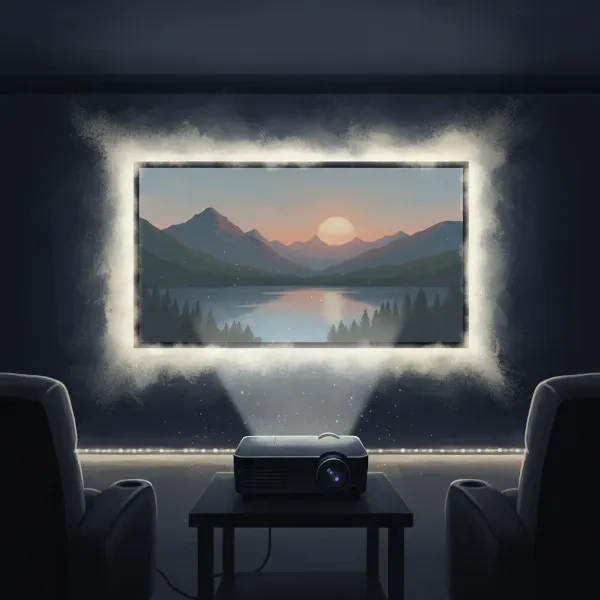 A projector casting a blurred halo of light around its main image on a screen, illustrating light leakage in a dark room.
Common Causes of Projector Light Leakage
Projector light leakage isn’t typically due to a single factor but often a combination of elements. Identifying the specific causes in your setup is the first step toward finding an effective solution.
- Projector Placement and Alignment: Incorrect positioning is perhaps the most frequent culprit. If the projector is not perfectly aligned—meaning it’s tilted, placed at the wrong angle or distance, or off-center relative to the screen—the projected image can overshoot the screen boundaries, causing light to bleed. Features like keystone correction or corner correction, while useful for image geometry, can sometimes contribute to light spill as they digitally manipulate the image, potentially scattering light.
- Room Environment: The characteristics of your viewing space play a significant role. Light-colored or glossy walls and ceilings, as well as reflective furniture, can bounce and scatter the projector’s light, making any existing light leakage more noticeable. Bright ambient light in the room can also exacerbate the perception of light bleed, reducing the overall contrast and making the spilled light more apparent.
- Projector Settings: Overly high brightness settings can intensify the light beam, causing it to extend beyond the screen area more readily. Similarly, using an incorrect aspect ratio can lead to the image not perfectly fitting the screen, resulting in light overflow.
- Lens and Internal Optics Issues: The precision of a projector’s lens and its internal optical components is critical. Manufacturing flaws, age-related wear and tear, or physical damage to the lens can lead to aberrations that scatter light in unintended directions. Even dust or dirt on the lens or inside the optics can refract light improperly, contributing to light bleed. A misalignment of the lens within its housing can also create an unwanted halo effect.
- Screen Type: Not all projector screens are designed equally to handle light. Lower-quality screens may have reflective surfaces that scatter light rather than absorbing it effectively. Furthermore, certain projector types, such as ultra-short throw (UST) projectors, require specific ambient light rejecting (ALR) or ceiling light rejecting (CLR) screens to properly contain the light and prevent spill.
- Projector Design: In some instances, particularly with lower-end or less precisely engineered projectors, the design itself may inherently allow for more light leakage. This can be due to less effective light filtering, poor light shielding, or less precise optics compared to higher-end models.
Mitigating Projector Light Leakage: Practical Solutions
Fortunately, projector light leakage is not an insurmountable problem. By systematically addressing its causes, you can significantly minimize or even eliminate light spill, ensuring a superior viewing experience.
Optimizing Projector Settings
Your projector’s internal settings offer immediate ways to combat light bleed. Start by navigating through your projector’s menu.
- Reduce Brightness: If your projector is set to an excessively high brightness level, lower it slightly. Finding the right balance that provides clear imagery without excessive light output can greatly reduce spill.
- Ensure Precise Alignment: Meticulously align your projector so that the lens is perfectly centered and perpendicular to the screen. Small adjustments can make a big difference in keeping the image contained.
- Minimize Keystone/Corner Correction: While useful, these digital corrections can sometimes contribute to light scatter. If possible, achieve perfect geometry through physical placement rather than digital adjustments.
- Utilize Built-in Masking: Many projectors come with internal masking features or shutters that can block unwanted light from projecting outside the intended image area. Check your projector’s manual for these options.
|
Our Picks for the Best projector in 2026
As an Amazon Associate I earn from qualifying purchases.
|
||
| Num | Product | Action |
|---|---|---|
| 1 | Aurzen Roku TV Smart Projector with Wifi and Bluetooth, Roku Streaming Experience Built-in, 1080P FHD, DoIby Audio, Auto Focus & Keystone, Zoom, Movie Portable Outdoor Mini Projector, White |

|
| 2 | 【Official Licensed Google TV】4K Smart Projector with WiFi and Bluetooth, VOPLLS Outdoor Projectors with Dolby/Auto Focus, Portable Movie Phone Wireless Gaming Wifi Proyector for Bedroom/Home/Celling |
|
| 3 | Projector-4K with WiFi and Bluetooth:[3500 ANSI/60W Dolby Audio/Official Licensed Apps], Outdoor-Projector with Smart OS 2.0 & AI Auto Focus,ONOAYO ONO5Pro 2.0 Smart Movie Projector for Indoor/Outdoor |
|
| 4 | [Built-in Official Apps/4K Support] Smart Outdoor Projector with WiFi and Bluetooth, 800ANSI Movie Projector, DoIby Audio with Dual Speaker, Auto Focus w/ YouTube&PrimeVideo Proyector, Upgrad P62 Pro |
|
| 5 | [3500 ANSI/ Official Apps/65W Audio] Outdoor 4K Projector with WiFi and Bluetooth, Auto Focus, Auto Keystone Smart Projector Support DoIby Audio, 2026 Upgrade GO2 Short Throw Projector with 360°Stand |
|
| 6 | HAPPRUN Native 1080P Bluetooth Mini Projector, Full HD Portable Outdoor Movie Projector with Built-in Speaker, Compatible with Smartphone, HDMI, USB, AV, Fire Stick, PS5 for Home, Bedroom, Outdoor Use |
|
| 7 | Epson Pro EX11000 3-Chip 3LCD Full HD 1080p Wireless Laser Projector, 4,600 Lumens Color/White Brightness, Miracast, 2 HDMI Ports, USB Power for Streaming, Built-in 16W Speaker |
|
| 8 | 1500 ANSI Official Licensed Google TV Smart Projector, HAPPRUN 4K Full HD Home Theater with Auto Focus, Dolby Sound, Wi-Fi Bluetooth, Built-in Apps, Compatible with Phone & PC, Indoor & Outdoor Use |
|
| 9 | 【Officially-Licensed APP & Native 1080P】Thinnest 1.81\" Smart Mini Projector with WiFi and Bluetooth, Auto Focus & Keystone Portable Outdoor Projector, VOPLLS 4K Support Home Movie Projector |
|
| 10 | Epson Pro EX9270 Wireless 1080p 3LCD Projector 4,100 Lumens Color and White Brightness, Apple AirPlay, Miracast, Stream from Phone or Laptop, 2 HDMI Ports, 1.6x Optical Zoom, Built-In Speaker |
|
Enhancing Your Viewing Environment
The room itself can be your greatest ally or adversary in the fight against light leakage.
- Control Ambient Light: Dimming or turning off room lights, especially those near the screen, reduces the contrast between the projected image and its surroundings, making light spill less noticeable. Consider investing in light-absorbing curtains or blinds to block external light sources.
- Employ Light-Absorbing Materials: Paint walls with dark, matte colors, particularly those adjacent to the screen. Black velvet fabric is an excellent choice for absorbing stray light and preventing reflections.
- Add Physical Barriers: Create masking borders around your screen using dark, light-absorbing materials. This acts as a physical barrier to absorb any light that spills past the screen’s edge.
Choosing the Right Screen
Your projection surface plays a crucial role in managing light.
- Invest in Quality Screens: High-quality screens are designed to contain projector light more effectively, minimizing bleed.
- Consider ALR/CLR Screens: For rooms with ambient light or if you’re using an ultra-short throw projector, Ambient Light Rejecting (ALR) or Ceiling Light Rejecting (CLR) screens are highly recommended. These screens are engineered to absorb stray light from the projector and ambient sources, significantly improving contrast and reducing light spill.
Maintenance and Hardware
Sometimes, the solution involves physical care or additional equipment.
- Regular Cleaning: Dust and dirt can accumulate on the projector lens and within the optical path, scattering light. Regular, gentle cleaning of the lens and internal components (following manufacturer guidelines) can maintain sharp focus and minimize leaks.
- External Accessories: Consider using projector lens hoods or “barn doors.” These accessories attach to the projector or lens and physically block light from escaping beyond the image area, offering a highly effective method for control.
- Lens Adjustment/Replacement: If internal lens aberrations are severe, a professional might be able to adjust the lens. In extreme cases of damage or manufacturing defects, lens replacement might be necessary.
- Professional Calibration: For optimal results, professional calibration tools like colorimeters or spectroradiometers can precisely measure and adjust your projector’s light output and distribution, helping to identify and correct any light bleed issues.
When to Be Concerned About Projector Light Leakage
While a minor, consistent amount of light bleed can be a characteristic of some projector models, particularly those using DLP technology, it’s important to differentiate between acceptable spill and a genuine problem. If the light leakage is significant, highly distracting, and noticeably compromises the clarity and contrast of your projected image, it’s cause for concern. A sudden increase in light leakage or its unexpected appearance where it wasn’t present before could indicate an underlying issue with your projector’s optics, alignment, or internal components. If you’ve tried the common mitigation strategies mentioned above and the problem persists or worsens, it might be time to consider whether the issue is covered under warranty or to seek advice from an AV consultant or a projector repair specialist. Ignoring persistent, excessive light bleed might not only affect your viewing enjoyment but could also be a symptom of a larger problem impacting your projector’s performance and longevity.
Conclusion
Projector light leakage is a common issue that can hinder the immersive visual experience projectors are designed to provide. However, by understanding its root causes and implementing a combination of strategic adjustments, environmental controls, and careful maintenance, you can effectively manage and significantly reduce light spill. From fine-tuning your projector’s settings and optimizing your room’s lighting to investing in high-quality screens and performing regular cleanings, each step contributes to a clearer, more vibrant, and truly immersive display. Don’t let unwanted light dim your viewing pleasure; take proactive measures to regain control over your projector’s light output.
What strategies have you found most effective in managing projector light leakage in your setup? Share your insights and tips in the comments below!
Frequently Asked Questions
Is projector light leakage a sign of a broken projector?
Not necessarily. While excessive or sudden light leakage can indicate a fault, a small amount of light bleed can be a normal physical characteristic of certain projector technologies, especially DLP. It’s often manageable with proper setup, environmental adjustments, and regular maintenance.
Does projector brightness affect light bleed?
Yes, absolutely. High brightness settings can intensify the light beam, causing it to extend beyond the intended screen area and making light bleed more pronounced. Reducing the projector’s brightness to an optimal level can significantly help in minimizing light spill.
Can all projector types have light leakage?
While light leakage is often associated with DLP projectors due to their optical design, other projector types like LCD or LCOS can also experience light spill. Causes can vary, including lens imperfections, misalignment, or issues with internal light paths, making it a potential concern across various projector technologies.