Projectors are the heart of immersive home theaters, engaging business presentations, and dynamic classroom experiences. However, nothing disrupts a crucial moment faster than your projector unexpectedly shutting down. Often, the culprit is overheating, a common issue that can shorten your device’s lifespan and degrade its performance. Understanding why your projector gets too hot and how to address it is crucial for maintaining its optimal function and ensuring years of vibrant, uninterrupted viewing. This comprehensive guide will explore the main reasons behind projector overheating, provide practical solutions, and outline preventive measures to keep your device running cool and efficiently.
Understanding Projector Overheating
Projector overheating occurs when the internal temperature of the device rises to a level that its cooling system can no longer manage effectively. These powerful devices generate significant heat from their light sources—whether traditional lamps, LEDs, or lasers—and other internal electronic components. To combat this heat, projectors are equipped with sophisticated cooling systems, typically involving fans and ventilation grilles designed to dissipate warmth and maintain a safe operating temperature.
When these cooling mechanisms are compromised, neglected, or forced to work in unfavorable conditions, the internal temperature climbs. Left unchecked, overheating can lead to reduced picture quality, automatic shutdowns to prevent damage, or even permanent failure of sensitive components. Recognizing the early warning signs is key to addressing the problem before it escalates. Watch out for frequent unexpected shutdowns during use, illuminated warning lights or error messages on your projector, an unusually loud fan, or a noticeable decrease in image brightness or color accuracy. A hot casing or even a faint burning smell are also strong indicators that your projector is struggling with excessive heat.
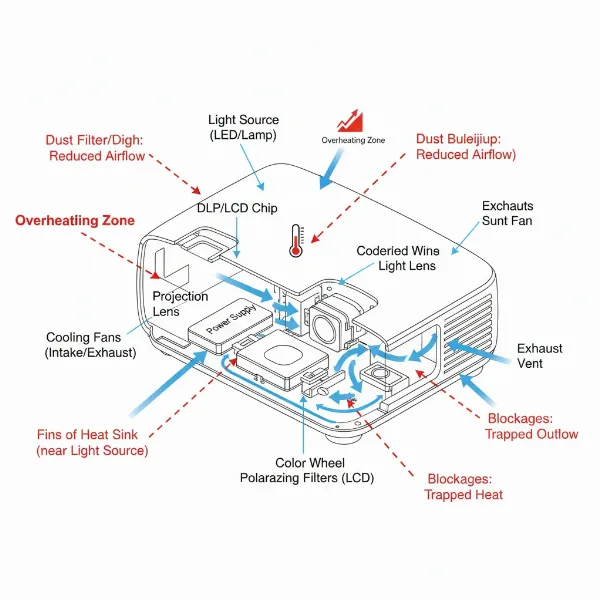 Diagram illustrating projector airflow and potential blockage points causing overheating
Common Causes of Projector Overheating
Several factors contribute to a projector’s internal temperature rising beyond safe limits. Identifying the specific cause is the first step toward implementing an effective solution and preventing future occurrences.
Dust Accumulation and Blocked Vents
|
Our Picks for the Best projector in 2026
As an Amazon Associate I earn from qualifying purchases.
|
||
| Num | Product | Action |
|---|---|---|
| 1 | Epson Pro EX11000 3-Chip 3LCD Full HD 1080p Wireless Laser Projector, 4,600 Lumens Color/White Brightness, Miracast, 2 HDMI Ports, USB Power for Streaming, Built-in 16W Speaker |

|
| 2 | 【Official Licensed Google TV】4K Smart Projector with WiFi and Bluetooth, VOPLLS Outdoor Projectors with Dolby/Auto Focus, Portable Movie Phone Wireless Gaming Wifi Proyector for Bedroom/Home/Celling |
|
| 3 | [Built-in Official Apps/4K Support] Smart Outdoor Projector with WiFi and Bluetooth, 800ANSI Movie Projector, DoIby Audio with Dual Speaker, Auto Focus w/ YouTube&PrimeVideo Proyector, Upgrad P62 Pro |
|
| 4 | Projector-4K with WiFi and Bluetooth:[3500 ANSI/60W Dolby Audio/Official Licensed Apps], Outdoor-Projector with Smart OS 2.0 & AI Auto Focus,ONOAYO ONO5Pro 2.0 Smart Movie Projector for Indoor/Outdoor |
|
| 5 | 【Officially-Licensed APP & Native 1080P】Thinnest 1.81\" Smart Mini Projector with WiFi and Bluetooth, Auto Focus & Keystone Portable Outdoor Projector, VOPLLS 4K Support Home Movie Projector |
|
| 6 | 1500 ANSI Official Licensed Google TV Smart Projector, HAPPRUN 4K Full HD Home Theater with Auto Focus, Dolby Sound, Wi-Fi Bluetooth, Built-in Apps, Compatible with Phone & PC, Indoor & Outdoor Use |
|
| 7 | Epson Pro EX9270 Wireless 1080p 3LCD Projector 4,100 Lumens Color and White Brightness, Apple AirPlay, Miracast, Stream from Phone or Laptop, 2 HDMI Ports, 1.6x Optical Zoom, Built-In Speaker |
|
| 8 | HAPPRUN Native 1080P Bluetooth Mini Projector, Full HD Portable Outdoor Movie Projector with Built-in Speaker, Compatible with Smartphone, HDMI, USB, AV, Fire Stick, PS5 for Home, Bedroom, Outdoor Use |
|
| 9 | [3500 ANSI/ Official Apps/65W Audio] Outdoor 4K Projector with WiFi and Bluetooth, Auto Focus, Auto Keystone Smart Projector Support DoIby Audio, 2026 Upgrade GO2 Short Throw Projector with 360°Stand |
|
| 10 | Aurzen Roku TV Smart Projector with Wifi and Bluetooth, Roku Streaming Experience Built-in, 1080P FHD, DoIby Audio, Auto Focus & Keystone, Zoom, Movie Portable Outdoor Mini Projector, White |
|
One of the most prevalent reasons for overheating is the insidious buildup of dust and debris. Over time, particles can accumulate on air filters, within ventilation grilles, and even on internal components, acting as an insulating layer. This accumulation severely restricts the airflow necessary for the cooling system to function efficiently. When air cannot circulate freely, hot air becomes trapped inside the projector, causing internal temperatures to soar.
Inadequate Ventilation and Placement
The physical environment where your projector operates plays a critical role in its temperature management. Placing a projector in a cramped space, such as an enclosed shelf, a tight cabinet, or with its aeration sides pressed against a wall, can significantly impede airflow. Such poor ventilation traps hot air around the device, forcing the internal fans to work harder and less effectively. Similarly, failing to leave adequate clearance (typically 30-50 cm on all sides) around the projector’s vents can create a microclimate of hot air that the cooling system struggles to overcome.
Extended Usage and Environmental Factors
Running a projector for many consecutive hours without breaks can lead to increased internal temperatures, as the cooling system works continuously without sufficient time to fully dissipate accumulated heat. Furthermore, the ambient temperature of the room directly impacts the projector’s ability to cool itself. Operating a projector in a hot, poorly ventilated room or an environment with high humidity makes it much harder for the cooling fans to work effectively, intensifying the challenge for temperature regulation.
Internal Component Issues
While less common than external factors, internal malfunctions can also cause overheating. A failing internal fan, for instance, cannot move air efficiently, leading to rapid heat buildup. Malfunctioning thermal sensors might not accurately detect internal temperatures, preventing the projector from activating its cooling mechanisms at the right time or shutting down to prevent damage. In traditional lamp-based projectors, an aging or degrading lamp can generate excessive heat beyond its normal parameters, contributing to the overall thermal load.
Step-by-Step Fixes for an Overheating Projector
When your projector begins to show signs of overheating, immediate action can prevent further damage and restore optimal performance. Here’s how to troubleshoot and fix common overheating issues.
Cleaning Your Projector Effectively
Regular and thorough cleaning is paramount. Begin by powering down your projector and unplugging it completely. Locate your projector’s air filters (if applicable) and gently remove them. Clean these filters according to your manufacturer’s instructions, typically with a soft brush or compressed air. For external grilles and vents, use a soft, dry cloth to wipe away dust. For internal components, carefully use compressed air to clear dust from vents, always blowing away from the projector to avoid pushing debris further inside. Avoid using strong detergents or abrasive materials, which can damage the delicate surfaces.
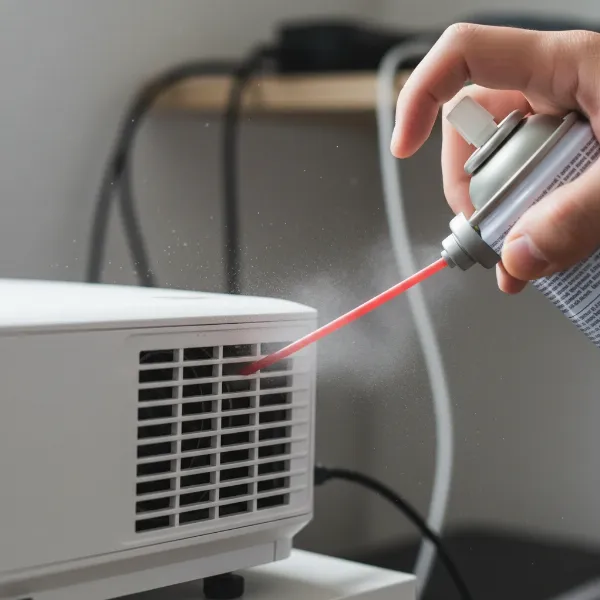 A person cleaning projector vents with compressed air, illustrating proper maintenance
Optimizing Projector Placement and Environment
Ensure your projector has ample space to “breathe.” Position it on a stable, open surface, away from walls or enclosed spaces. Leave at least 30-50 cm of clearance around all air intake and exhaust vents to allow for unrestricted airflow. If possible, operate the projector in a cool, well-ventilated room. Consider using a room fan or air conditioning to help lower the ambient temperature, especially during extended viewing sessions. Avoid placing the projector near heat sources like radiators or direct sunlight.
Managing Usage Patterns
To prevent heat buildup from continuous operation, take short breaks during extended viewing sessions. Power off the projector properly and allow it to cool down completely before unplugging or moving it. Do not leave the projector running unnecessarily when it’s not in use. These small habits can significantly reduce the thermal stress on your device.
Addressing Internal Component Problems
If, after cleaning and optimizing its environment, your projector continues to overheat, the issue might be internal. A failing fan, a faulty thermal sensor, or a degrading lamp (in lamp-based models) may require replacement. These repairs often involve opening the projector’s casing and dealing with sensitive electronics, which is best left to qualified technicians. Attempting such repairs without proper expertise can void warranties and cause further damage. Consult your projector’s manual or contact the manufacturer’s support for guidance on professional repair services.
Preventing Projector Overheating: Best Practices for Longevity
Proactive measures are far more effective than reactive fixes when it comes to projector overheating. Implementing a routine of smart usage and maintenance will significantly extend your projector’s lifespan and ensure consistent performance.
Regular Maintenance Schedule
Establish a routine for cleaning your projector. Depending on your usage and environment, aim to clean air filters and external vents every 1-3 months. If your projector is in a particularly dusty or smoky area, more frequent cleaning may be necessary. Always refer to your projector’s user manual for specific cleaning instructions and recommended maintenance intervals.
Ensuring Optimal Airflow
Beyond initial placement, periodically check that nothing is obstructing the projector’s vents. This includes cables, curtains, or any objects that might have shifted into the airflow path. For ceiling-mounted projectors, ensure the mounting bracket doesn’t restrict ventilation and that there’s adequate space around the unit. Some users find success with cooling pads or external fans specifically designed for electronics, which can provide an extra layer of thermal management, especially in challenging environments.
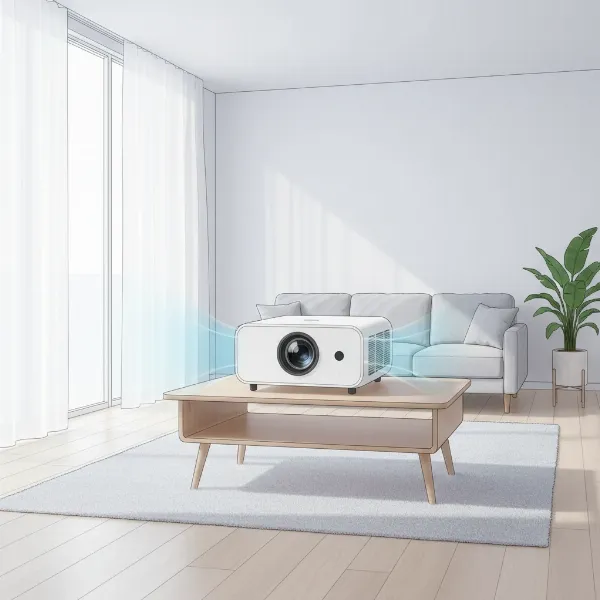 An illustration of a projector in an ideal room setup with good airflow and ventilation
Controlling Room Temperature and Humidity
Maintaining a stable and moderate room temperature is beneficial for all electronic devices, including projectors. Avoid operating your projector in excessively hot rooms, especially during summer months. High humidity can also contribute to component degradation over time, indirectly affecting thermal performance. Aim for a dry, cool environment within the manufacturer’s recommended operating temperature range.
Smart Usage Habits
Consciously manage how long your projector runs. If you anticipate a short break in viewing, consider powering down the projector to allow it to cool, rather than leaving it in standby mode for extended periods. When not in use for a prolonged time, store your projector in a clean, dust-free environment, perhaps covered with a breathable fabric to prevent dust accumulation.
> “Preventive maintenance is the single most effective strategy for extending the life of your projector and avoiding costly repairs. Simple steps like regular cleaning and ensuring proper ventilation can make a world of difference.” – Dr. Alistair Finch, Senior Optics Engineer
Conclusion
Projector overheating is a common but largely preventable issue that can significantly impact your device’s performance and longevity. By understanding the core causes—such as dust buildup, poor ventilation, and extended use—you empower yourself with the knowledge to act. Implementing simple yet effective fixes, from regular cleaning and optimizing placement to managing usage patterns, can often resolve the problem entirely. More importantly, establishing a routine of preventive maintenance ensures your projector remains a reliable source of brilliant visuals for years to come. Don’t let a little heat dim your experience; take charge of your projector’s health today. What proactive steps will you take to keep your projector cool and performing at its best?
Frequently Asked Questions
Can a projector explode from overheating?
While extremely rare, severe, prolonged overheating can potentially lead to component failure, including the lamp (in traditional models), which might burst. However, modern projectors have built-in safety mechanisms that automatically shut down the device long before such a catastrophic event could occur, protecting both the projector and the user.
How long can a projector run before it overheats?
The time a projector can run before overheating varies widely depending on the model, lamp type, room temperature, and ventilation. Many projectors are designed for extended use, but prolonged sessions (e.g., 8+ hours) without adequate airflow or in hot environments can stress the cooling system, leading to overheating. Always refer to your manufacturer’s guidelines.
What is the ideal temperature for a projector?
Most projector manufacturers recommend operating their devices within a specific ambient temperature range, typically between 5°C to 35°C (40°F to 95°F). The internal operating temperature will be higher, but the cooling system is designed to manage it within safe limits when the external conditions are optimal. Keeping your room cool and well-ventilated is key.