The world of projectors offers a dazzling array of technologies, each promising a unique visual experience. For anyone looking to invest in a projector, whether for home entertainment, professional presentations, or cinematic immersion, understanding the fundamental differences in their core imaging systems is crucial. Among the most discussed distinctions are single-chip and three-chip projector designs, particularly within the Digital Light Processing (DLP) family, often compared to the popular 3LCD technology. This guide will demystify these architectures, highlighting their mechanisms, advantages, disadvantages, and ideal applications, empowering you to make the most informed decision.
General Overview of Projectors
At its heart, a projector is an optical device that takes an image signal and projects it onto a surface, typically a screen, to produce a magnified display. From bringing cinematic magic into your living room to delivering impactful presentations in a boardroom or creating immersive experiences in large venues, projectors serve a vast range of purposes. Historically, projectors have evolved from simple slide and overhead transparency machines to sophisticated digital devices capable of displaying stunning high-definition and 4K content. Today, the market is primarily dominated by two major projection technologies: Digital Light Processing (DLP) and Liquid Crystal Display (LCD), with DLP further segmented into single-chip (1DLP) and three-chip (3DLP) configurations.
Understanding Digital Light Processing (DLP) Technology
DLP technology, pioneered by Texas Instruments, uses a Digital Micromirror Device (DMD) chip as its core imaging engine. This chip is covered by millions of microscopic mirrors, each corresponding to a single pixel of the projected image. These tiny mirrors can tilt rapidly, reflecting light towards or away from the lens, thereby creating bright or dark pixels on the screen. The fundamental difference within DLP lies in how these micromirrors create color.
Single-Chip DLP (1DLP)
A single-chip DLP projector utilizes one DMD chip to generate the entire image. To produce color, white light from the lamp or laser source is passed through a rapidly spinning color wheel. This wheel typically has segments of red, green, and blue (and sometimes white or other colors) that sequentially flash these colors onto the DMD chip. The human eye then blends these rapidly displayed colors into a full-color image due to persistence of vision.
- Advantages of 1DLP:
- Cost-Effective and Compact: Generally more affordable and allows for smaller, more portable projector designs.
- High Contrast and Sharpness: DLP’s reflective nature and minimal gaps between micromirrors contribute to excellent contrast ratios and crisp, sharp images with deep blacks.
- Fast Response Time: The rapid tilting of micromirrors enables smooth motion handling, making 1DLP suitable for fast-paced video, sports, and gaming.
- Low Maintenance: The DMD chip itself is sealed, making it less susceptible to dust accumulation and potential image degradation.
- Improving Performance: Modern 1DLP projectors, especially those with advanced LED or laser light sources and multi-segment color wheels, have significantly improved color accuracy and brightness, bridging the gap with more advanced systems.
- Disadvantages of 1DLP:
- Rainbow Effect (RBE): Some viewers, particularly in high-contrast scenes or when shifting their gaze rapidly, may perceive brief flashes of red, green, and blue, known as the “rainbow effect.” While less common in newer, faster-spinning color wheels, it can be distracting for sensitive individuals.
- Color Brightness (Historically): Older or lower-end 1DLP models could sometimes offer lower color brightness compared to their white brightness, potentially leading to less vibrant or saturated colors without additional color processing technologies like BrilliantColor.
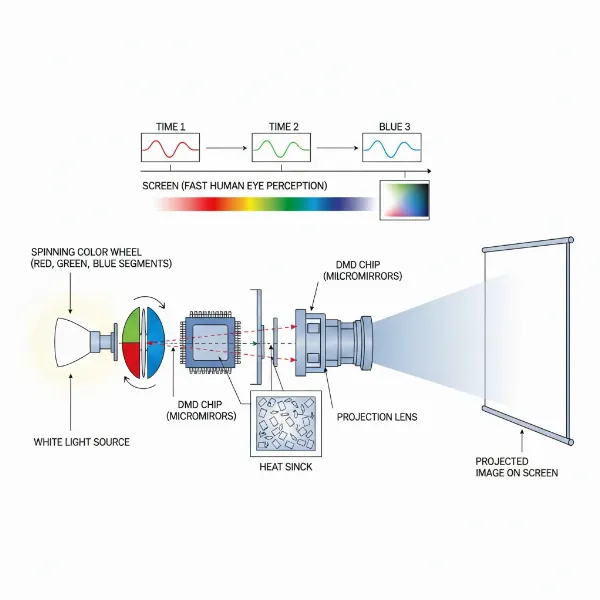 Diagram showing a single-chip DLP projector's internal mechanism with a spinning color wheel.
Three-Chip DLP (3DLP)
Three-chip DLP projectors represent the pinnacle of DLP technology, primarily used in high-end professional, large-venue, and cinematic applications. Instead of a single DMD and a color wheel, 3DLP systems employ three separate DMD chips: one dedicated to red, one to green, and one to blue.
- Mechanism: White light is split into its primary colors (red, green, blue) by dichroic prisms. Each colored light beam then hits its respective DMD chip, which creates a monochromatic image for that color. These three colored images are then optically recombined by another prism before being projected as a single, full-color image onto the screen. This simultaneous processing of colors is the key differentiator.
- Advantages of 3DLP:
- Superior Brightness: By processing colors simultaneously, 3DLP projectors achieve significantly higher brightness levels, making them ideal for large screens and environments with substantial ambient light.
- Exceptional Color Accuracy and Fidelity: The dedicated chips for each primary color allow for precise color control, resulting in unparalleled color accuracy, saturation, and a wider color gamut.
- No Rainbow Effect: Since colors are displayed simultaneously rather than sequentially, the rainbow effect is completely eliminated, providing a smooth and artifact-free viewing experience.
- High Frame Rates and Dynamic Image Quality: 3DLP systems often support higher frame rates, crucial for motion simulation, live events, and detailed, fast-moving content.
- Precision and Sharpness: With proper alignment, 3DLP projectors deliver incredibly sharp and precise images, showcasing the finest details.
- Disadvantages of 3DLP:
- Significantly Higher Cost: The complexity of three DMD chips, advanced optics, and precision manufacturing makes 3DLP projectors substantially more expensive.
- Larger Size and Weight: Housing three DMD chips and complex optical paths results in much larger and heavier projectors, limiting portability.
- Potential Convergence Issues: While offering superior precision, aligning three separate imaging chips requires meticulous calibration. Minor misconvergence can theoretically lead to slight image softness, though high-end systems are engineered to minimize this.
|
Our Picks for the Best projector in 2026
As an Amazon Associate I earn from qualifying purchases.
|
||
| Num | Product | Action |
|---|---|---|
| 1 | Projector-4K with WiFi and Bluetooth:[3500 ANSI/60W Dolby Audio/Official Licensed Apps], Outdoor-Projector with Smart OS 2.0 & AI Auto Focus,ONOAYO ONO5Pro 2.0 Smart Movie Projector for Indoor/Outdoor |
![Check Projector-4K with WiFi and Bluetooth:[3500 ANSI/60W Dolby Audio/Official Licensed Apps], Outdoor-Projector with Smart OS 2.0 & AI Auto Focus,ONOAYO ONO5Pro 2.0 Smart Movie Projector for Indoor/Outdoor on Amazon](https://projectorcam.com/wp-content/plugins/amazon-tables/assets/images/buy.png)
|
| 2 | 【Official Licensed Google TV】4K Smart Projector with WiFi and Bluetooth, VOPLLS Outdoor Projectors with Dolby/Auto Focus, Portable Movie Phone Wireless Gaming Wifi Proyector for Bedroom/Home/Celling |
|
| 3 | HAPPRUN Native 1080P Bluetooth Mini Projector, Full HD Portable Outdoor Movie Projector with Built-in Speaker, Compatible with Smartphone, HDMI, USB, AV, Fire Stick, PS5 for Home, Bedroom, Outdoor Use |
|
| 4 | 【Officially-Licensed APP & Native 1080P】Thinnest 1.81\" Smart Mini Projector with WiFi and Bluetooth, Auto Focus & Keystone Portable Outdoor Projector, VOPLLS 4K Support Home Movie Projector |
|
| 5 | 1500 ANSI Official Licensed Google TV Smart Projector, HAPPRUN 4K Full HD Home Theater with Auto Focus, Dolby Sound, Wi-Fi Bluetooth, Built-in Apps, Compatible with Phone & PC, Indoor & Outdoor Use |
|
| 6 | Aurzen Roku TV Smart Projector with Wifi and Bluetooth, Roku Streaming Experience Built-in, 1080P FHD, DoIby Audio, Auto Focus & Keystone, Zoom, Movie Portable Outdoor Mini Projector, White |
|
| 7 | Epson Pro EX11000 3-Chip 3LCD Full HD 1080p Wireless Laser Projector, 4,600 Lumens Color/White Brightness, Miracast, 2 HDMI Ports, USB Power for Streaming, Built-in 16W Speaker |
|
| 8 | Epson Pro EX9270 Wireless 1080p 3LCD Projector 4,100 Lumens Color and White Brightness, Apple AirPlay, Miracast, Stream from Phone or Laptop, 2 HDMI Ports, 1.6x Optical Zoom, Built-In Speaker |
|
| 9 | [Built-in Official Apps/4K Support] Smart Outdoor Projector with WiFi and Bluetooth, 800ANSI Movie Projector, DoIby Audio with Dual Speaker, Auto Focus w/ YouTube&PrimeVideo Proyector, Upgrad P62 Pro |
|
| 10 | [3500 ANSI/ Official Apps/65W Audio] Outdoor 4K Projector with WiFi and Bluetooth, Auto Focus, Auto Keystone Smart Projector Support DoIby Audio, 2026 Upgrade GO2 Short Throw Projector with 360°Stand |
|
Understanding 3LCD Projector Technology
Another prevalent projection technology is 3LCD (Three Liquid Crystal Display), primarily championed by manufacturers like Epson. Unlike DLP’s reflective micromirrors, 3LCD technology is transmissive, meaning light passes through liquid crystal panels.
- Mechanism: A light source emits a white beam, which is then split into red, green, and blue components by dichroic mirrors. Each colored beam passes through its own dedicated LCD panel, where individual pixels are controlled by liquid crystals to allow or block light, creating three separate monochromatic images. These three images are then recombined using a dichroic prism to form a single, full-color image projected onto the screen.
- Advantages of 3LCD:
- Excellent Color Brightness (Color Light Output – CLO): 3LCD projectors typically boast equal white and color brightness, meaning colors appear vibrant and saturated, even in well-lit environments. This is a key strength for presentations, educational settings, and applications requiring accurate color reproduction.
- No Rainbow Effect: Like 3DLP, 3LCD technology projects all three colors simultaneously, eliminating the rainbow effect that some sensitive viewers experience with single-chip DLP.
- Efficient in Ambient Light: Their strong color brightness often makes 3LCD projectors perform well in rooms where full darkness isn’t achievable.
- Disadvantages of 3LCD:
- Lower Contrast and Less Deep Blacks: Compared to DLP, 3LCD projectors generally offer lower native contrast ratios. Blacks tend to appear more grayish, which can impact the perceived depth and realism of images in dark scenes.
- “Screen Door Effect”: In some 3LCD projectors, particularly those with lower resolutions or when viewed up close, the grid-like structure between pixels (due to the LCD panels) can be visible, sometimes referred to as the “screen door effect.”
- Potential for Dust and Color Degradation: The transmissive nature of LCD panels makes them more susceptible to dust accumulation, which can cause spots on the image. Over time, LCD panels can also be prone to color shifting or degradation, requiring more maintenance like filter cleaning or replacement.
- Larger Size: 3LCD projectors are generally larger than comparable 1DLP models due to the additional optical components and three LCD panels.
- Motion Blur: Some 3LCD projectors may exhibit slight motion blur in fast-moving content compared to the rapid response of DLP technology.
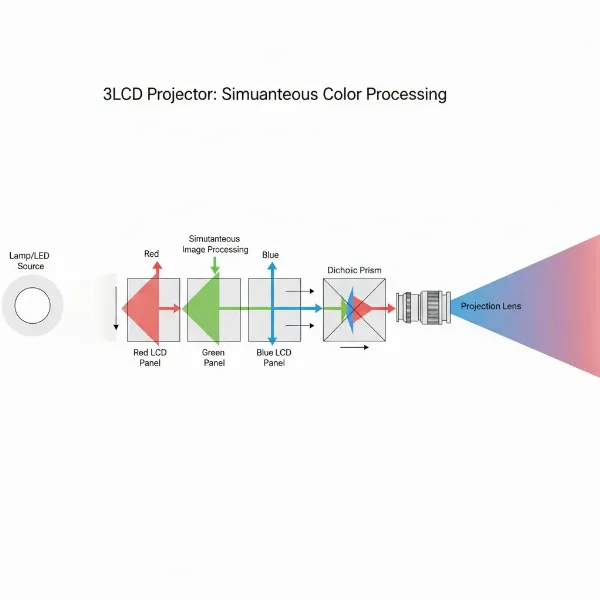 Diagram depicting a 3LCD projector's mechanism, separating light into RGB and recombining them.
Key Factors When Choosing a Projector
Beyond the core technology, several other specifications critically influence a projector’s performance and suitability for your needs:
- Brightness (Lumens): Measured in ANSI lumens, brightness indicates how bright the projected image will appear. Higher lumens are crucial for larger screens or rooms with ambient light. It’s important to consider both white brightness and color brightness (Color Light Output – CLO) for an accurate representation of overall image vibrancy.
- Resolution (SVGA, XGA, 720p, 1080p, 4K): This determines the number of pixels in the image, directly impacting detail and sharpness. Common resolutions range from standard definition (SVGA, XGA) for basic presentations to Full HD (1080p) and Ultra HD (4K) for cinematic and highly detailed viewing.
- Contrast Ratio: This measures the difference between the brightest white and the darkest black a projector can produce. A higher contrast ratio results in more detailed shadows, richer colors, and a more dynamic image.
- Light Source (Lamp, LED, Laser):
- Lamps: Traditional, affordable, but have limited lifespan (2,000-5,000 hours) and require replacement.
- LED: Longer lifespan (20,000+ hours), instant on/off, good color, but generally lower brightness.
- Laser: Longest lifespan (20,000-30,000+ hours), high brightness, consistent color, low maintenance, but higher initial cost.
- Keystone Correction: This feature allows you to correct distorted images (trapezoidal shape) when the projector is not perfectly perpendicular to the screen. Both digital and optical keystone correction are available, with optical generally offering better image quality.
- Throw Ratio: Defines the relationship between the projection distance and the image width. It helps determine how far your projector needs to be from the screen to achieve a desired image size. Short-throw projectors are ideal for small spaces.
- Connectivity (HDMI, VGA, USB, Wireless): Modern projectors should offer a variety of input options to connect to different sources, including HDMI for high-definition video and audio, USB for media playback, and increasingly, wireless capabilities for seamless streaming.
Comparison: Single Chip DLP, Three Chip DLP, and 3LCD
To summarize the intricate differences and help you visualize the trade-offs, here’s a detailed comparison of these three dominant projector technologies:
| Feature | Single-Chip DLP (1DLP) | Three-Chip DLP (3DLP) | 3LCD |
|---|---|---|---|
| Core Mechanism | 1 DMD + Color Wheel (sequential color) | 3 DMDs (RGB) + Prism (simultaneous color) | 3 LCD Panels (RGB) + Prism (simultaneous, transmissive) |
| Brightness | Good, improving with advanced light sources | Excellent (industry standard for high brightness) | Excellent (especially color brightness, CLO) |
| Color Accuracy | Good (improving), can vary without enhancements | Exceptional (high fidelity, wide gamut) | Very good (vibrant, consistent color output) |
| Contrast Ratio | Very High, deep blacks | Very High, deepest blacks | Moderate, blacks can appear grayish |
| Rainbow Effect | Possible for sensitive viewers | None | None |
| Sharpness | Very good, crisp, pixel-free | Excellent, precise (when converged well) | Good, but potential “screen door effect” (visible pixels) |
| Motion Handling | Excellent (fast response, minimal blur) | Excellent (high frame rates, smooth) | Good, but can have slight motion blur |
| Cost | Generally most affordable | Highest initial cost | Mid-range (often more affordable than 3DLP) |
| Size/Portability | Compact, highly portable | Large, heavy (less portable, fixed installations) | Larger than 1DLP (less portable than 1DLP) |
| Maintenance | Low (sealed chip), color wheel susceptible to dust | Moderate (requires precise setup/convergence checks) | Higher (dust filters, potential color degradation) |
| Ideal Use Cases | Home entertainment, gaming, portable presentations, budget-conscious users | Large venues, simulation, high-end cinema, professional AV, critical viewing | Classrooms, business presentations, home theater (budget-mid-range), environments with ambient light |
Choosing the Right Projector for Your Needs
Deciding between single-chip DLP, three-chip DLP, and 3LCD ultimately comes down to your specific needs, priorities, and budget.
- Determine Your Primary Use:
- Home Cinema/Gaming (Budget-Friendly): A high-quality single-chip DLP projector often provides excellent contrast, sharpness, and smooth motion for movies and games at an accessible price. If you’re sensitive to the rainbow effect, testing it out is essential.
- Home Cinema/Gaming (Premium Experience): A 3LCD projector offers vibrant colors and eliminates the rainbow effect, which can be ideal for a rich, immersive home theater experience, especially if ambient light is a factor.
- Professional Presentations/Education: Both 1DLP (for portability and sharpness) and 3LCD (for color brightness in well-lit rooms) are strong contenders. Consider audience size and presentation content.
- Large Venues/High-End Cinema/Simulation: Three-chip DLP is the undisputed champion for applications demanding extreme brightness, color accuracy, and artifact-free images on massive screens.
- Consider Your Budget: 1DLP projectors are typically the most budget-friendly, followed by 3LCD. Three-chip DLP projectors represent a significant investment due to their advanced technology and superior performance.
- Evaluate Viewing Environment: For dark, dedicated home theaters, the deep blacks and high contrast of DLP shine. In rooms with some ambient light, 3LCD’s high color brightness can be an advantage.
- Personal Sensitivity to the Rainbow Effect: This is a crucial, subjective factor for 1DLP. If you are sensitive, 3DLP or 3LCD are safer choices.
- Read Reviews and See Demos: Practical experience is invaluable. If possible, test different technologies in person with content similar to what you’ll be watching to gauge image quality, color rendition, and motion handling.
Tips for Projector Usage and Maintenance
To ensure your projector delivers years of optimal performance, proper usage and maintenance are key, regardless of the technology.
- Keep it Clean: Regularly clean the projector’s lens with a microfiber cloth and compressed air for vents to prevent dust buildup, which can degrade image quality and airflow.
- Proper Shutdown: Always allow the projector to cool down properly after use, especially lamp-based models, to extend bulb life.
- Filter Maintenance (3LCD): If you have a 3LCD projector, regularly clean or replace its air filter as recommended by the manufacturer to prevent dust from reaching the LCD panels.
- Optimal Placement: Ensure adequate ventilation around the projector to prevent overheating. Use keystone correction sparingly, as digital correction can slightly reduce image quality.
Conclusion
The journey into the world of projectors reveals a fascinating interplay of engineering and visual science. Whether you opt for the versatile and cost-effective single-chip DLP, the color-rich and rainbow-effect-free experience of 3LCD, or the unparalleled performance and precision of three-chip DLP, each technology offers distinct advantages tailored to different needs and budgets. The “best” projector isn’t a universal truth; it’s the one that perfectly aligns with your specific viewing environment, content preferences, and financial considerations. By understanding these core differences, you can confidently navigate the market and find a projector that truly transforms your visual experiences.
What kind of visual experience are you hoping to create with your next projector?
Frequently Asked Questions
What is the “rainbow effect” in projectors?
The “rainbow effect” (RBE) is a visual artifact perceived by some individuals when viewing single-chip DLP projectors. It manifests as brief flashes of red, green, and blue colors, particularly noticeable in high-contrast scenes or when moving your eyes across the screen quickly. It occurs because these projectors display colors sequentially using a color wheel, rather than simultaneously.
Is 3DLP always better than 1DLP?
While 3DLP generally offers superior brightness, color accuracy, and eliminates the rainbow effect, “better” is subjective. 3DLP projectors are significantly more expensive and larger, making them impractical for many home or small business users. For most consumer applications, modern 1DLP projectors offer excellent performance, especially with advancements in light sources and color processing, at a more accessible price point.
Do 3LCD projectors require more maintenance than DLP?
Generally, yes. 3LCD projectors typically use air filters that need regular cleaning or replacement to prevent dust from accumulating on the LCD panels, which can cause image spots. While DLP projectors have sealed DMD chips, older lamp-based DLP models still require lamp replacements. However, laser and LED DLP projectors greatly reduce maintenance needs due to their long-lasting light sources.