Projectors have become indispensable tools, transforming everything from business presentations to home movie nights into immersive visual experiences. Yet, these sophisticated devices, especially their delicate internal components, are remarkably vulnerable to the unpredictable nature of our electrical grids. A sudden power outage or fluctuation isn’t just an inconvenience; it can be a death knell for your projector, significantly shortening its lifespan or causing immediate, costly damage. This is where an Uninterruptible Power Supply (UPS), commonly known as a battery backup, becomes a critical, non-negotiable component for any projector setup.
Understanding Projectors and Their Vulnerabilities
Projectors, at their core, are devices designed to project an image onto a surface. Their evolution has been rapid, moving from early, bulky lamp-based models to today’s sleek LED and laser projectors. Each type has distinct characteristics, but all share a fundamental reliance on a consistent and stable power supply.
Traditional lamp-based projectors utilize high-intensity discharge (HID) lamps that operate at extremely high temperatures. While modern LED and laser projectors boast longer lifespans and often cooler operation, they still contain sensitive electronics susceptible to power anomalies. The common thread across all projector technologies is the need for controlled shutdown procedures, particularly for cooling internal components, which a UPS is uniquely designed to provide.
Critical Factors for Projector Lifespan: The Power Connection
Several key factors contribute to a projector’s performance and longevity, many of which are directly impacted by its power source:
- Brightness (Lumen): The higher the lumen output, the more intensely the light source (lamp, LED, or laser) works, generating more heat. This heat needs to be dissipated effectively.
- Resolution: Higher resolutions demand more processing power from the projector’s internal electronics, leading to increased heat generation.
- Contrast Ratio: Achieving deep blacks and bright whites requires precise control over the light output and processing, again adding to the thermal load.
- Lamp Life (Traditional Lamps): This is arguably the most critical factor for older projectors. Projector lamps operate at thousands of degrees Fahrenheit. When a projector undergoes a normal shutdown, it enters a “cool-down mode” where the image turns off, but the fans continue to run, gradually reducing the lamp’s temperature. Without this controlled cooling, a sudden power cut can cause the lamp to cool unevenly, leading to stress fractures or significantly shortening its operational life.
- Keystone Correction & Throw Ratio: While these features define the projector’s installation flexibility and image geometry, they don’t directly relate to power vulnerability.
- Connectivity: Modern projectors often feature multiple connectivity options like HDMI, VGA, and USB. While these carry data, the primary power delivery remains through the main power cable, making the entire unit susceptible to power issues.
The Hidden Dangers of Power Fluctuations
Our electrical grids, while generally reliable, are prone to various inconsistencies that can be detrimental to sensitive electronics like projectors.
- Sudden Power Outages: The most obvious threat. An immediate loss of power halts the projector’s cooling fans, leaving the light source and internal electronics at dangerously high temperatures. This can lead to rapid degradation, premature lamp failure, or damage to delicate circuits.
- Voltage Spikes and Surges: These are brief, intense bursts of electricity that can occur due to lightning strikes, utility grid switching, or even large appliances cycling on and off. Surges can instantly overload and fry internal components.
- Brownouts and Sags: Conversely, these are drops in voltage below the normal operating level. While less dramatic than surges, consistent brownouts can stress power supplies and other components, leading to their premature failure.
- Impact on Projector Components: The lamp is often the first victim in traditional projectors. Without proper cooling, its temperature can increase beyond safe limits, shortening its life or causing immediate failure. Additionally, sustained excessive heat due to inadequate cooling can halve the lifespan of surrounding electronics for every 10 degrees Fahrenheit above 80 degrees Fahrenheit.
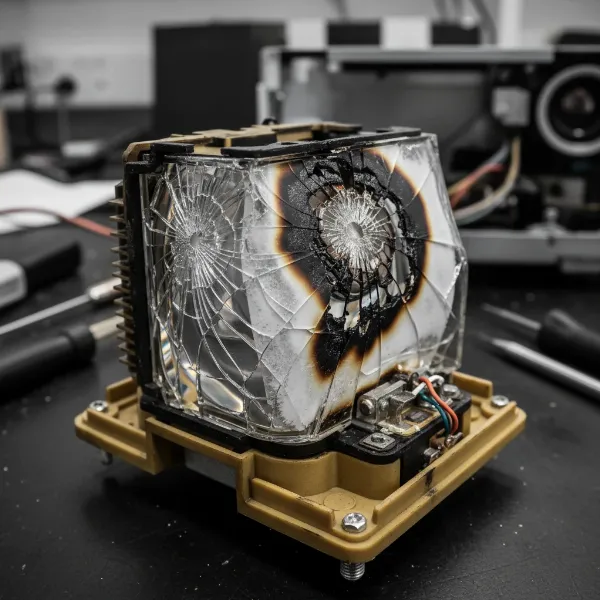 a damaged projector lamp with visible cracks and burn marks, highlighting improper shutdown damage
What is a UPS (Uninterruptible Power Supply)?
An Uninterruptible Power Supply (UPS) is more than just a battery; it’s a sophisticated power protection system designed to provide continuous, stable power to connected devices. Its primary function is to supply temporary power when the main power source fails, allowing for a graceful shutdown or continuous operation during short outages. Beyond backup power, most UPS units also offer critical power conditioning.
There are primarily three types of UPS systems:
- Standby/Offline UPS: This is the most basic type. The connected equipment runs directly on utility power until a power failure occurs, at which point the UPS switches to battery power. There’s a slight delay (transfer time) during this switch.
- Line-Interactive UPS: A more advanced version, it continuously monitors incoming voltage and uses an automatic voltage regulator (AVR) to correct minor power fluctuations without switching to battery power. It still has a brief transfer time during a full outage.
- Online/Double Conversion UPS: This is the highest level of protection. The connected equipment always runs on power converted from the UPS’s battery, which is constantly recharged by the utility power. This “double conversion” process ensures zero transfer time and provides perfectly clean, consistent power, isolating the equipment from any grid disturbances. For sensitive electronics like projectors, an online UPS with a pure sine wave output is often recommended.
Why a UPS is Indispensable for Your Projector
Investing in a UPS for your projector is not an extravagance; it’s a vital safeguard that protects your investment and ensures uninterrupted performance.
- Ensuring Proper Shutdown and Cooling: This is the most crucial benefit, especially for lamp-based projectors. A UPS provides the necessary few minutes of power to allow the projector to complete its fan-driven cool-down cycle, preserving the lamp and other internal components.
- Protection Against Power Surges and Spikes: Many UPS units include robust surge protection, shielding your projector from damaging voltage spikes that can occur during electrical storms or grid instabilities.
- Stable and Clean Power Delivery: Beyond just backup, a good UPS (especially line-interactive or online models) conditions the power, filtering out electrical noise, sags, and brownouts. This stable, clean power optimizes projector performance and extends the lifespan of sensitive internal circuits.
- Uninterrupted Viewing and Presentations: Imagine a crucial business presentation or the climax of your favorite movie being abruptly cut short. A UPS provides enough time to save work, finish a scene, or gracefully shut down your system, preventing disruption and data loss.
- Safeguarding Your Investment: Projectors, and particularly their replacement lamps, can be significant expenses. A UPS acts as affordable insurance, preventing costly repairs or premature replacements due to preventable power-related damage.
UPS Considerations for Different Projector Technologies
The need for a UPS varies slightly depending on your projector’s light source technology.
Traditional Lamp-Based Projectors
For projectors using traditional lamps, a UPS is crucial. These lamps generate immense heat and require a carefully managed cool-down period. A sudden power loss can instantly stop the cooling fans, leading to:
- Stress fractures: Uneven cooling can crack the hot lamp glass.
- Shortened lamp life: Repeated improper shutdowns dramatically reduce the lamp’s total hours.
- Damage to internal components: Surrounding electronics suffer from excessive heat.
A UPS guarantees that the projector can complete its essential cool-down cycle, even if the main power goes out, preserving both the lamp and the projector’s longevity.
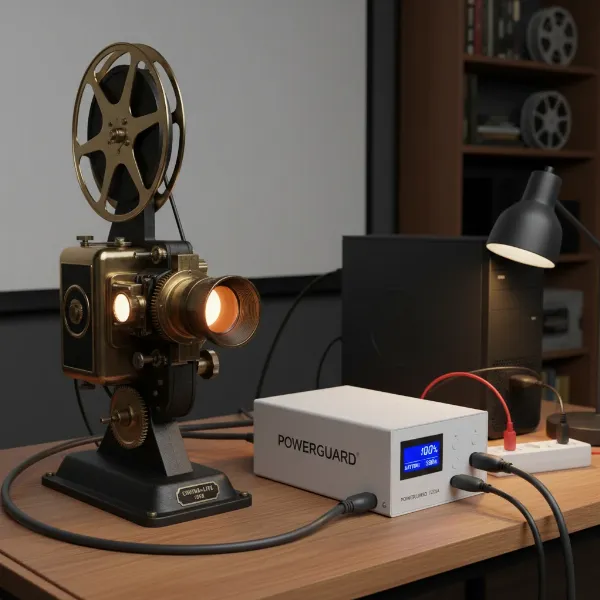 a ups unit connected to a traditional lamp-based projector, ensuring stable power supply
LED and Laser Projectors
LED and laser projectors are inherently more robust against sudden power interruptions. Their light sources generally run cooler, have much longer lifespans, and do not suffer the same catastrophic lamp failure risks as traditional lamps. Their cool-down cycles are also often much shorter.
However, a UPS still offers significant benefits for these newer technologies:
- Surge Protection: All sensitive electronics, regardless of their light source, benefit from protection against damaging power surges and spikes.
- Stable Power: LED and laser projectors, like any complex electronic device, perform best with clean, consistent power, which a UPS provides by filtering out noise and regulating voltage.
- Uninterrupted Operation: Even if damage isn’t the primary concern, a UPS ensures that your movie isn’t interrupted, or your presentation isn’t abruptly cut off, allowing for seamless use.
Choosing the Right UPS for Your Projector
Selecting the appropriate UPS involves understanding a few key specifications to match it to your projector’s needs.
- Understanding Power Requirements (Watts vs. VA): UPS capacity is often listed in Volt-Amperes (VA) and Watts (W). Watts represent the real power consumed, while VA is the apparent power. Always size your UPS based on the wattage of your projector and any other connected equipment. Projectors are considered heavy loads. Check your projector’s manual or label for its wattage consumption.
- Runtime Needs: How long do you need your projector to run on battery power? For simple safe shutdown, a few minutes might suffice. If you experience frequent, short outages and want to continue viewing or presenting, you’ll need a higher-capacity UPS with a longer runtime.
- Pure Sine Wave Output: Sensitive electronics, especially those with Active PFC (Power Factor Correction) power supplies, benefit greatly from a pure sine wave output. This replicates the smooth waveform of utility power. While some projectors might tolerate a “simulated” or “modified” sine wave, pure sine wave is ideal for optimal performance and protection.
- Capacity Recommendations: For typical home theater projectors or business projectors, a UPS with a capacity of 1000VA (around 600-700W) may be sufficient for smaller units. For heavier loads, such as high-end projectors or those combined with other AV equipment, consider 1500VA (900-1000W) or even 2000VA (1200-1400W) or larger units. It’s always better to slightly overestimate than underestimate.
- Type of UPS: For maximum protection and performance, an online UPS is the gold standard due to its zero transfer time and continuous power conditioning. A line-interactive UPS with pure sine wave output can also be a good balance of cost and protection for many users.
- Additional Features: Look for UPS units with a sufficient number of outlets, data line protection (for Ethernet), and management software that allows you to monitor power conditions and battery health.
Detailed Comparison: UPS vs. Surge Protector
It’s common to confuse a surge protector with a UPS, but they serve different, albeit complementary, roles.
- Surge Protector: A surge protector acts as a shield against sudden, brief spikes in voltage. It diverts excess electricity away from your devices, protecting them from damage during lightning strikes or power surges. However, a surge protector offers no protection against power outages, brownouts, or sags, and it does not provide backup power for a graceful shutdown.
- UPS (Uninterruptible Power Supply): A UPS incorporates surge protection as one of its features. Crucially, it goes beyond surge protection by providing battery backup power during outages, offering continuous power conditioning, and regulating voltage. For a projector, especially a lamp-based one, the ability to continue powering the cooling fans during an outage is paramount—a capability a standalone surge protector simply cannot provide. Therefore, while a surge protector is good, a UPS is the superior and comprehensive solution for projector protection.
Maximizing Your Projector’s Lifespan with a UPS
Integrating a UPS into your projector setup is a smart move for long-term reliability and performance. Here’s a practical guide to get the most out of your investment:
- Assess your projector’s power draw: Always refer to your projector’s specifications to determine its wattage. This is crucial for selecting a UPS with adequate capacity.
- Consider your environment: If you live in an area prone to frequent power outages, voltage fluctuations, or electrical storms, a UPS becomes even more critical.
- Prioritize pure sine wave models: For the best compatibility and protection for sensitive projector electronics, opt for a UPS that provides a pure sine wave output.
- Don’t skimp on capacity: While it might seem tempting to save money on a lower-capacity unit, ensuring your UPS can handle your projector’s peak power draw with some headroom is vital for stable operation and longevity.
- Regular battery checks for the UPS: UPS batteries have a finite lifespan. Most units have indicators or software to warn you when batteries need replacement, typically every 3-5 years.
- Proper placement and ventilation: Ensure both your projector and UPS are placed in well-ventilated areas to prevent overheating, which can degrade performance and shorten component life for both devices.
Conclusion
In the world of projectors, a consistent and clean power supply is not just a luxury; it’s a fundamental requirement for protecting your investment and ensuring an unblemished viewing or presentation experience. A UPS (Uninterruptible Power Supply) offers multi-faceted protection, guarding against damaging power surges, stabilizing voltage fluctuations, and, most critically, providing essential battery backup for proper cool-down during unexpected outages. Especially for traditional lamp-based projectors, this controlled shutdown prevents premature lamp failure and safeguards delicate internal components, dramatically extending the projector’s lifespan. For newer LED and laser projectors, a UPS still provides invaluable surge protection and power conditioning, guaranteeing smooth, uninterrupted performance. Don’t leave your valuable projector vulnerable to the unpredictability of power; equip it with a reliable UPS. What steps will you take today to secure your projector’s future?
Frequently Asked Questions
Do all projectors need a UPS?
Traditional lamp-based projectors definitely benefit most from a UPS to ensure proper cool-down during power outages, preventing expensive lamp damage. While LED and laser projectors are more robust, a UPS still offers valuable surge protection and stable power delivery for all sensitive electronics, making it a wise investment for any projector.
How long will a UPS power my projector?
The runtime of a UPS depends on its capacity (wattage) and your projector’s power consumption. A UPS is primarily designed to provide enough time for a safe shutdown (typically 5-15 minutes), not for extended operation. However, higher-capacity units can offer longer runtimes for brief outages.
Can a regular surge protector replace a UPS for a projector?
No, a regular surge protector cannot replace a UPS. A surge protector only protects against voltage spikes, while a UPS provides continuous power conditioning, surge protection, and, critically, battery backup power during outages, allowing your projector to shut down safely without damage.
What’s the difference between VA and Watts for a UPS?
VA (Volt-Amperes) is the apparent power, while Watts (W) is the real power consumed by your devices. When choosing a UPS for a projector, it’s essential to size it based on the projector’s wattage rather than just its VA rating, as Watts represent the actual power the UPS can deliver to your equipment.
Is an online UPS really necessary for a home theater projector?
While a line-interactive UPS with pure sine wave output can be sufficient for many home theater setups, an online (double conversion) UPS offers the highest level of protection. It provides continuous, perfectly clean power with zero transfer time, isolating your projector from all grid inconsistencies and ensuring optimal performance and longevity for high-end equipment.