Few things disrupt a cinematic experience or a crucial business presentation quite like an unexpected buzzing from your projector. This irritating noise can quickly shift your focus from the vibrant display to the distracting hum, leaving you wondering about the cause and, more importantly, the solution. A projector’s intricate design, combining mechanical and electrical components, means there are various potential culprits behind an unwanted buzzing sound. Understanding these common issues is the first step toward restoring peace and quiet to your viewing or presentation environment. This comprehensive guide will delve into the primary reasons your projector might be buzzing, offer practical diagnostic tips, and provide effective solutions to help you quiet your device and maintain its optimal performance.
Understanding Projector Buzzing Noises
Projectors are sophisticated devices designed to produce brilliant images, but their operation involves several components that can generate noise. At their core, projectors rely on powerful lamps or lasers for illumination and often include elaborate cooling systems with fans to dissipate the significant heat generated. These mechanical parts, along with electrical circuits, can all contribute to various operational sounds. While a gentle hum is typically normal, an unusual or increasingly loud buzzing noise often signals an underlying problem. Generally, buzzing sounds can be categorized into two main types: mechanical, which often manifest as rattles, vibrations, or fan-related noises, and electrical, which tend to be a more consistent, high-pitched hum or static-like sound, sometimes even persisting when the unit is powered off. Identifying the nature of the buzz is crucial for accurate diagnosis.
Common Mechanical Causes of Projector Buzzing
Mechanical issues are frequently at the root of a buzzing projector. These problems often stem from moving parts that are either obstructed, worn out, or improperly secured.
Fan Issues
The cooling fan is arguably the most common source of mechanical noise in a projector. Its continuous operation to prevent overheating makes it susceptible to wear and tear and environmental factors.
-
Dust Accumulation and Imbalance: Over time, dust and debris can build up on the fan blades, creating an imbalance. This imbalance causes the fan to vibrate excessively, leading to a noticeable buzzing or rattling sound. Dust can also impede airflow, forcing the fan to work harder and spin faster, thus increasing noise.
-
Worn Bearings: Like any mechanical component with moving parts, fan bearings can wear out. Worn bearings result in increased friction and instability, producing a grinding or moaning buzz as the fan spins.
-
Objects Hitting Fan Blades: Occasionally, a loose wire, a piece of debris, or even a foreign object can come into contact with the spinning fan blades, causing a distinct, repetitive buzzing or clicking sound.
-
Cooling System Strain/Overheating: If the projector’s internal temperature rises too high, the cooling system, particularly the fans, will ramp up to maximum speed to compensate. This increased effort can lead to louder fan noise, often perceived as a strenuous buzz. Overheating itself can be caused by:
- Dirty filters: Clogged air filters prevent proper airflow.
- Blocked exhaust ports: Obstructions around the vents hinder heat escape.
- High ambient temperature: Operating the projector in a hot environment.
- High altitude mode: Some projectors have a high-altitude mode that increases fan speed, intentionally increasing noise for better cooling in thinner air.
-
Solution: For dust-related issues, a thorough cleaning with compressed air can often resolve the problem. If bearings are worn, or the fan is damaged, replacement is necessary. Ensuring proper ventilation around the projector is also key to preventing the fans from overworking.
|
Our Picks for the Best projector in 2026
As an Amazon Associate I earn from qualifying purchases.
|
||
| Num | Product | Action |
|---|---|---|
| 1 | Mini Projector with Built-in Rechargeable Battery for Outdoor, Portable Projector with WiFi and Bluetooth, 4K Projector for Bedroom, Smart Projector |

|
| 2 | Astronaut Galaxy Projector with Bluetooth Speaker & White Noise, App & Remote Control Star Projector, Galaxy Projector for Bedroom Adults Kids, Spaceman Night Light for Gaming Room, Home Theater |
|
| 3 | Projector-4K with WiFi and Bluetooth:[3000 ANSI/40W Dolby Audio/Official Licensed Apps], Outdoor-Projector with Smart OS 2.0 & AI Auto Focus,ONOAYO ONO5Pro 2.0 Smart Movie Projector for Indoor/Outdoor |
|
| 4 | [Built-in Official Apps/4K Support] Smart Outdoor Projector with WiFi and Bluetooth, 800ANSI Movie Projector, DoIby Audio with Dual Speaker, Auto Focus w/ YouTube&PrimeVideo Proyector, Upgrad P62 Pro |
|
| 5 | Aurzen Roku TV Smart Projector with Wifi and Bluetooth, Roku Streaming Experience Built-in, 1080P FHD, Dolby Audio, Auto Focus & Keystone, Zoom, Movie Portable Outdoor Mini Projector, White |
|
| 6 | Mini Smart Projector, 1500 ANSI Portable Projector with WiFi and Bluetooth, HAPPRUN 4K Full HD Home Theater with 270° Stand, Dolby Sound, Built-in Apps,Compatible with Phone & PC, Indoor & Outdoor Use |
|
| 7 | [Officially-Licensed App & Auto Focus]Smart Mini Projector with WiFi and Bluetooth, XuanPad 4K Support Movie Projector, Portable Native 1080P Outdoor Projector with 360° Stand |
|
| 8 | Magcubic Mini Projector with WiFi 6 and Bluetooth 5.4, Portable Projector 4K Support, 5W Soundbase Speaker, Auto Vertical Keystone 180°Rotatable Smart Proyector for Movie Home Outdoor |
|
| 9 | HAPPRUN Native 1080P Bluetooth Mini Projector, Full HD Portable Outdoor Movie Projector with Built-in Speaker, Compatible with Smartphone, HDMI, USB, AV, Fire Stick, PS5 for Home, Bedroom, Outdoor Use |
|
| 10 | 【Officially-Licensed APP & Native 1080P】Thinnest 1.81\" Smart Mini Projector with WiFi and Bluetooth, Auto Focus & Keystone Portable Outdoor Projector, VOPLLS 4K Support Home Movie Projector |
|
Loose Components
Inside a projector, various components are held together with screws and brackets. Over time, or due to vibrations, these fasteners can loosen, leading to internal parts vibrating against each other or the projector casing. This can create a general humming or rattling buzz.
- Solution: Carefully tightening visible screws on the exterior (if accessible) and ensuring the projector is on a stable surface can sometimes mitigate this. For internal loose components, professional intervention might be required to safely secure them.
Color Wheel Problems (DLP Projectors)
DLP (Digital Light Processing) projectors utilize a spinning color wheel to create full-color images. If this color wheel or its bracket becomes warped, misaligned, or if the motor driving it develops issues, it can generate a specific type of buzzing or whining noise. This noise is often more noticeable when the projector first warms up or when switching between bulb modes.
- Solution: Addressing color wheel issues typically requires opening the projector and often involves delicate adjustments or replacement of the color wheel assembly. This is generally a task for experienced technicians rather than a casual DIY fix.
Electrical Causes Behind Projector Buzzing
Beyond mechanical issues, electrical components can also be sources of buzzing noises, often characterized by a more consistent electronic hum rather than a mechanical rattle.
Lamp or Ballast Malfunctions
Projector lamps require a significant amount of power, which is regulated by a component called the ballast. If either the lamp itself is faulty or the ballast is malfunctioning, it can produce an audible electrical hum or buzz. This often occurs as the lamp is warming up or during its operation. A worn-out lamp might also flicker and buzz before failing completely.
- Solution: Replacing a faulty lamp or ballast can resolve this issue. Always use genuine replacement parts specific to your projector model. If you suspect the ballast, it’s best to consult a professional, as it deals with high voltage.
Electrical Interference or Grounding Issues
An electronic buzzing sound can sometimes be a symptom of electrical interference or poor grounding. This might occur if the projector is plugged into an overloaded circuit, shares an outlet with other high-power devices, or if there’s an issue with the power outlet’s grounding. The buzz might fluctuate in intensity or change when other electrical devices are turned on or off nearby.
- Solution: Try plugging the projector into a different outlet or a dedicated surge protector. Ensure that the power cable is securely connected and consider if the issue started after adding new electronics to the same circuit. Using a UPS (Uninterruptible Power Supply) can sometimes help stabilize power and reduce interference.
Failing Power Supply
A particularly concerning cause of electrical buzzing is a failing power supply unit (PSU). This can sometimes manifest as a low-level hum or static-like noise, even when the projector is turned off but still plugged into the wall. This type of persistent buzzing, especially if it’s new, can indicate a serious problem.
> “A continuous buzzing from a projector, particularly when it’s supposed to be off, can often signal a failing power supply. It’s a red flag that shouldn’t be ignored, as it could pose a safety risk.” – John Smith, Projector Repair Specialist
- Warning: A failing power supply can be a potential fire hazard. If you notice your projector buzzing when off, unplug it immediately.
- Solution: Do not attempt to fix a failing power supply yourself. This requires professional diagnosis and repair or replacement to ensure safety. Contact the manufacturer’s support or an authorized service center.
Diagnosing the Source of the Buzzing Sound
Pinpointing the exact source of a projector’s buzz requires a methodical approach. Start by carefully listening to the type of sound and where it seems to originate.
- Listen Carefully: Is the sound a mechanical rattle, a high-pitched whine, or an electrical hum? Does it change with fan speed, lamp intensity, or when specific inputs are used?
- Check for Overheating: Place your hand near the exhaust vents. Is the projector unusually hot? Are the fans spinning at maximum speed constantly?
- Inspect for Visible Dust/Obstructions: With the projector off and unplugged, carefully inspect the air intake filters and exhaust vents for dust buildup or blockages.
- Test Power Sources: Try plugging the projector into a different wall outlet or a dedicated power strip to rule out electrical interference from the current source.
- Caution: While some basic checks are safe, opening the projector’s casing can void your warranty and expose you to high-voltage components. Unless you are experienced with electronics, it’s generally best to leave internal inspections to qualified technicians.
Practical Solutions to Silence Your Projector
Once you have a better understanding of what might be causing the noise, you can implement targeted solutions.
- Clean Air Filters and Vents Regularly: This is one of the easiest and most effective preventative measures. Refer to your projector’s manual for instructions on how to access and clean the air filter. Use compressed air to clear dust from vents and cooling pathways.
- Ensure Proper Ventilation and Ambient Temperature: Always operate your projector in a well-ventilated area. Do not place it in enclosed spaces or directly against walls that block airflow. Maintain a reasonable room temperature to prevent the projector from overheating and its fans from overworking.
- Perform Internal Cleaning (If Comfortable and Experienced): If dust accumulation is severe internally, and you are comfortable with basic electronics repair, you might carefully open the casing (after unplugging and allowing it to cool) to clean the internal fans and components with compressed air. Be extremely gentle to avoid damaging delicate parts.
- Check and Secure Loose Parts: If you suspect loose internal components are causing vibration, and you are knowledgeable, you can attempt to gently press on the casing while the projector is running to see if the noise changes. If you open the unit, inspect for loose screws or unsecured brackets and tighten them carefully.
- Replace Faulty Fans, Lamps, or Ballasts: If diagnostics point to a specific component failure, such as a worn-out fan, a flickering lamp, or a humming ballast, replacement is often the most direct solution. Ensure you purchase compatible, high-quality replacement parts.
- Address Electrical Issues: For electrical interference, ensure your projector is connected to a properly grounded outlet. Consider using a surge protector or a line conditioner to stabilize power.
- When to Seek Professional Help: For issues involving the power supply, complex internal repairs like color wheel adjustments, or if you’re uncomfortable performing any of the recommended steps, it is always best to consult a certified repair technician. Professional service ensures safety and proper functionality.
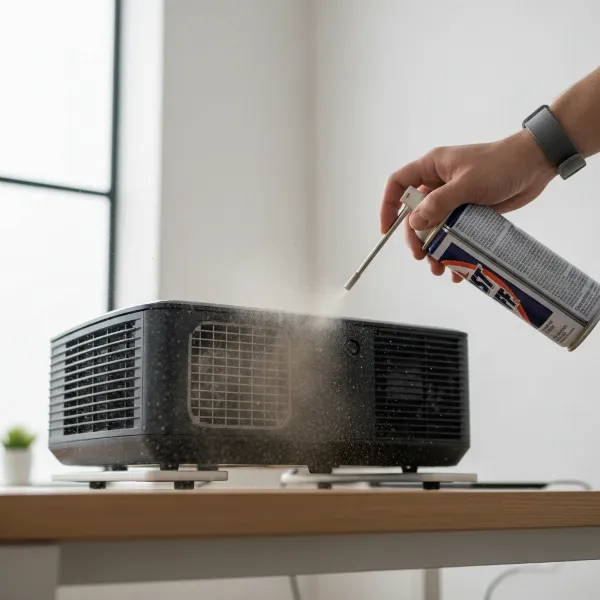 A person cleaning projector vents with compressed air, highlighting dust removal for noise reduction.
Preventative Measures for a Quiet Projector
A proactive approach to projector maintenance can significantly reduce the likelihood of annoying buzzing sounds.
- Regular Maintenance: Incorporate projector cleaning into your routine. This includes cleaning filters, vents, and potentially external surfaces to prevent dust buildup.
- Proper Placement for Ventilation: Always position your projector where it has ample space around its intake and exhaust vents. Avoid placing it on soft surfaces like carpets that can block airflow.
- Use Surge Protectors: A good quality surge protector can shield your projector from power fluctuations and electrical surges that can damage components, including the power supply and ballast.
- Turn Off Properly: Allow your projector to complete its cool-down cycle before unplugging it. Most projectors continue running their fans for a short period after being turned off to safely cool the lamp, and interrupting this process can lead to overheating and component stress over time.
Conclusion
A buzzing projector can be more than just an annoyance; it can signal a range of issues from simple dust buildup to more serious electrical faults. By systematically identifying whether the noise is mechanical or electrical, and then pinpointing the specific component involved, you can often resolve the problem and restore your projector to its quiet, efficient operation. Regular maintenance, proper ventilation, and prompt attention to unusual sounds are key to extending your projector’s lifespan and ensuring an uninterrupted viewing experience. Don’t let a buzz diminish your enjoyment; take action to diagnose and address the issue, and you’ll be back to crystal-clear, silent projections in no time. What steps will you take today to ensure your projector remains a silent workhorse?
Frequently Asked Questions
Why does my projector hum when it’s off?
A projector humming when off, but still plugged in, often indicates a failing power supply unit or a problem with residual current in the electrical circuit. While sometimes a minor coil hum, a new or unusually loud hum can signify a serious issue and potential fire hazard. It’s crucial to unplug the device and consult a professional for diagnosis.
Can dust cause my projector to buzz?
Yes, dust is a very common culprit for projector buzzing. Accumulations on cooling fan blades can cause imbalance and vibration, leading to a mechanical buzzing or rattling. Additionally, dust clogging air filters and vents can cause the projector to overheat, forcing cooling fans to work harder and louder. Regular cleaning is essential.
Is a buzzing projector dangerous?
It depends on the cause. If the buzzing is from a loose fan or minor vibration, it’s typically not dangerous but can indicate future performance issues. However, if the buzzing is an electrical hum, especially if it’s constant or present when the projector is off, it could signify a failing power supply or electrical fault. In such cases, there is a potential fire hazard, and the projector should be unplugged and inspected by a professional immediately.