Waking up to a perfect movie night, only for your projector to display a disturbing “starry night” of white or black dots across the screen, can be incredibly frustrating. This common yet alarming visual anomaly is a clear sign that something is amiss with your projector. More often than not, if you own a DLP (Digital Light Processing) projector, these persistent dots point to a specific and critical component failure: the Digital Micromirror Device (DMD) chip. Understanding this issue is key to diagnosing, addressing, and potentially preventing it, ensuring your projection experience remains pristine.
Understanding Your Projector’s “Starry Night”
When your projector begins to show a scattering of fixed white or black dots, resembling a celestial field of tiny stars, you’re experiencing a widespread issue known as “stuck pixels.” These dots aren’t fleeting visual glitches; they are permanent imperfections that indicate a hardware problem within your projector. While various factors can affect picture quality, this particular “starry night” effect is almost exclusively tied to the degradation of the DMD chip, the heart of many projectors.
What is a DMD Chip and How Does it Work?
At the core of every DLP projector lies the Digital Micromirror Device (DMD) chip, a marvel of micro-electromechanical systems (MEMS) technology developed by Texas Instruments. This tiny silicon chip is densely packed with millions of microscopic mirrors, each measuring only a few microns wide – smaller than a human hair.
Each of these minuscule mirrors corresponds to a single pixel on your projected image. When light from the projector’s lamp hits the DMD chip, these mirrors can rapidly tilt in one of two directions:
- “On” position: The mirror tilts to reflect light directly through the projection lens, creating a bright pixel on your screen.
- “Off” position: The mirror tilts away from the lens, directing light towards a heatsink, resulting in a dark pixel.
By switching these mirrors on and off thousands of times per second, the DMD chip creates grayscale images. In color DLP projectors, a spinning color wheel synchronizes with the mirror movements, allowing each pixel to display millions of different colors with remarkable speed and precision. This intricate dance of micromirrors is what generates the vibrant, high-contrast images that DLP projectors are known for.
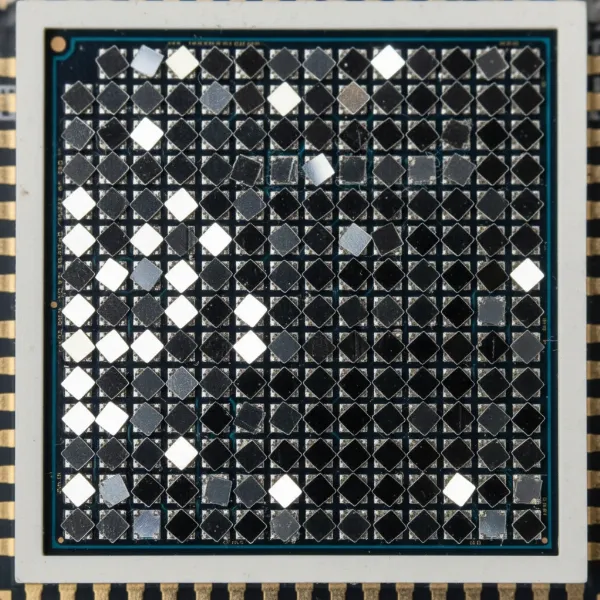 A close-up image of a DLP DMD chip showing millions of tiny, reflective micromirrors.
The Root Cause: Why DMD Chips Fail
The appearance of white or black dots is a direct symptom of the DMD chip failing, primarily due to prolonged heat stress. These tiny, delicate micromirrors are constantly in motion within a compact, often hot environment. Over extended periods of use, especially if the projector’s cooling system is compromised or insufficient, the constant thermal cycles and mechanical stress can cause individual mirrors to malfunction.
- White Dots (Stuck “On”): When a micromirror gets permanently stuck in the “on” position, it continuously reflects light through the lens, creating a persistent white dot on the screen, regardless of the image content.
- Black Dots (Stuck “Off”): Conversely, if a micromirror becomes jammed in the “off” position, it will always divert light away from the lens, resulting in a dark or black dot where a pixel should be.
This degradation is typically progressive. You might notice a few dots initially, but over time, more and more mirrors will fail, causing the “starry night” effect to spread across your screen, significantly impacting image quality. While primary DMD chip failure is internal, external factors like poor ventilation or accumulated dust can exacerbate overheating, accelerating the chip’s demise.
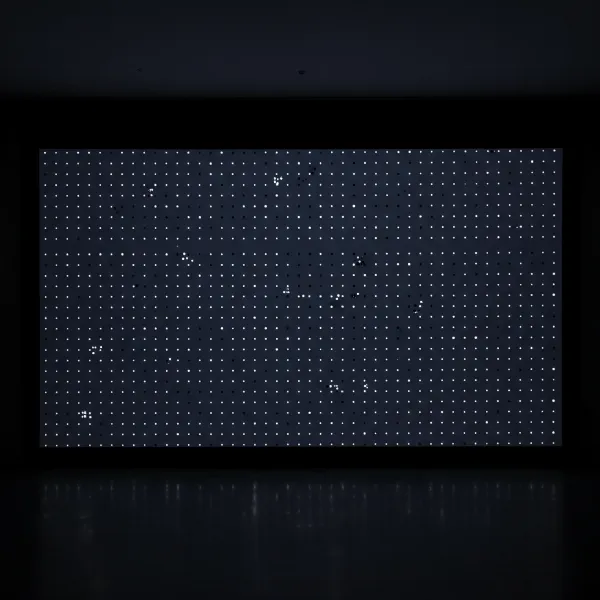 A projector screen displaying a "starry night" effect with scattered white and black dots.
Distinguishing DMD Failure from Other Projector Issues
While other projector problems can cause image anomalies, the characteristic fixed pattern of distinct white or black dots strongly indicates DMD chip failure. It’s important to differentiate this from other issues:
- Dust on the lens or inside the optical path: This usually manifests as soft, fuzzy dark spots, shadows, or smudges that might move or blur rather than fixed, sharp pixels. Cleaning the lens or internal optics can often resolve these.
- Dirty projector screen: Stains or debris on the screen itself can mimic dark spots, but these are external and won’t appear when the projector is off or if you project onto a different surface.
- Connection issues or signal problems: These typically result in flickering, color distortion across the entire image, or a complete loss of signal, rather than localized, fixed dots.
The unique precision and immobility of the white or black dots are the tell-tale signs of a failing DMD chip, specifically in DLP projectors.
Projector Types and DMD Chip Relevance
The issue of white or black dots due to DMD chip failure is exclusive to DLP (Digital Light Processing) projectors. This is because the DMD chip is the defining technology behind DLP.
- DLP Projectors: These projectors utilize the DMD chip with its array of micromirrors. Whether they use a single DMD chip with a color wheel or three DMD chips (one for each primary color), they are susceptible to this type of mirror failure. Many modern LED and Laser projectors also use DLP technology (e.g., LED-DLP or Laser-DLP), meaning they, too, can experience DMD chip issues.
- LCD (Liquid Crystal Display) Projectors: LCD projectors use three separate LCD panels (one for red, green, and blue) to create an image. Pixel problems in LCD projectors manifest differently, often as small dead pixels that remain black, or “stuck” pixels that stay a single color, but not the widespread “starry night” effect caused by micromirror failure.
- LCOS (Liquid Crystal on Silicon) Projectors: Found in some high-end home theater and professional projectors, LCOS technology combines elements of both LCD and DLP. While they can have pixel issues, they do not use micromirrors, so DMD failure is not a concern.
Therefore, if your projector is an LCD or LCOS model, the white or black dots you observe are likely due to a different component failure than a DMD chip.
What to Do When White or Black Dots Appear
Discovering white or black dots on your projector screen can be disheartening, but understanding the cause empowers you to take appropriate action.
The unfortunate truth is that once micromirrors on a DMD chip fail, they cannot be unstuck or repaired individually. The only effective solution is to replace the entire DMD chip.
Here’s what you should consider:
- Confirm DLP Projector: First, verify that your projector is indeed a DLP model. This issue is specific to this technology.
- Warranty Check: Many DMD chips, particularly those from Texas Instruments, come with a multi-year warranty (often 5 years) provided to manufacturers. Contact your projector manufacturer’s customer support. You might be eligible for a repair or replacement under warranty, potentially only paying for labor.
- DIY Replacement: For those with technical expertise, replacing a DMD chip can be a DIY project. The chip is often compared to a CPU and requires careful handling, the application of thermal paste, and precise reassembly. Replacement DMD chips can be purchased online from various suppliers, with costs typically ranging from $140 to $250 or more, depending on the projector model and chip specifications. There are many online tutorials (often on platforms like YouTube) that guide you through the process.
- Professional Repair: If you’re not comfortable performing a DIY repair, a professional projector repair service can replace the DMD chip. This will incur labor costs in addition to the chip’s price.
- Consider Replacement: Depending on the age and value of your projector, the cost of a new DMD chip and potential labor might approach the price of a new entry-level or mid-range projector. Evaluate if it’s more economical to replace the entire unit, especially if your projector is older or has other looming issues.
“The appearance of fixed white or black dots is the signature of a failing DMD chip. While frustrating, it’s a clear diagnostic signal that points directly to the necessary repair or replacement.” – Projectorcam.com Technical Team, Projector Technician
Preventing DMD Chip Issues and Maximizing Projector Lifespan
While DMD chip failure is often linked to the inherent wear and tear of its intricate mechanical components under thermal stress, there are steps you can take to potentially prolong its life and ensure your projector operates optimally.
- Ensure Adequate Ventilation: Overheating is the primary catalyst for DMD chip failure. Make sure your projector has plenty of space around its air intake and exhaust vents. Avoid placing it in enclosed cabinets or against walls that block airflow.
- Regular Cleaning of Vents and Filters: Dust and debris can accumulate in the projector’s vents and filters, restricting airflow and causing internal temperatures to rise. Routinely clean these areas using compressed air or a soft brush. Some projectors have removable, washable filters that should be cleaned as per the manufacturer’s recommendations.
- Maintain a Moderate Operating Environment: Avoid using your projector in excessively hot or humid environments. Consistent, high temperatures place additional stress on the DMD chip and other internal components.
- Proper Shutdown Procedures: Allow the projector to cool down properly after use. Most modern projectors have an automatic cool-down cycle. Avoid unplugging the projector immediately after turning it off, as this can disrupt the cooling process.
- Consider Projector Design: When purchasing a new projector, research models known for robust cooling systems or sealed optical engines, which can help prevent dust ingress and maintain more stable internal temperatures.
By adopting these proactive measures, you can create an optimal operating environment for your DLP projector, potentially extending the life of its critical DMD chip and preserving your viewing experience for years to come.
Conclusion
The presence of white or black dots on your projector screen can be an unwelcome sight, signaling a common yet significant issue within DLP projectors: a failing Digital Micromirror Device (DMD) chip. This intricate component, with its millions of tiny mirrors, is susceptible to thermal stress over time, leading to pixels becoming permanently stuck “on” or “off.” While other factors can affect image quality, the distinctive “starry night” effect is a definitive symptom of DMD chip degradation.
Understanding the function of the DMD chip and its vulnerability to heat is crucial for any DLP projector owner. The only reliable solution for this issue is a DMD chip replacement, a repair that can be undertaken DIY or by a professional, often with a warranty check as a first step. By prioritizing proper ventilation, regular cleaning, and careful usage, you can help mitigate the risks of premature DMD chip failure and extend the life of your beloved projector. Don’t let a few dots dim your projection dreams; armed with this knowledge, you can navigate the world of projector maintenance with confidence. What steps will you take today to ensure your projector delivers a flawless image tomorrow?
Frequently Asked Questions
Are white or black dots on a projector always caused by DMD chip issues?
|
Our Picks for the Best projector in 2026
As an Amazon Associate I earn from qualifying purchases.
|
||
| Num | Product | Action |
|---|---|---|
| 1 | Projector-4K with WiFi and Bluetooth:[3000 ANSI/40W Dolby Audio/Official Licensed Apps], Outdoor-Projector with Smart OS 2.0 & AI Auto Focus,ONOAYO ONO5Pro 2.0 Smart Movie Projector for Indoor/Outdoor |
![Check Projector-4K with WiFi and Bluetooth:[3000 ANSI/40W Dolby Audio/Official Licensed Apps], Outdoor-Projector with Smart OS 2.0 & AI Auto Focus,ONOAYO ONO5Pro 2.0 Smart Movie Projector for Indoor/Outdoor on Amazon](https://projectorcam.com/wp-content/plugins/amazon-tables/assets/images/buy.png)
|
| 2 | 【Officially-Licensed APP & Native 1080P】Thinnest 1.81\" Smart Mini Projector with WiFi and Bluetooth, Auto Focus & Keystone Portable Outdoor Projector, VOPLLS 4K Support Home Movie Projector |
|
| 3 | Mini Projector with Built-in Rechargeable Battery for Outdoor, Portable Projector with WiFi and Bluetooth, 4K Projector for Bedroom, Smart Projector |
|
| 4 | Magcubic Mini Projector with WiFi 6 and Bluetooth 5.4, Portable Projector 4K Support, 5W Soundbase Speaker, Auto Vertical Keystone 180°Rotatable Smart Proyector for Movie Home Outdoor |
|
| 5 | [Built-in Official Apps/4K Support] Smart Outdoor Projector with WiFi and Bluetooth, 800ANSI Movie Projector, DoIby Audio with Dual Speaker, Auto Focus w/ YouTube&PrimeVideo Proyector, Upgrad P62 Pro |
|
| 6 | [Officially-Licensed App & Auto Focus]Smart Mini Projector with WiFi and Bluetooth, XuanPad 4K Support Movie Projector, Portable Native 1080P Outdoor Projector with 360° Stand |
|
| 7 | Mini Smart Projector, 1500 ANSI Portable Projector with WiFi and Bluetooth, HAPPRUN 4K Full HD Home Theater with 270° Stand, Dolby Sound, Built-in Apps,Compatible with Phone & PC, Indoor & Outdoor Use |
|
| 8 | Aurzen Roku TV Smart Projector with Wifi and Bluetooth, Roku Streaming Experience Built-in, 1080P FHD, Dolby Audio, Auto Focus & Keystone, Zoom, Movie Portable Outdoor Mini Projector, White |
|
| 9 | HAPPRUN Native 1080P Bluetooth Mini Projector, Full HD Portable Outdoor Movie Projector with Built-in Speaker, Compatible with Smartphone, HDMI, USB, AV, Fire Stick, PS5 for Home, Bedroom, Outdoor Use |
|
| 10 | Astronaut Galaxy Projector with Bluetooth Speaker & White Noise, App & Remote Control Star Projector, Galaxy Projector for Bedroom Adults Kids, Spaceman Night Light for Gaming Room, Home Theater |
|
In DLP projectors, fixed white or black dots resembling a “starry night” are almost always caused by a failing DMD chip. While dust or other issues can cause blurry spots or smudges, the precise, static dots are characteristic of micromirror failure within the DMD.
Can I fix a DMD chip myself?
Yes, for technically inclined individuals, replacing a DMD chip can be a DIY repair. It involves carefully disassembling the projector, replacing the chip (often similar to a CPU), and applying new thermal paste. However, this should only be attempted if you are comfortable with electronics repair, as improper installation can cause further damage.
How much does it cost to replace a DMD chip?
The cost of a replacement DMD chip typically ranges from $140 to over $250, depending on the specific projector model and chip type. If you opt for professional repair, you will also incur labor charges, which can significantly increase the total cost.
Does a failing DMD chip affect all types of projectors?
No, DMD chip issues are exclusive to DLP (Digital Light Processing) projectors. LCD and LCOS projectors use different display technologies and, therefore, exhibit different types of pixel failures not related to micromirrors.
How can I prevent DMD chip failure?
While not entirely preventable due to wear and tear, you can extend your DMD chip’s life by ensuring proper projector ventilation, regularly cleaning air filters and vents to prevent overheating, and avoiding operation in excessively hot environments.