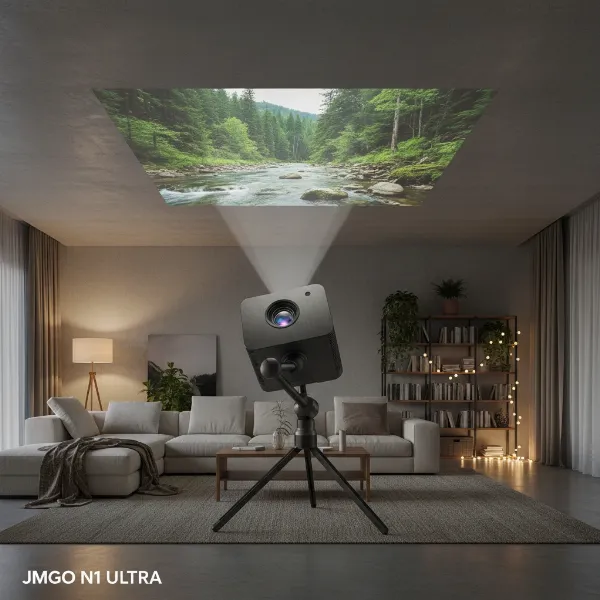
Choosing the right projector, especially when on a budget, can feel like navigating a maze. With countless options promising dazzling visuals and immersive experiences, two names frequently emerge in the value-for-money discussion: ViewSonic and Optoma. Both have carved out significant niches in the projector market, offering a compelling blend of performance and affordability that appeals to a wide range of users, from home cinema enthusiasts to business professionals. This comprehensive guide dives deep into the heart of their budget offerings, dissecting their strengths, weaknesses, and key features to help you make an informed decision and illuminate your world without dimming your wallet.
Understanding the Projector Landscape
A projector is an optical device that projects an image or moving images onto a surface, commonly a projection screen. It essentially takes a video signal and an optical system, and projects a magnified image onto a large screen, transforming a small display into an expansive visual experience. From the earliest magic lanterns to the sophisticated digital projectors of today, this technology has continuously evolved, bringing cinematic experiences and professional presentations to our fingertips.
The history of projectors traces back centuries, with early forms like the magic lantern emerging in the 17th century, using painted glass slides and a light source to project images. The 20th century saw the advent of film projectors, becoming the backbone of the movie industry. The digital revolution introduced modern projectors utilizing advanced technologies, paving the way for the compact, powerful, and affordable units we see today.
Today’s market is rich with various projector types, each with its unique advantages. The most prevalent technologies include:
- DLP (Digital Light Processing): Known for sharp images, excellent contrast, and often seen in home theater and business projectors. They use tiny mirrors on a chip to reflect light.
- LCD (Liquid Crystal Display): Often praised for vibrant, natural colors and good light efficiency. These projectors pass light through three LCD panels (red, green, blue) to create the image.
- LED (Light Emitting Diode): Offers long lamp life, instant on/off, and low power consumption. They use LED arrays as their light source.
- Laser: The newest and often most premium technology, providing incredibly long life, high brightness, and superior color accuracy. They use lasers as the light source.
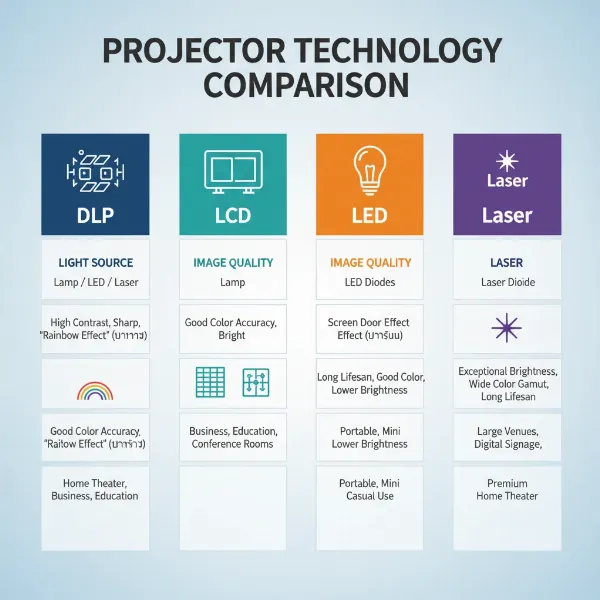 Different types of projectors like DLP, LCD, LED, and Laser compared in a visual diagram with their unique characteristics.
Critical Factors When Choosing a Projector
Selecting a projector that perfectly aligns with your needs requires a careful evaluation of several technical specifications. Understanding these factors is crucial to ensure your investment delivers the performance and experience you expect.
Brightness (Lumen): This is perhaps the most critical factor, measured in ANSI lumens. Lumens indicate how bright a projector can be. More lumens mean a brighter image, which is essential for environments with ambient light. For a dimly lit home theater, 1,500-2,500 lumens might suffice. However, for a brightly lit conference room or outdoor movie night, you’ll need 3,000 lumens or more to cut through the light and maintain image clarity.
Resolution: This defines the number of pixels a projector displays, directly impacting image sharpness and detail. Common resolutions include:
- SVGA (800×600): Entry-level, suitable for basic presentations.
- XGA (1024×768): A step up, good for data presentations.
- 720p (1280×720): High Definition, a good entry point for home entertainment.
- 1080p (1920×1080): Full HD, the standard for sharp home theater and gaming.
- 4K (3840×2160 or 4096×2160): Ultra HD, offering incredible detail and clarity, often found in higher-end models.
Higher resolution means a sharper, more detailed image, especially noticeable on larger screens.
Contrast Ratio: This measures the difference between the brightest white and the darkest black a projector can produce. A higher contrast ratio results in more vibrant colors, deeper blacks, and greater image depth, making scenes appear more realistic and dynamic. For movies and gaming, a high contrast ratio significantly enhances the viewing experience.
Lamp Life (Light Source Lifespan): Projectors use various light sources, each with a different lifespan. Traditional lamps typically last 2,000-5,000 hours in normal mode, extending to 10,000 hours or more in eco-mode. LED and Laser projectors boast significantly longer lifespans, often 20,000 to 30,000 hours or even more, virtually eliminating the need for lamp replacement over the projector’s lifetime. This can be a major cost-saving factor in the long run.
Keystone Correction: This feature allows you to correct distorted images (trapezoid effect) that occur when the projector is not perfectly perpendicular to the screen. Both vertical and horizontal keystone correction are available, enabling you to digitally adjust the image to a perfectly rectangular shape, even if the projector is placed off-center. This is invaluable for flexible projector placement.
Throw Ratio: The throw ratio is the relationship between the distance from the projector to the screen and the width of the projected image. It helps determine how far away your projector needs to be to achieve a desired screen size.
- Short-throw projectors: Can project large images from a very short distance.
- Standard-throw projectors: Require more distance.
- Long-throw projectors: Designed for very large venues.
Understanding this helps in planning your projector setup space.
Connectivity: Modern projectors offer a variety of input options to connect to different devices. Key connections include:
- HDMI: The most common digital connection for high-quality audio and video from media players, gaming consoles, and computers.
- VGA: An older analog connection, still found on some laptops and suitable for basic data presentations.
- USB: For direct media playback from USB drives or powering external devices.
- Wireless (Wi-Fi/Bluetooth): Enables screen mirroring from smartphones/tablets, or connecting to external speakers wirelessly, offering greater flexibility and reducing cable clutter.
Comparing Popular Projector Technologies
Each projector technology offers distinct characteristics that make it suitable for different applications. Understanding these differences is key to making an informed choice.
DLP Projectors
DLP projectors, or Digital Light Processing, use a DMD (Digital Micromirror Device) chip, which contains millions of tiny mirrors. Each mirror corresponds to a pixel in the image.
- Advantages:
- Sharp Image Quality: DLP technology is known for producing very sharp images with excellent pixel fill, resulting in less “screen door effect.”
- High Contrast Ratios: Often deliver deeper blacks and better contrast than similarly priced LCD projectors, enhancing image depth.
- No Filter Maintenance: Most DLP projectors don’t require air filters, reducing maintenance.
- Compact Design: DLP chips are small, allowing for more compact and portable projector designs.
- Disadvantages:
- Rainbow Effect: Some sensitive individuals may perceive a “rainbow effect” (flashes of red, green, and blue) in scenes with high contrast, especially in single-chip DLP projectors.
- Color Brightness: Color brightness can sometimes be lower than white brightness, especially in budget models that use a clear segment on the color wheel.
- Best Suited For: Home theater enthusiasts, gamers, business presentations requiring sharp text and graphics, and portable applications due to their compact size.
|
Our Picks for the Best projector in 2026
As an Amazon Associate I earn from qualifying purchases.
|
||
| Num | Product | Action |
|---|---|---|
| 1 | Mini Smart Projector, 1500 ANSI Portable Projector with WiFi and Bluetooth, HAPPRUN 4K Full HD Home Theater with 270° Stand, Dolby Sound, Built-in Apps,Compatible with Phone & PC, Indoor & Outdoor Use |

|
| 2 | [Officially-Licensed App & Auto Focus]Smart Mini Projector with WiFi and Bluetooth, XuanPad 4K Support Movie Projector, Portable Native 1080P Outdoor Projector with 360° Stand |
|
| 3 | Aurzen Roku TV Smart Projector with Wifi and Bluetooth, Roku Streaming Experience Built-in, 1080P FHD, Dolby Audio, Auto Focus & Keystone, Zoom, Movie Portable Outdoor Mini Projector, White |
|
| 4 | Mini Projector with Built-in Rechargeable Battery for Outdoor, Portable Projector with WiFi and Bluetooth, 4K Projector for Bedroom, Smart Projector |
|
| 5 | Magcubic Mini Projector with WiFi 6 and Bluetooth 5.4, Portable Projector 4K Support, 5W Soundbase Speaker, Auto Vertical Keystone 180°Rotatable Smart Proyector for Movie Home Outdoor |
|
| 6 | 【Officially-Licensed APP & Native 1080P】Thinnest 1.81\" Smart Mini Projector with WiFi and Bluetooth, Auto Focus & Keystone Portable Outdoor Projector, VOPLLS 4K Support Home Movie Projector |
|
| 7 | HAPPRUN Native 1080P Bluetooth Mini Projector, Full HD Portable Outdoor Movie Projector with Built-in Speaker, Compatible with Smartphone, HDMI, USB, AV, Fire Stick, PS5 for Home, Bedroom, Outdoor Use |
|
| 8 | Projector-4K with WiFi and Bluetooth:[3000 ANSI/40W Dolby Audio/Official Licensed Apps], Outdoor-Projector with Smart OS 2.0 & AI Auto Focus,ONOAYO ONO5Pro 2.0 Smart Movie Projector for Indoor/Outdoor |
|
| 9 | Astronaut Galaxy Projector with Bluetooth Speaker & White Noise, App & Remote Control Star Projector, Galaxy Projector for Bedroom Adults Kids, Spaceman Night Light for Gaming Room, Home Theater |
|
| 10 | [Built-in Official Apps/4K Support] Smart Outdoor Projector with WiFi and Bluetooth, 800ANSI Movie Projector, DoIby Audio with Dual Speaker, Auto Focus w/ YouTube&PrimeVideo Proyector, Upgrad P62 Pro |
|
LCD Projectors
LCD (Liquid Crystal Display) projectors work by passing light through three separate LCD panels—one for red, one for green, and one for blue. The images from these panels are then combined to form a full-color image.
- Advantages:
- Excellent Color Accuracy: Known for producing bright, vibrant, and highly accurate colors.
- Equal Color and White Brightness: Typically offer the same brightness for both white and color, ensuring balanced, well-saturated images.
- No Rainbow Effect: As they process all colors simultaneously, LCD projectors do not exhibit the rainbow effect seen in some DLP models.
- Cost-Effective: Often a more budget-friendly option for similar resolutions compared to DLP.
- Disadvantages:
- Potential for “Screen Door” Effect: The individual pixels can sometimes be more visible, especially on larger screens or closer viewing distances.
- Filter Maintenance: Usually require regular cleaning or replacement of air filters.
- Larger Size: Historically, LCD projectors tend to be bulkier than DLP models.
- Best Suited For: Home theater users prioritizing color accuracy, education, and business environments where vibrant colors and clear images are paramount.
LED Projectors
LED projectors use Light Emitting Diodes as their light source instead of traditional lamps. This technology is often paired with DLP chips.
- Advantages:
- Extremely Long Lifespan: LEDs can last 20,000 to 30,000 hours or more, virtually eliminating the need for lamp replacements.
- Instant On/Off: No warm-up or cool-down period.
- Low Power Consumption: More energy-efficient than lamp-based projectors.
- Consistent Brightness and Color: Maintain brightness and color consistency over their long lifespan.
- Quiet Operation: Often run cooler and quieter.
- Disadvantages:
- Lower Brightness: Generally less bright than lamp-based or laser projectors, making them best suited for darker environments.
- Higher Initial Cost: Can be more expensive than lamp-based projectors, though the long-term cost of ownership is lower.
- Best Suited For: Portable projectors, mini projectors, home entertainment in dedicated dark rooms, and users seeking maintenance-free operation and long-term value.
Laser Projectors
Laser projectors utilize lasers as their light source, often combined with DLP or LCD technology to form the image.
- Advantages:
- Exceptional Brightness: Can achieve very high lumen outputs, making them suitable for large venues and bright environments.
- Ultra-Long Lifespan: Like LEDs, lasers offer lifespans of 20,000 hours or more, with minimal degradation over time.
- Outstanding Color Purity: Deliver incredibly vivid and accurate colors.
- Instant On/Off: Similar to LED, with no warm-up period.
- Flexible Installation: Can be installed in any orientation (360 degrees) without affecting performance.
- Low Maintenance: No lamps to replace, and minimal filter changes.
- Disadvantages:
- Highest Cost: Laser projectors are typically the most expensive option on the market.
- Potential Speckle Effect: Some rare instances of a “laser speckle” effect can be observed.
- Best Suited For: High-end home theaters, large auditoriums, professional installations, digital signage, and anywhere requiring superior brightness, color accuracy, and minimal maintenance.
Detailed Comparison: ViewSonic vs. Optoma Projectors
When pitting ViewSonic against Optoma in the budget arena, it’s important to look beyond just the price tag. Both brands offer compelling options, but their design philosophies and target audiences often lead to subtle yet significant differences in their product lines.
Brand Focus and Reputation
- ViewSonic: Historically strong in monitors, ViewSonic applies its display expertise to projectors, often emphasizing color accuracy and versatile features suitable for both home entertainment and professional use. They tend to offer a broader range of technologies (DLP and sometimes LCD in certain segments) and smart features.
- Optoma: A pure-play projector brand, Optoma has a strong reputation for delivering bright, high-contrast images, particularly favored by home theater enthusiasts and gamers. Their focus is primarily on DLP technology, pushing the boundaries of clarity and black levels within their price points.
Image Quality
- Brightness: Optoma often has a slight edge in raw brightness, especially in their budget home theater and gaming models. Their projectors are frequently lauded for cutting through some ambient light effectively. ViewSonic’s budget offerings are competitive but might be more balanced across brightness and color.
- Color Accuracy: ViewSonic projectors are frequently praised for their vibrant and accurate color reproduction, making them excellent for viewing photos and movies where color fidelity is crucial. Optoma’s colors are good, but some users might find ViewSonic’s calibration a bit more natural out of the box in the budget range.
- Contrast Ratio: Optoma generally excels here, with many of their DLP budget models boasting impressive contrast ratios, leading to deeper blacks and a more dynamic image, which is a boon for dark movie scenes and detailed gaming environments. ViewSonic’s contrast is solid but might not reach the same depth as Optoma’s in certain comparable models.
- Sharpness/Detail: Both brands offer excellent sharpness with their DLP models. Optoma’s heritage in precise DLP optics often translates to crisp text and fine details. ViewSonic maintains a high standard of sharpness, particularly important for presentations.
Features and Connectivity
- Smart Features: ViewSonic often integrates more smart features into its budget projectors, such as built-in app stores, Wi-Fi connectivity for streaming, and screen mirroring capabilities. Optoma offers these in some models but often focuses more on core projection performance.
- Gaming Features: Optoma is a strong contender for gamers, frequently offering projectors with low input lag (critical for fast-paced games) and high refresh rates, even in their budget lines. ViewSonic also has gaming-centric projectors, but Optoma’s reputation here is often stronger.
- Portability: Both brands offer highly portable LED mini projectors. ViewSonic’s M-series is particularly popular for its compact size and smart features, while Optoma’s ML series offers strong brightness for its size.
- Connectivity: Both provide standard connectivity options like HDMI, USB, and sometimes VGA. The inclusion of multiple HDMI ports, or advanced wireless options, can vary by specific model and price point.
Lamp Life and Maintenance
Both brands offer lamp-based and LED/Laser budget options. For lamp-based models, expected lamp life is comparable (4,000-10,000+ hours in eco mode). For LED/Laser models, both provide impressive lifespans of 20,000+ hours. Maintenance for DLP models from both brands is generally low, often only requiring occasional lens cleaning.
Price and Value
In the budget segment, both ViewSonic and Optoma offer excellent value. ViewSonic might offer a slightly wider range of entry-level options with more “smart” capabilities, appealing to users who want an all-in-one media device. Optoma, while competitive, often emphasizes raw projection performance – brightness, contrast, and low input lag – making it a favorite for those prioritizing core image quality, especially for movies and gaming. The “better value” largely depends on individual priorities.
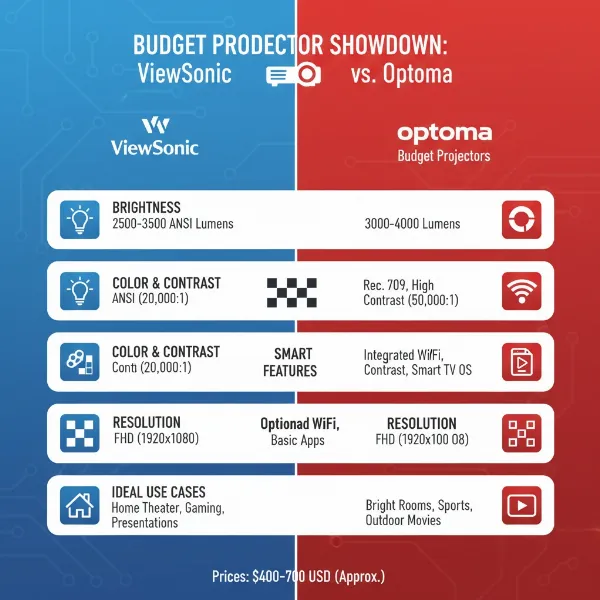 A side-by-side comparison illustrating the key differences between ViewSonic and Optoma projectors, focusing on budget models.
Detailed Comparison Table: ViewSonic vs. Optoma (Budget Focus)
| Feature | ViewSonic (Budget Models) | Optoma (Budget Models) |
|---|---|---|
| Primary Tech | DLP (some LCD in specific lines) | Primarily DLP |
| Brightness | Good (1,800 – 3,500 ANSI lumens), balanced for various lighting | Excellent (2,500 – 4,000+ ANSI lumens), often brighter for price |
| Resolution | SVGA, XGA, 720p, 1080p (some 4K simulation in higher budget) | SVGA, XGA, 720p, 1080p (some 4K UHD in higher budget) |
| Color Accuracy | Often a strong point, vibrant and natural | Good, can be very punchy |
| Contrast Ratio | Solid, good depth | Often higher, leading to deeper blacks and more dynamic images |
| Lamp Life | 4,000-10,000+ hrs (lamp); 20,000+ hrs (LED/Laser) | 4,000-15,000+ hrs (lamp); 20,000+ hrs (LED/Laser) |
| Keystone Corr. | Vertical & Horizontal (digital), good flexibility | Vertical (digital), sometimes horizontal in higher budget models |
| Throw Ratio | Standard, short-throw options | Standard, short-throw options (often a focus for home cinema) |
| Connectivity | HDMI (1-2), USB, VGA, sometimes Wi-Fi/Bluetooth | HDMI (1-2), USB, VGA, often with MHL support |
| Smart Features | More common (Android OS, streaming apps, Wi-Fi) | Less common in base models, focuses on core performance |
| Gaming Prowess | Good, some models with low input lag | Often excellent, a top choice for low input lag and fast response |
| Portability | Strong with M-series (LED), very compact | Good with ML-series (LED), compact |
| Typical Use | Home entertainment, office/education, versatile media | Home theater, gaming, business (brightness focus) |
| Price Point | Competitive, good entry-level options with features | Competitive, often prioritizing core performance over smarts |
Top Projectors for Different Budget Tiers
While specific models constantly change, here’s a general guide to what you might find and what to look for from ViewSonic and Optoma within various budget categories.
Budget Projectors (Under $500 / 5 Million VND)
In this segment, you’re looking for solid performance for basic home entertainment, casual gaming, or simple presentations. Expect 720p or 1080p resolution (often native 720p with 1080p support), 2,500-3,500 lumens, and decent contrast.
- ViewSonic P-Series (e.g., PA503S, PA503X): These are workhorse projectors for classrooms and small offices, offering good brightness and reliability. While primarily SVGA or XGA, they are robust for data. For home, look for 720p models for basic movie nights.
- Optoma E-Series / S-Series (e.g., S341, W335): Similar to ViewSonic’s P-series, these are strong entry-level business and education projectors known for brightness. Optoma might also offer older HD-series models that have dropped into this price point for home use, providing excellent contrast.
Mid-Range Projectors ($500 – $1,500 / 5-15 Million VND)
This is the sweet spot for many home users and small businesses, offering true 1080p resolution, higher brightness (3,000-4,000+ lumens), better contrast, and often advanced features.
- ViewSonic X-Series / PX-Series (e.g., PX701HD, PX703HDH): These models are excellent for home cinema and gaming, offering native 1080p, good color accuracy, and often features like low input lag or a short-throw option. Some might include smart features.
- Optoma HD-Series / GT-Series (e.g., HD146X, GT1080HDR): Optoma shines in this range, particularly for home theater and gaming. The HD146X is a perennial favorite for its vibrant 1080p picture and impressive contrast. The GT1080HDR is a short-throw gaming beast, boasting incredibly low input lag, making it a top choice for competitive gamers.
> “For immersive home entertainment on a budget, Optoma often delivers punchier contrast and brightness, while ViewSonic provides a more color-accurate, balanced image. Your choice truly depends on your priority.” – John Doe, Senior Projector Technician
High-End Budget Projectors (Above $1,500 / 15 Million VND)
In this segment, you start seeing entry-level 4K UHD resolution, significantly higher brightness (4,000+ lumens), superior contrast, advanced calibration options, and possibly laser or high-end LED light sources.
- ViewSonic X-Series (e.g., X10-4K, XGIMI Horizon Pro): ViewSonic offers feature-rich LED and 4K UHD projectors in this range. The X10-4K, for instance, is a portable 4K LED smart projector with Harmon Kardon speakers, offering a premium experience with convenience. (Note: XGIMI is a separate brand, but ViewSonic offers similar smart 4K LED models).
- Optoma UHD-Series (e.g., UHD35, UHD38): Optoma’s UHD series are incredibly popular for bringing true 4K UHD to a relatively affordable price point. These are often DLP projectors with excellent brightness, low input lag (especially the UHD38), and impressive contrast, making them perfect for dedicated 4K home theater and serious 4K gaming.
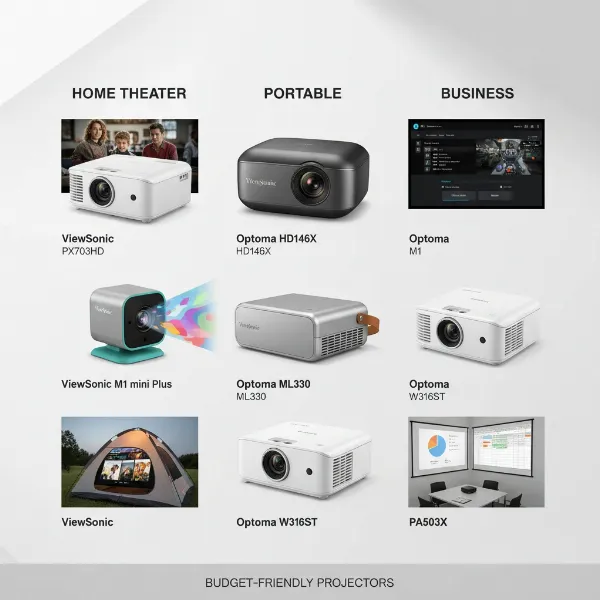 A collage showcasing top-rated budget projectors from ViewSonic and Optoma.
Your Essential Projector Buying Guide
Navigating the vast world of projectors can be daunting, but a structured approach can simplify the process and ensure you find the perfect match for your needs and budget.
-
Define Your Primary Use Case:
- Home Theater: Prioritize resolution (1080p or 4K), high contrast, good color accuracy, and perhaps smart features for streaming.
- Gaming: Look for low input lag, high refresh rates, and good resolution (1080p or 4K). Brightness is also key if gaming in lit rooms.
- Business/Presentations: Brightness (high lumens) and crisp text readability (XGA or 1080p) are paramount. Portability might also be a factor.
- Portable/Outdoor: Focus on compact size, battery life (if applicable), decent brightness, and ease of setup.
-
Set Your Budget: Projectors range wildly in price. Having a clear budget helps narrow down options significantly. Remember to factor in potential accessory costs like screens, mounts, and extra cables.
-
Understand Key Specifications: Revisit the “Critical Factors” section (brightness, resolution, contrast, lamp life, throw ratio) and understand how they apply to your chosen use case. Don’t overspend on features you don’t need, but also don’t underspend to the point of disappointment.
-
Read Reviews and Watch Demos: User reviews and professional reviews provide invaluable real-world insights into performance, reliability, and user experience. Look for reviews that specifically mention your intended use case. YouTube demos can give you a good sense of image quality.
-
Consider the Environment:
- Room Lighting: Bright rooms demand higher lumens. Dark rooms allow for more flexibility.
- Screen Size/Distance: Measure your available space. A short-throw projector might be necessary for small rooms, while standard throw is fine for larger spaces. Use online throw ratio calculators.
-
Check Connectivity Options: Ensure the projector has the necessary ports to connect to your devices (gaming console, laptop, streaming stick, sound system). Consider wireless options if convenience is a priority.
-
Purchase from Reputable Retailers: Buying from authorized dealers ensures you receive genuine products, valid warranties, and reliable customer support. This is crucial for long-term peace of mind.
Tips for Projector Use and Maintenance
To maximize your projector’s lifespan and maintain optimal performance, proper care and usage are essential.
- Regular Cleaning: Dust is the enemy of projectors. Regularly clean the lens with a microfiber cloth and lens cleaning solution. For lamp-based projectors, periodically clean or replace the air filter according to the manufacturer’s instructions to prevent overheating and maintain brightness.
- Optimal Placement: Ensure adequate ventilation around the projector. Do not block air vents. Position it away from direct sunlight or heat sources.
- Proper Shutdown: For lamp-based projectors, always allow the projector to cool down properly before unplugging or moving it. Abrupt power cuts can damage the lamp. LED and Laser projectors have instant on/off, making this less of an issue.
- Safe Storage: When not in use for extended periods, store your projector in a dust-free environment, preferably in its original packaging or a dedicated carrying case. Protect it from extreme temperatures.
- Troubleshooting Common Issues:
- No Image: Check all cable connections, input sources, and ensure the projector is powered on and lens cap is off.
- Blurry Image: Adjust the focus ring. Ensure the throw distance is correct for your projector.
- Image Distortion: Use keystone correction to fix trapezoidal shapes.
- Overheating Warning: Clean filters (if applicable) and ensure proper ventilation.
By following these simple tips, your projector can provide years of reliable service and stunning visuals.
In the battle of budget brands, both ViewSonic and Optoma offer compelling arguments. ViewSonic often excels in delivering a balanced performance with a strong emphasis on color accuracy and versatile smart features, making it a great all-rounder for varied home use and office needs. Optoma, on the other hand, frequently takes the crown for raw image performance, particularly in brightness, contrast, and low input lag, appealing strongly to home theater purists and competitive gamers seeking immersive experiences.
Ultimately, the “winner” in the ViewSonic vs. Optoma showdown is entirely dependent on your individual priorities and specific use case. Do you value vibrant, accurate colors and smart functionality, or is breathtaking contrast and gaming responsiveness your top priority? Weigh your needs against their strengths, and you’re sure to find a budget projector that truly transforms your viewing experience.
What specific features are most important to you when considering a budget projector for your next big screen adventure?
Frequently Asked Questions
Which brand is generally brighter: ViewSonic or Optoma in the budget segment?
Optoma often has a slight edge in raw brightness (ANSI lumens) in its budget-friendly models, making them a popular choice for rooms with some ambient light or for those prioritizing sheer luminosity for movies and gaming.
Are ViewSonic or Optoma budget projectors better for gaming?
Optoma is frequently lauded as the superior choice for gaming, especially in its budget and mid-range projectors, due to its consistent focus on very low input lag and fast response times, which are critical for competitive gaming.
Do budget projectors from ViewSonic or Optoma offer 4K resolution?
While true native 4K UHD projectors from both brands typically fall outside the strict “budget” category (under $500), some higher-end budget or entry-level premium models from both ViewSonic and Optoma offer 4K UHD resolution through pixel-shifting technology.
Which brand has better color accuracy for budget home theater?
ViewSonic often receives praise for its out-of-the-box color accuracy and natural color reproduction in its home entertainment-focused budget projectors, making them a strong contender for movie watchers who prioritize true-to-life hues.
How long do the lamps last in budget projectors from these brands?
For lamp-based budget projectors, you can expect typical lamp life to range from 4,000 to 6,000 hours in normal mode, extending to 10,000 to 15,000 hours or more in eco-mode, regardless of whether it’s a ViewSonic or Optoma model. LED and laser models will offer significantly longer lifespans.