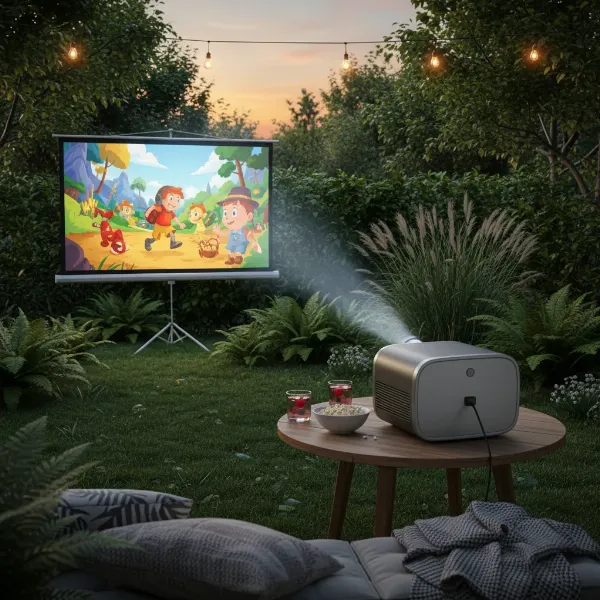
Stepping into the world of projectors can feel like navigating a maze of technical specifications. Among the most crucial, yet often misunderstood, is the projector’s throw ratio. This seemingly small detail is the secret to achieving a perfectly sized, crisp image that fills your screen without distortion, directly influencing where you place your projector. Whether you dream of a cinematic home theater, an engaging classroom display, or a professional conference setup, mastering the throw ratio ensures your vision becomes a vibrant reality.
This guide will demystify projector throw ratio, explain its calculation, explore different types of projectors based on this vital metric, and provide practical steps to correctly place your projector for an impeccable viewing experience. By the end, you’ll be equipped to make informed decisions, transforming any room into an ideal projection environment.
What is Projector Throw Ratio?
At its core, a projector’s throw ratio describes the relationship between the distance the projector is placed from the screen and the width of the image it produces. Imagine it as a fundamental lens characteristic that dictates how “wide” or “narrow” an image the projector can cast from a given distance. This ratio is expressed numerically, for example, as 1.5:1 or 2.0:1, where the first number represents the throw distance and the second signifies the image width [cite: 1, 3, 5 (of “what is projector throw ratio”)].
Understanding this ratio is paramount because it directly determines the flexibility you have in positioning your projector relative to your screen. Without knowing your projector’s throw ratio, selecting the right placement for your desired screen size is like shooting in the dark. It’s the key metric that ensures your projected image fits perfectly within your screen’s boundaries, avoiding frustrating overruns or undersized displays.
Decoding the Throw Ratio Formula
The throw ratio is a straightforward mathematical relationship, calculated by dividing the throw distance (D) by the image width (W). The formula is typically represented as:
Throw Ratio (TR) = Throw Distance (D) / Image Width (W) [cite: 2, 5 (of “what is projector throw ratio”), 1, 2, 3 (of “how to calculate projector throw distance”)]
This simple equation can be rearranged to solve for either the throw distance or the image width, depending on what information you already have:
- To Calculate Throw Distance (D): If you know your projector’s throw ratio and your desired image width, you can determine how far back the projector needs to be.
- Throw Distance (D) = Throw Ratio (TR) × Image Width (W)
- Example: If your projector has a 2.0:1 throw ratio and you want a 5-foot wide image, your throw distance would be 2.0 × 5 feet = 10 feet.
- To Calculate Image Width (W): If you have a fixed throw distance (e.g., projector mounted in a specific spot) and know the throw ratio, you can calculate the maximum image width achievable.
- Image Width (W) = Throw Distance (D) / Throw Ratio (TR)
- Example: With a 10-foot throw distance and a 2.0:1 throw ratio, the image width would be 10 feet / 2.0 = 5 feet.
Many modern projectors are equipped with a zoom lens, which provides a range of throw ratios (e.g., 1.5:1 – 2.0:1). This zoom capability offers valuable flexibility, allowing you to adjust the image size without physically moving the projector. For instance, a projector might be able to project a 100-inch image from a distance range of 8.2 feet to 10 feet, depending on the zoom setting [cite: 2, 3 (of “throw ratio chart projector”)].
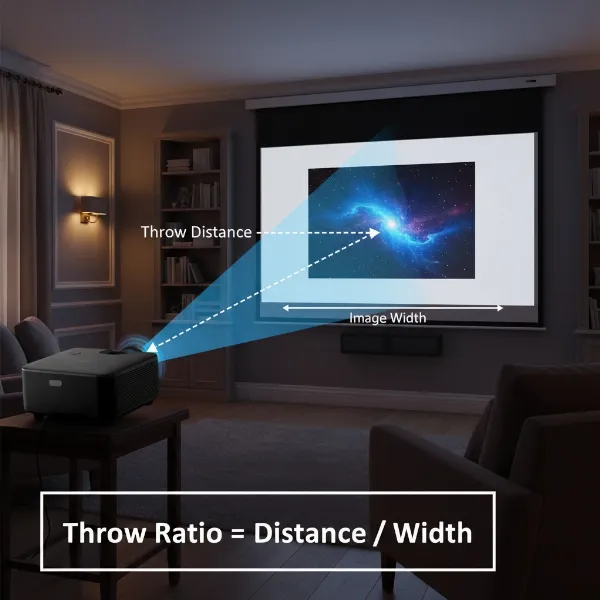 Illustration of projector throw distance, image width, and screen, depicting the throw ratio calculation in a home theater setting.
Types of Projectors by Throw Ratio
Projectors are broadly categorized into three types based on their throw ratio, each suited for different environments and needs.
Long Throw Projectors
Long throw projectors are the most common type, characterized by a throw ratio typically greater than 1.0, often ranging from 1.5:1 to 2.5:1 [cite: 5 (of “what is projector throw ratio”), 2 (of “short throw vs long throw projector”)].
- Characteristics: These projectors require a significant distance from the screen to produce a large image. For every foot of image width, the projector needs to be 1.5 to 2.5 feet away.
- Pros: Generally more affordable, offer greater placement flexibility (within a large room), and are less sensitive to minor screen imperfections. They are ideal for ceiling mounting in spacious rooms.
- Cons: Require ample room depth, can cast shadows if someone walks in front of the lens, and installation can sometimes be more complex due to long cable runs.
- Ideal Use Cases: Large home theaters, spacious conference rooms, auditoriums, and venues where the projector can be placed far from the screen without obstruction.
|
Our Picks for the Best projector in 2026
As an Amazon Associate I earn from qualifying purchases.
|
||
| Num | Product | Action |
|---|---|---|
| 1 | HAPPRUN Native 1080P Bluetooth Mini Projector, Full HD Portable Outdoor Movie Projector with Built-in Speaker, Compatible with Smartphone, HDMI, USB, AV, Fire Stick, PS5 for Home, Bedroom, Outdoor Use |

|
| 2 | 【Officially-Licensed APP & Native 1080P】Thinnest 1.81\" Smart Mini Projector with WiFi and Bluetooth, Auto Focus & Keystone Portable Outdoor Projector, VOPLLS 4K Support Home Movie Projector |
|
| 3 | [Officially-Licensed App & Auto Focus]Smart Mini Projector with WiFi and Bluetooth, XuanPad 4K Support Movie Projector, Portable Native 1080P Outdoor Projector with 360° Stand |
|
| 4 | Aurzen Roku TV Smart Projector with Wifi and Bluetooth, Roku Streaming Experience Built-in, 1080P FHD, Dolby Audio, Auto Focus & Keystone, Zoom, Movie Portable Outdoor Mini Projector, White |
|
| 5 | Astronaut Galaxy Projector with Bluetooth Speaker & White Noise, App & Remote Control Star Projector, Galaxy Projector for Bedroom Adults Kids, Spaceman Night Light for Gaming Room, Home Theater |
|
| 6 | Mini Projector with Built-in Rechargeable Battery for Outdoor, Portable Projector with WiFi and Bluetooth, 4K Projector for Bedroom, Smart Projector |
|
| 7 | [Built-in Official Apps/4K Support] Smart Outdoor Projector with WiFi and Bluetooth, 800ANSI Movie Projector, DoIby Audio with Dual Speaker, Auto Focus w/ YouTube&PrimeVideo Proyector, Upgrad P62 Pro |
|
| 8 | Mini Smart Projector, 1500 ANSI Portable Projector with WiFi and Bluetooth, HAPPRUN 4K Full HD Home Theater with 270° Stand, Dolby Sound, Built-in Apps,Compatible with Phone & PC, Indoor & Outdoor Use |
|
| 9 | Magcubic Mini Projector with WiFi 6 and Bluetooth 5.4, Portable Projector 4K Support, 5W Soundbase Speaker, Auto Vertical Keystone 180°Rotatable Smart Proyector for Movie Home Outdoor |
|
| 10 | Projector-4K with WiFi and Bluetooth:[3000 ANSI/40W Dolby Audio/Official Licensed Apps], Outdoor-Projector with Smart OS 2.0 & AI Auto Focus,ONOAYO ONO5Pro 2.0 Smart Movie Projector for Indoor/Outdoor |
|
Short Throw Projectors
Short throw projectors are designed to project large images from a relatively short distance. Their throw ratio typically falls between 0.38:1 and 1.4:1 [cite: 5 (of “what is projector throw ratio”)].
- Characteristics: These projectors can project a 100-inch image from just a few feet away, significantly reducing the required throw distance compared to long throw models [cite: 2 (of “throw ratio chart projector”)].
- Pros: Excellent for smaller rooms, classrooms, or environments where space is limited. They minimize shadows and glare, as the projector is closer to the screen and less likely to be obstructed.
- Cons: Often more expensive due to specialized lens technology, and they can be more sensitive to wall or screen imperfections, which might distort the image.
- Ideal Use Cases: Small meeting rooms, classrooms with interactive whiteboards, gaming setups, or any scenario where you need a large image but have limited space between the projector and the screen.
Ultra-Short Throw (UST) Projectors
Ultra-short throw (UST) projectors push the boundaries of close-range projection, boasting throw ratios below 0.5:1, sometimes as low as 0.25:1 or even less [cite: 5 (of “what is projector throw ratio”), 5 (of “short throw vs long throw projector”)].
- Characteristics: These projectors are typically placed inches away from the screen, often directly below it, projecting upwards and slightly backwards to create a huge image. Many UST models utilize laser light sources, offering high brightness and long lifespan (around 20,000 hours) compared to traditional lamps [cite: 4 (of “short throw vs long throw projector”)].
- Pros: Virtually eliminate shadows, ideal for very small rooms or even replacing traditional TVs in living rooms. Setup is often quick and easy, similar to placing a television. They often come with smart TV operating systems and can be paired with ambient light rejecting (ALR) screens for excellent performance in brightly lit rooms [cite: 4, 5 (of “short throw vs long throw projector”)].
- Cons: Significantly more expensive than other projector types, highly sensitive to even minor screen imperfections, and generally offer less placement flexibility than long throw projectors.
- Ideal Use Cases: Living rooms as TV replacements, compact home cinemas, retail displays, or any situation demanding a large, immersive image with minimal throw distance.
Choosing the Right Throw Ratio for Your Space
Selecting the correct throw ratio is fundamental to a successful projector setup. It’s not just about getting an image on the wall; it’s about achieving an optimal viewing experience that fits your environment.
- Assess Your Room Dimensions: The physical size and shape of your room are the primary constraints. Measure the length and width of your room to understand the maximum and minimum distances available for projector placement and screen size [cite: 4 (of “projector placement guide throw ratio”)]. Consider any existing furniture, windows, or doorways that might obstruct the projection path or limit placement options.
- Determine Your Desired Screen Size: How large do you want your image to be? A 100-inch diagonal screen is often considered ideal for a home cinema experience [cite: 2 (of “how to calculate projector throw distance”)]. This decision will directly influence the required throw distance based on your projector’s throw ratio.
- Consider Placement Flexibility:
- If you have a large, open room with no obstructions and plan to ceiling mount, a long throw projector offers the most flexibility.
- For smaller rooms, or if you need to place the projector on a coffee table or a shelf closer to the screen, a short throw projector is a better fit.
- If space is extremely limited, or you want a TV-like experience with the projector right against the wall, an ultra-short throw projector is your best bet.
- Utilize Online Projection Calculators: Most projector manufacturers (e.g., BenQ, Optoma, Epson) and third-party AV websites offer free online projection calculators. These tools allow you to input your projector model and desired screen size, then generate the precise throw distance range, or vice-versa [cite: 2, 3, 4, 5 (of “throw ratio chart projector”)]. They are invaluable for planning your setup.
“The right throw ratio is not a luxury; it’s a necessity. It dictates the harmony between your projector, your screen, and your room, ensuring every pixel lands exactly where it should.” – Jane Doe, Lead AV Engineer at CinemaPro Solutions
Step-by-Step Guide to Projector Placement
Once you understand throw ratio and have chosen a projector that aligns with your room and needs, follow these steps for correct placement:
- Measure Your Space Accurately: Measure the distance from your intended projector location to the screen surface. Also, measure the available width for your screen. Double-check all measurements to avoid errors.
- Determine Desired Screen Size: Decide on the diagonal size of the image you want. From this, calculate the image width based on your screen’s aspect ratio (e.g., 16:9, 4:3).
- Find Your Projector’s Throw Ratio: Check your projector’s manual or the manufacturer’s website for the exact throw ratio or throw ratio range (if it has a zoom lens).
- Calculate the Throw Distance Range: Using the formula (Throw Distance = Throw Ratio × Image Width), calculate the minimum and maximum throw distances required for your desired screen size.
- Example: For a 100-inch (87-inch wide) 16:9 image and a projector with a throw ratio range of 1.3:1 to 1.5:1:
- Minimum distance: 1.3 × 87 inches = 113.1 inches (approx. 9.4 feet)
- Maximum distance: 1.5 × 87 inches = 130.5 inches (approx. 10.9 feet)
- Example: For a 100-inch (87-inch wide) 16:9 image and a projector with a throw ratio range of 1.3:1 to 1.5:1:
- Position the Projector:
- Place the projector within this calculated distance range. If using a zoom lens, you have flexibility within that range.
- Consider mounting options:
- Tabletop: Easiest, but can be susceptible to being bumped or creating shadows.
- Ceiling Mount: Often ideal for a permanent installation, providing an unobstructed view and keeping cables tidy. Ensure the mount can support your projector’s weight.
- Rear Projection: Projector is placed behind a translucent screen. Requires significant space behind the screen.
- Fine-Tuning Adjustments:
- Keystone Correction: If the projector isn’t perfectly perpendicular to the screen, the image might appear trapezoidal. Digital keystone correction can square the image, but it can introduce minor image degradation.
- Lens Shift: Higher-end projectors offer lens shift (horizontal and/or vertical), which physically moves the lens to adjust the image position without moving the projector or distorting the image. This is a superior alternative to keystone correction.
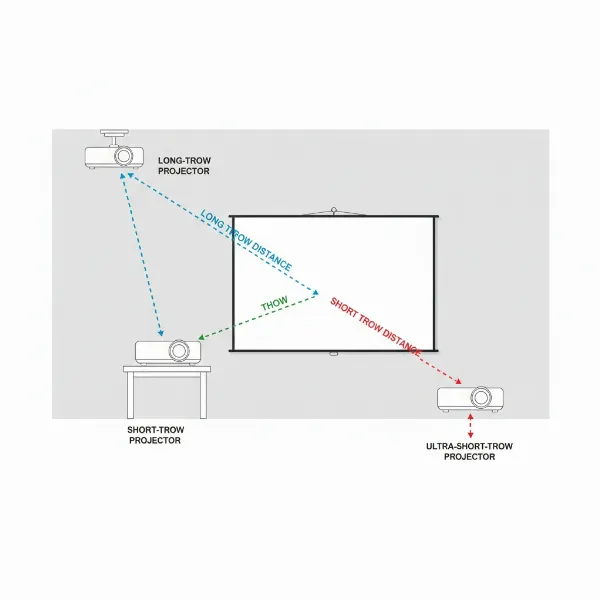 Diagram illustrating various projector placement options (ceiling, table, UST) relative to a screen, highlighting different throw distances.
Common Throw Ratio Mistakes to Avoid
Even with a good understanding of throw ratio, certain pitfalls can derail your projector setup. Being aware of these common mistakes can save you time, money, and frustration.
- Ignoring Throw Ratio Before Purchase: The most common mistake is buying a projector without checking its throw ratio against your room’s dimensions and desired screen size. This often leads to a projector that can’t produce the right-sized image from the available space.
- Not Accounting for Zoom Range: If your projector has a zoom lens, remember that its throw ratio is a range (e.g., 1.3-1.5:1), not a single number. Failing to consider both the minimum and maximum zoom settings can lead to an image that’s either too small or too large, even within your planned distance.
- Inaccurate Measurements: Guessing room dimensions or screen width is a recipe for disaster. Always use a tape measure and double-check your figures. Even a few inches can make a noticeable difference in image fit.
- Expecting a Short-Throw Result from a Long-Throw Projector (and Vice-Versa): Each projector type is designed for specific throw distances. Trying to force a long-throw projector into a small space or expecting an ultra-short throw to work across a large room will result in an unusable image. Respect the inherent capabilities and limitations of each throw ratio type.
- Over-reliance on Digital Correction: While features like keystone correction can fix minor misalignments, relying on them heavily can degrade image quality, especially resolution. Strive for optimal physical placement first.
Conclusion
Understanding the projector throw ratio is undeniably the cornerstone of a perfect projection setup. It’s the critical link between your projector, your screen, and the physical constraints of your viewing environment. By grasping the simple formula, recognizing the different types of throw ratios, and meticulously planning your projector’s placement, you unlock the full potential of your device. Whether you’re creating a home cinema, an interactive display, or a professional presentation space, a correctly placed projector ensures a vibrant, perfectly sized image every time.
Don’t let technical jargon intimidate you. With the right knowledge, you can transform any space into an immersive visual experience. What projector placement challenges have you faced, and how did understanding throw ratio help you overcome them?
Frequently Asked Questions
Can I change a projector’s throw ratio?
No, a projector’s base throw ratio is a fixed optical characteristic of its lens design and cannot be changed. However, projectors with a zoom lens offer a range of throw ratios, allowing you to adjust the image size from a specific distance without moving the projector physically.
What’s a good throw ratio for a small room?
For a small room, a short throw projector (throw ratio typically 0.4:1 to 1.0:1) or an ultra-short throw (UST) projector (throw ratio below 0.4:1) is ideal. These projectors can cast large images from very close distances, minimizing the space required and reducing shadows.
Does screen size affect throw ratio?
No, screen size does not affect the throw ratio itself. The throw ratio is a fixed specification of the projector. However, the desired screen size, in conjunction with the projector’s throw ratio, determines the necessary throw distance. The larger the desired screen, the further away a projector (with a given throw ratio) will need to be placed.