In the dynamic world of home entertainment, choosing the right projection setup can significantly impact your viewing experience. As technology advances, two primary approaches have emerged for bringing streaming content to the big screen: smart projectors with integrated operating systems and traditional projectors paired with external streaming sticks. This article delves into a comprehensive comparison of these interfaces, helping you decide which solution best aligns with your needs for convenience, flexibility, and overall performance.
The Evolution of Projector Interfaces
The modern projector is far more than just a device for displaying static images. Smart projectors have revolutionized the market by embedding full-fledged operating systems, such as Android TV or proprietary interfaces, directly into the projector itself. This transforms the projector into a standalone entertainment hub, capable of running apps, connecting to Wi-Fi, and offering a complete smart experience without requiring additional devices.
Conversely, streaming sticks, like the Amazon Fire TV Stick or Chromecast with Google TV, are compact external devices designed to plug into any projector (or TV) via an HDMI port. They bring their own robust operating systems and app ecosystems, turning a basic projector into a smart one. The core question for many consumers revolves around this fundamental difference: do you prioritize the streamlined, all-in-one convenience of a smart projector, or the flexible, often powerful, customization offered by a projector paired with a dedicated streaming stick?
Smart Projectors: The All-in-One Experience
Smart projectors are designed to offer a cohesive, integrated entertainment solution, minimizing clutter and simplifying the user experience.
Seamless Integration and Simplicity
The primary allure of a smart projector lies in its seamless integration. With an operating system built directly into the device, there’s no need for extra accessories, tangled HDMI cables, or power adapters for an external streaming unit. This results in a cleaner setup and a more aesthetically pleasing entertainment space. The user interface is often tailored for the projector’s hardware, ensuring a smoother and more responsive experience, with updates managed directly by the manufacturer to keep the system current with the latest features and security patches. Many smart projectors also come equipped with conveniences like auto-focus and auto-keystone correction, automatically adjusting the image for optimal clarity and geometry, even when placed at an angle.
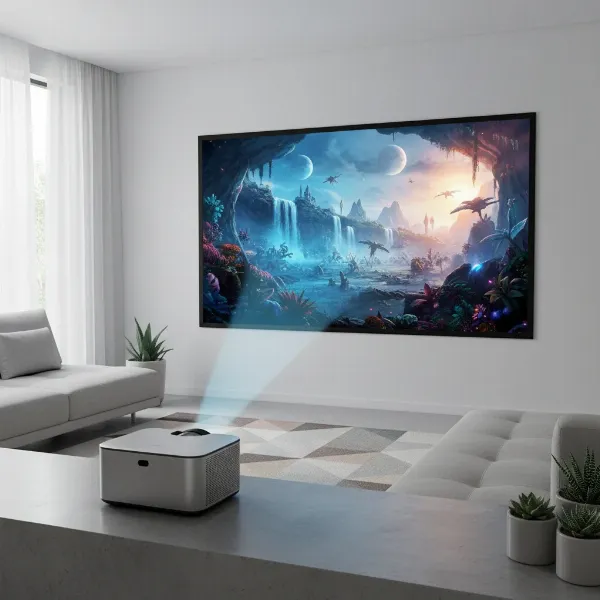 A sleek smart projector displaying a movie on a screen, with no visible external devices or cables, highlighting its integrated design.
Advanced Features and Portability
Beyond streaming apps, many smart projectors offer an array of advanced features. These can include built-in speakers, and in some models, even integrated cameras and microphones, making them suitable for video calls or interactive presentations. Wireless casting capabilities (such as Miracast, AirPlay, Chromecast, and DLNA) allow for easy screen sharing from smartphones or laptops. For those who frequently move their projector, the all-in-one nature of a smart projector makes it exceptionally portable. It operates independently, requiring only power and a surface to project onto, ideal for backyard movie nights, camping trips, or moving between rooms.
Considerations for Smart Projectors
While appealing, smart projectors do come with certain considerations. They generally carry a higher initial cost compared to a traditional projector. Budget-friendly smart projectors might feature less powerful processors, potentially leading to slower navigation, app stuttering, or limitations in running demanding applications or streaming at higher resolutions. Furthermore, you are typically locked into the projector’s built-in operating system. If that system becomes outdated, lacks specific apps, or experiences performance issues, upgrading usually means replacing the entire projector, offering less flexibility than swapping out an inexpensive streaming stick. Some integrated systems may also have gaps in app availability or less optimized applications compared to the dedicated, constantly updated ecosystems of leading streaming devices.
Streaming Sticks: The Power of External Flexibility
For users seeking more control, better performance, or a budget-conscious approach, pairing a traditional projector with a streaming stick presents a compelling alternative.
Cost-Effectiveness and Upgradeability
One of the most significant advantages of streaming sticks is their affordability and the upgrade path they provide. Purchasing a basic, high-quality projector and combining it with an inexpensive streaming stick often results in a lower overall initial investment than a premium smart projector. More importantly, streaming sticks are easily replaceable and upgradeable. If a newer streaming stick with enhanced features, better performance, or a different operating system becomes available, you can simply purchase the new stick and plug it in, instantly upgrading your projector’s smart capabilities without replacing the entire unit. This extends the longevity and usefulness of non-smart or older projectors, making them future-proof.
Enhanced Performance and App Ecosystem
Dedicated streaming devices are often engineered with more powerful processors and optimized software specifically for media consumption. This typically translates to snappier menu navigation, faster app loading times, and a smoother, more vibrant streaming experience compared to some built-in projector systems. Top streaming stick brands like Amazon, Google, and Apple invest heavily in their app ecosystems, offering a wider range of applications and ensuring superior optimization for popular streaming services. In many cases, these dedicated devices deliver greatly improved picture and sound quality over built-in projector apps, filling any potential gaps in app availability that might exist with integrated systems.
Potential Downsides of Streaming Sticks
While highly flexible, streaming sticks introduce their own set of drawbacks. They inherently create more clutter, requiring an additional device, a power adapter, and an HDMI cable to connect to your projector. This can lead to a less clean setup and more cables to manage. The setup process is also more manual; you’ll need to plug in the stick, power it separately, and potentially switch inputs on the projector. Compatibility can sometimes be an issue, particularly with older projectors that may have limited HDMI ports, power delivery capabilities, or specific resolution requirements. Some larger streaming stick designs can also block adjacent HDMI ports on your projector or AV receiver, necessitating the use of an HDMI extender. And, of course, a streaming stick means one more remote control to keep track of.
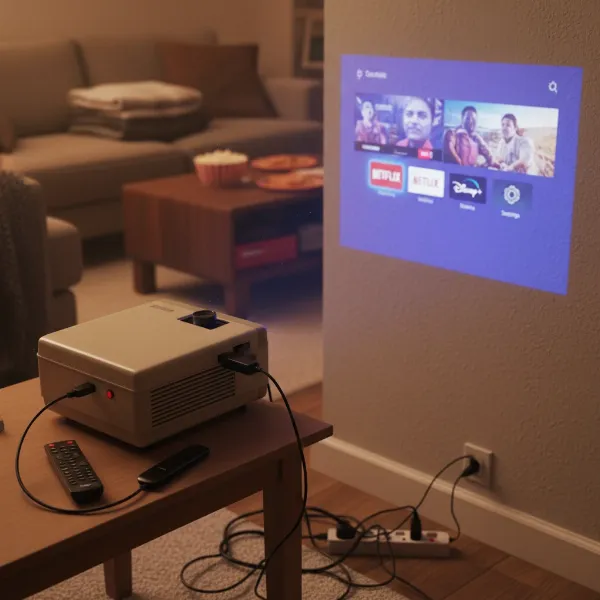 A traditional projector connected to a streaming stick via an HDMI cable, with visible power adapters and a remote control, illustrating a less integrated setup.
Detailed Comparison: Smart Projector vs. Streaming Stick
To simplify the decision, here’s a detailed comparison of key aspects:
| Feature | Smart Projector (Built-in Interface) | Streaming Stick (External Interface) |
|---|---|---|
| Integration | All-in-one, seamless, fewer cables. | Separate device, adds clutter, requires more cables/adapters. |
| Cost | Higher initial investment, especially for high-performance models. | Lower initial cost (for stick), can upgrade projector affordably. |
| Flexibility | Limited to built-in OS; full projector replacement for OS upgrade. | High flexibility; easily swap or upgrade the stick independently. |
| Performance | Varies; budget models can be slow; premium models are robust. | Often high, dedicated processors, optimized for streaming. |
| Portability | Excellent, self-contained unit. | Good, but requires carrying an extra device and cables. |
| Setup | Simple, often auto-adjusts (focus, keystone), instant power-on. | More manual steps, multiple connections, potential compatibility issues. |
| App Availability | Wide range via integrated app store, but some gaps/optimizations vary. | Very wide range, frequently updated and highly optimized apps. |
| Upgradeability | Low for the OS; requires replacing the whole projector for OS changes. | High; easily upgrade or replace the stick for new features/performance. |
| Clutter | Minimalist, clean setup. | More components, potential for cable mess. |
Choosing Your Ideal Interface: A Buying Guide
The choice between a smart projector and a streaming stick ultimately depends on your individual priorities and usage scenarios.
Assess Your Budget
Consider not just the initial purchase price but also the long-term value. A smart projector’s higher upfront cost might be offset by its convenience, while a streaming stick offers affordable upgrades over time.
Prioritize Convenience vs. Customization
If a minimalist setup, instant power-on, and an integrated experience are paramount, a smart projector is likely your best bet. If you value the freedom to customize your streaming ecosystem, access the latest apps, and have a clear upgrade path, a streaming stick offers greater control.
Consider Portability Needs
For those who envision moving their projector frequently between locations, the self-contained nature of a smart projector provides unparalleled ease. If your projector remains largely stationary, the minor inconvenience of an external stick is less of a factor.
Evaluate Performance Demands
For critical viewers who demand the absolute best picture and sound quality, a high-end streaming stick often outperforms the built-in apps of many smart projectors, even premium ones. Dedicated streaming devices often receive priority for new codecs and features.
Tolerance for Clutter
A clean, cable-free environment strongly favors a smart projector. If a few extra devices and cables don’t bother you, the benefits of a streaming stick might outweigh this aesthetic consideration.
Tips for Maximizing Your Projector Interface Experience
Regardless of your choice, optimizing your setup can enhance your viewing. For smart projectors, ensure a strong, stable Wi-Fi connection to support integrated streaming, regularly update the projector’s firmware, and explore voice command features for hands-free control. If your smart projector struggles with certain apps, consider adding a streaming stick as a supplementary input.
For streaming sticks, utilize an HDMI extender if the stick blocks adjacent ports. Always check for the latest model of your chosen streaming stick, as performance and features improve rapidly. Connecting your stick to a robust Wi-Fi network or, ideally, via an Ethernet adapter (if available on the stick or through an accessory) will ensure the smoothest streaming experience.
Conclusion
The decision between a smart projector and a projector with a streaming stick hinges on a balance of convenience, flexibility, and budget. Smart projectors offer an elegant, all-in-one solution with simplified setup and excellent portability, perfect for those seeking a streamlined experience. Conversely, pairing a traditional projector with a streaming stick provides superior flexibility, cost-effective upgrades, and often more robust performance and app availability from dedicated media players. Both options have evolved significantly, making it easier than ever to enjoy immersive big-screen entertainment. By carefully considering your priorities, you can select the interface that best transforms your viewing habits.
Which interface will you choose to power your ultimate home theater or portable viewing adventure? The world of projectors is more accessible and versatile than ever before.
Frequently Asked Questions
Is a smart projector better than a regular projector with a Fire Stick?
It depends on your priorities. A smart projector offers a cleaner, more integrated, and often more portable experience with less setup. A regular projector with a Fire Stick provides more flexibility, cost-effective upgrades, and potentially better app performance and a wider app selection from Amazon’s optimized ecosystem.
Do smart projectors have built-in Netflix?
Many smart projectors, especially those running Android TV or Google TV, come with pre-installed streaming apps, including Netflix. However, some proprietary smart projector operating systems might have limitations or require you to side-load apps. Always check the specific model’s app support before purchasing.
Can I use a streaming stick with any projector?
Most modern projectors with an HDMI input are compatible with streaming sticks. However, older projectors might lack sufficient HDMI ports, or the stick’s power requirements or resolution output might not be fully supported. Ensure your projector has an available HDMI port and sufficient power (either directly from the port or via an external power adapter for the stick).
How does the user interface differ between smart projectors and streaming sticks?
Smart projectors typically offer an interface tailored to the projector’s controls and often include features like auto-focus and keystone correction integrated into the OS. Streaming sticks, on the other hand, provide a user interface optimized for their specific streaming platform (e.g., Fire OS, Google TV, tvOS), often with more extensive content aggregation, voice search capabilities, and frequent updates from the streaming stick manufacturer.