Choosing the right projector can transform your viewing and presentation experience, but with countless options, finding the perfect blend of portability and performance can be a challenge. If you’re searching for a compact projector that doesn’t compromise on picture quality, the AAXA P7 Mini LED Projector might just be your ideal solution. This review delves into what makes the AAXA P7 Mini stand out, exploring its features, performance, and why it’s a top contender in the pico projector market. Whether you’re a business professional on the go, a movie enthusiast seeking a portable big-screen experience, or simply looking for a versatile display, understanding the capabilities of this tiny powerhouse is key to making an informed decision.
Overview of the AAXA P7 Mini Projector
The AAXA P7 Mini is a groundbreaking pico projector that redefines what’s possible in a small form factor. At its core, a projector is an optical device that projects an image or video onto a surface, typically a projection screen. The P7 Mini takes this fundamental concept and shrinks it down, making high-definition projection incredibly portable without sacrificing crucial performance metrics. Its emergence marks a significant step in the evolution of projectors, moving from bulky, stationary units to sleek, handheld devices.
Historically, projectors were large, cumbersome machines reserved for dedicated home theaters or corporate boardrooms. Over the decades, technological advancements have led to smaller, more efficient designs. The AAXA P7 Mini is a prime example of this progression, incorporating modern LED light sources and advanced DLP (Digital Light Processing) technology. DLP projectors use millions of tiny mirrors to reflect light, creating a sharp and vibrant image, while LED light sources offer extended lifespan and energy efficiency. While other technologies like LCD (Liquid Crystal Display) and Laser projectors also exist, DLP with an LED engine is particularly well-suited for compact, portable designs like the P7 Mini.
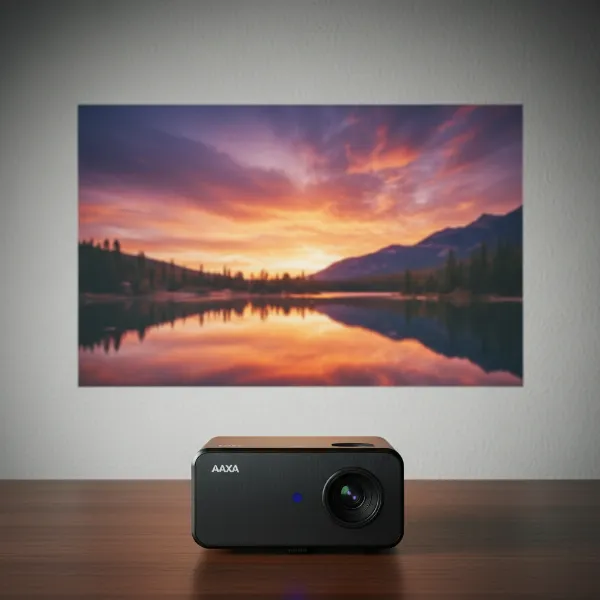 A compact AAXA P7 Mini LED projector projecting a vibrant image on a screen.
Important Factors When Choosing a Projector
Selecting the right projector involves understanding several technical specifications that directly impact your viewing experience. These factors help ensure the projector meets your specific needs, whether for casual entertainment or critical presentations.
Brightness (Lumen): Brightness, measured in lumens, indicates how much light the projector can emit. For the AAXA P7 Mini, it boasts up to 600 LED lumens when connected to AC power, and around 450 LED lumens on battery. This distinction between LED lumens and the more commonly cited ANSI lumens is important; LED lumens often appear higher due to the perceived brightness of LED colors. For typical home entertainment in dimly lit rooms or for business presentations, this level of brightness is generally sufficient. However, in brightly lit environments, any projector, especially a mini one, will struggle to produce a vivid image.
Resolution: This refers to the number of pixels displayed, determining the sharpness and detail of the image. The AAXA P7 Mini features native 1080p (1920×1080) Full HD resolution. This is a significant advantage for a projector of its size, ensuring crisp text and detailed images, making it suitable for both high-quality video playback and clear presentations. While lower resolutions like SVGA or XGA exist, 1080p offers a much superior visual experience, and 4K projectors, while offering even more detail, are typically much larger and more expensive.
Contrast Ratio: Contrast ratio measures the difference between the brightest white and the darkest black a projector can produce. A higher contrast ratio results in deeper blacks and brighter whites, leading to a more dynamic and realistic image with greater perceived depth. While specific contrast ratios for the P7 Mini aren’t always highlighted, its DLP technology generally provides good inherent contrast, contributing to well-saturated colors.
Lamp Life: The lifespan of a projector’s light source is crucial for long-term ownership. The AAXA P7 Mini utilizes an LED light source with an impressive rated lifespan of 30,000 hours. This means you can use the projector for many years without needing to worry about replacing expensive bulbs, a common concern with traditional lamp-based projectors. This long lamp life contributes significantly to the projector’s overall value and low maintenance.
Keystone Correction: This feature allows the projector to correct distorted images caused by projecting at an angle. If the projector isn’t perfectly perpendicular to the screen, the image might appear trapezoidal. Keystone correction digitally adjusts the image to make it rectangular. The AAXA P7 Mini typically includes this feature, providing flexibility in placement, though optical keystone is always preferred for preserving image quality.
Throw Ratio: Throw ratio describes the relationship between the projection distance and the width of the projected image. It determines how far the projector needs to be from the screen to achieve a certain screen size. Understanding the throw ratio helps you plan your setup, ensuring you have enough space for the desired image size. Mini projectors often have flexible throw ratios to accommodate various small spaces.
Connectivity: Modern projectors require diverse connectivity options to interface with various devices. The AAXA P7 Mini comes equipped with essential ports such as HDMI, allowing connections to laptops, streaming sticks, and gaming consoles. It also includes USB and a memory card slot, enabling direct media playback without needing an external source. Some iterations of the P7 Mini, particularly models available on platforms like Amazon, have been noted to include Bluetooth connectivity, offering more flexibility for audio output.
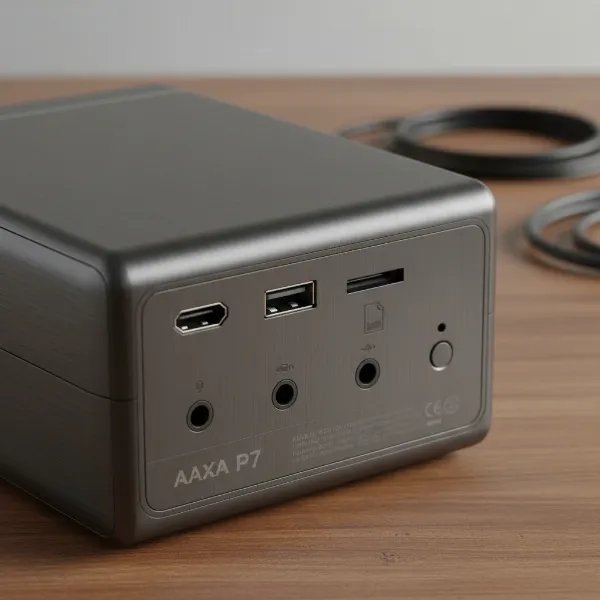 Rear view of AAXA P7 Mini projector showcasing its HDMI, USB, and memory card ports.
Comparing Popular Projector Types
Projectors come in various technologies, each with its own set of advantages and disadvantages. Understanding these differences helps to contextualize the AAXA P7 Mini’s performance and design choices.
DLP Projectors
Digital Light Processing (DLP) projectors, like the AAXA P7 Mini, use a DMD (Digital Micromirror Device) chip, which contains millions of microscopic mirrors. These mirrors tilt rapidly to create the image.
- Pros: Known for sharp images, good contrast, and minimal pixelation. They generally have a sealed optical engine, reducing dust contamination.
- Cons: Some single-chip DLP projectors can exhibit a “rainbow effect” (brief flashes of red, green, and blue) for sensitive viewers, though this is less frequent in LED models.
- Best for: Detail-oriented presentations, gaming, and cinematic experiences where sharpness and contrast are paramount.
LCD Projectors
Liquid Crystal Display (LCD) projectors use three separate LCD panels (one each for red, green, and blue light) to create the image.
- Pros: Typically offer excellent color saturation and brightness. They generally don’t have the rainbow effect.
- Cons: Can sometimes have visible pixel structure (“screen door effect”) and require filter cleaning. They also tend to be larger than DLP counterparts.
- Best for: Home theater setups and presentations where vibrant, accurate color is a top priority.
LED Projectors
LED (Light Emitting Diode) projectors refer to the light source used, which can be combined with either DLP or LCD imaging technology. The AAXA P7 Mini is an LED DLP projector.
- Pros: Extremely long lamp life (30,000+ hours), instant on/off, low power consumption, and often produce a wider color gamut.
- Cons: Generally less bright than traditional lamp-based projectors, though this gap is closing.
- Best for: Portability, low maintenance, and energy efficiency, making them ideal for mini and pico projectors.
Laser Projectors
Laser projectors use laser diodes as their light source. Like LED, laser is a light source, not an imaging technology, so they are often paired with DLP or LCD chips.
- Pros: Exceptional brightness, incredibly long lifespan (20,000+ hours), wide color gamut, and consistent color over time.
- Cons: Typically the most expensive projector type and can be larger and heavier.
- Best for: High-end home theaters, large venues, and professional installations where premium performance is required.
Detailed Comparison of Projector Types
| Feature | DLP Projector (e.g., AAXA P7 Mini) | LCD Projector | LED Projector (Light Source) | Laser Projector (Light Source) |
|---|---|---|---|---|
| Image Engine | Micro-mirrors (DMD chip) | 3 LCD panels | Paired with DLP or LCD | Paired with DLP or LCD |
| Light Source | Lamp, LED, or Laser | Lamp, LED, or Laser | LED diodes | Laser diodes |
| Brightness | Varies widely; generally good for size (P7 Mini: 600 LED lumens) | Very good; often high ANSI lumens | Moderate to good (improving); long-lasting | Excellent; very high ANSI lumens |
| Contrast Ratio | Typically high; good deep blacks | Good | Good, depending on imaging engine | Excellent |
| Color Accuracy | Good, can be very vibrant | Excellent, natural colors | Good to excellent, wide gamut | Excellent, consistent over time |
| Lamp Life | Varies (Lamp: 2,000-6,000h; LED/Laser: 20,000-30,000h+) | Varies (Lamp: 2,000-6,000h; LED/Laser: 20,000-30,000h+) | Very long (30,000+ hours) | Extremely long (20,000+ hours) |
| Portability | Can be very compact (like P7 Mini) | Less compact due to 3 panels | Often found in ultra-portable designs | Less common in ultra-portable, but changing |
| Maintenance | Low; sealed optical engine | Higher; filter cleaning, panel alignment | Very low; no lamp changes | Very low; no lamp changes |
| “Rainbow Effect” | Possible with single-chip DLP (less with LED) | Not present | Possible if paired with single-chip DLP | Possible if paired with single-chip DLP |
| Cost | Mid-range to high-end | Mid-range | Generally mid-range for mini projectors | High-end |
Top AAXA Projectors for Current Needs
AAXA is known for its range of portable and mini projectors. While the P7 Mini is a fantastic all-rounder, understanding its position relative to other AAXA models can help in your purchasing decision.
AAXA P7 Mini: The Versatile Portable Projector
- Key Features: Native 1080p, 600 LED lumens (AC), 450 LED lumens (battery), DLP with LED light source, 30,000-hour lamp life, compact size.
- Pros: Excellent portability, crisp Full HD resolution for its size, decent brightness for dark rooms, long-lasting LED light source. Good for business presentations where text needs to be clear.
- Cons: Fan noise can be noticeable at higher brightness settings, video quality is good for short clips but might show slight detail loss in bright areas for full-length movies. Some models lack Bluetooth.
- Best for: Professionals needing a portable presentation device, casual backyard movie nights, camping, or anyone looking for an ultra-compact secondary display.
The AAXA P7 Mini has been recognized as an Editors’ Choice for a palmtop data projector, excelling in displaying small type and intricate designs.
Projectors in Different Price Segments
For those exploring other options within AAXA’s lineup or considering alternatives, here’s a look at what you might find across various price points.
Projectors Under $400 (Entry-Level to Mid-Range)
At this price point, you often find models that prioritize portability and basic functionality. The AAXA P7 Mini often falls into this category, offering incredible value for its native 1080p resolution and brightness.
- Example 1: AAXA P7 Mini: As detailed above, it’s a strong contender for its resolution and portability.
- Example 2: AAXA P8 Smart Mini Projector: While more compact than the P7, its image quality might not be as good as the P7, making the P7 a preferred choice for image fidelity.
Projectors $400 – $800 (Mid-Range to Upper Mid-Range)
In this segment, you start seeing higher brightness, more advanced features like smart platforms, and potentially better audio.
- Example: AAXA P7+ Portable Projector: This is an upgraded version of the P7. It maintains the 1080p resolution and portability but adds features like an onboard Android 10.0 streaming platform and screen mirroring, along with the option for solar power charging. It boasts 550 LED lumens and offers enhanced connectivity, making it ideal for those who want smart features built-in without significantly increasing the footprint.
Projectors Over $800 (Premium)
This category includes brighter, higher-resolution (often 4K) projectors with advanced optics, superior audio, and sophisticated smart features. These are typically larger and less portable than the P7 Mini.
- Example: AAXA M6 Projector: While less bright than some premium options, the M6 is known for its strong performance and slightly brighter output than the P7. It’s often compared for its robust feature set and slightly larger form factor offering more power.
Buying Guide for the AAXA P7 Mini Projector
Navigating the world of projectors can feel complex, but a structured approach can simplify your decision, especially when considering a specialized device like the AAXA P7 Mini.
1. Determine Your Primary Use: Before anything else, clarify what you’ll primarily use the AAXA P7 Mini for. Are you a road warrior needing to impress clients with sharp presentations? Do you envision spontaneous backyard movie nights? Or perhaps you want a portable screen for gaming on the go?
- For Business Presentations: The P7 Mini’s native 1080p resolution ensures text and graphics are clear and readable, even at small font sizes (as low as 7 points). Its portability means you can easily carry it to different meeting rooms or client sites.
- For Casual Entertainment: While capable of showing video, it performs best in low-light conditions. It’s excellent for short-to-mid-length video clips and photos from USB drives. For full-length movies, you might notice occasional loss of detail in bright areas.
- For Gaming: The compact size is great, but be mindful of potential audio syncing issues with some consoles if using the P7+ model’s speakers (though the P7 Mini generally has fewer advanced smart features so this may be less of an issue). External speakers are recommended for a better audio experience.
2. Set Your Budget: The AAXA P7 Mini offers excellent value for its price point, typically falling into the mid-range for mini projectors. Consider if the added smart features of the P7+ or the higher brightness of larger, more expensive models are worth the extra investment for your specific needs.
3. Understand the Specifications:
- Brightness: Remember the P7 Mini’s 600 LED lumens (AC) / 450 LED lumens (battery). This is good for dark environments, but don’t expect it to compete with sunlight.
- Resolution: Native 1080p is a major selling point, ensuring sharp images.
- Contrast Ratio: Contributes to picture depth.
- Connectivity: Ensure it has the ports you need (HDMI for most devices, USB for media, and consider Bluetooth if an Amazon model is available and wireless audio is important).
- Battery Life: Check the estimated battery life if you plan to use it untethered frequently.
4. Read User Reviews and Professional Assessments: Always cross-reference product specifications with real-world user feedback and expert reviews. Customers frequently praise the P7 Mini’s brightness and picture quality for its size and price. They often highlight its portability as a significant strength. However, some users have noted the fan noise, particularly at higher brightness settings. Professional reviews like those from PCMag often provide detailed technical evaluations of data and video image quality, including observations on color saturation and potential rainbow artifacts (common with single-chip DLP).
5. Purchase from Reputable Retailers: To ensure you receive a genuine product with reliable warranty and customer support, always buy your AAXA P7 Mini from authorized dealers or well-known electronics retailers. This safeguards your investment and provides peace of mind.
Tips for Using and Maintaining Your AAXA P7 Mini Projector
To maximize the lifespan and performance of your AAXA P7 Mini, proper usage and maintenance are essential.
- Cleaning: Regularly clean the projector’s lens with a soft, lint-free cloth designed for optics. For the casing, a gentle wipe with a dry or slightly damp cloth is usually sufficient. Avoid abrasive cleaners or solvents. Ensure the ventilation grilles are free from dust buildup to prevent overheating, which can impact performance and longevity.
- Storage: When not in use, store your AAXA P7 Mini in a cool, dry place, away from direct sunlight and extreme temperatures. Using a protective carrying case can shield it from dust and accidental bumps, especially important for a portable device.
- Troubleshooting Common Issues:
- No Image: Check all cable connections (HDMI, power). Ensure the correct input source is selected on the projector.
- Fuzzy Image: Adjust the focus wheel until the image is sharp. Ensure the projection surface is flat and the projector is within the recommended throw distance. Use keystone correction if the image is trapezoidal.
- Overheating/Fan Noise: Ensure the projector has adequate ventilation; do not block air vents. If the fan seems excessively loud, try reducing the brightness mode if available, as higher brightness often means more fan activity. Ensure firmware is up to date, as AAXA has released updates addressing issues like color oversaturation, which might also optimize performance.
- Color Issues: If colors appear oversaturated or incorrect, check the projector’s picture settings. As noted by users, sometimes a firmware update can resolve color balance issues.
“The AAXA P7 Mini excels in delivering a truly portable 1080p experience, making it a standout for business presentations and casual viewing where space and mobility are key.” – Projectorcam Expert, Lead Technician at Projectorcam.com
Conclusion
The AAXA P7 Mini LED Projector truly encapsulates the essence of portable projection, offering a compelling blend of native 1080p resolution, decent brightness for its size, and exceptional portability. While it thrives in darker environments and is a champion for clear data presentations, it also provides a respectable experience for casual video and photo sharing. Its long-lasting LED light source and robust build make it a reliable companion for both work and play. For anyone seeking a compact projector that delivers genuine Full HD quality without breaking the bank, the AAXA P7 Mini is undoubtedly a device worth considering. Have you ever imagined carrying a theater in your pocket?
Frequently Asked Questions
What is the actual brightness of the AAXA P7 Mini?
The AAXA P7 Mini outputs up to 600 LED lumens when powered by AC and approximately 450 LED lumens on its internal battery. It’s important to note this is LED lumens, which can appear brighter than an equivalent ANSI lumen rating due to the perceived brightness of LED colors.
Does the AAXA P7 Mini have a built-in battery, and how long does it last?
Yes, the AAXA P7 Mini includes a built-in rechargeable lithium-ion battery. While specific battery life varies with usage and brightness settings, it typically provides enough power for a movie or a series of presentations on the go.
Is the AAXA P7 Mini suitable for gaming?
The AAXA P7 Mini can be used for gaming, especially for casual sessions where portability is key. Its native 1080p resolution provides a clear picture. However, for serious gamers, external speakers are highly recommended, as the built-in audio might be limited, and some users of the P7+ have noted minor audio syncing issues with consoles.
Can the AAXA P7 Mini project in a well-lit room?
Like most mini projectors, the AAXA P7 Mini performs best in dimly lit or dark rooms. While its brightness is impressive for its size, projecting in a well-lit room will significantly wash out the image, making it difficult to view.
What connectivity options does the AAXA P7 Mini offer?
The AAXA P7 Mini typically includes HDMI for connecting to laptops, streaming devices, and gaming consoles, as well as USB and a memory card slot for direct media playback. Some specific models or regional versions may also include Bluetooth connectivity for wireless audio.
Does the AAXA P7 Mini have a noticeable fan noise?
Yes, some users have reported that the AAXA P7 Mini’s fan can be audible, particularly when operating at full brightness. However, many find it to be within acceptable limits, especially when watching movies with external speakers or in settings where ambient noise is present.