Choosing the perfect projector screen size is more than just picking the largest option that fits your wall; it’s about crafting an immersive and comfortable viewing experience tailored to your space and preferences. An incorrect screen size can lead to anything from eye strain and neck discomfort to a loss of picture detail, undermining the very reason you invested in a projector. This comprehensive guide will walk you through the essential calculations, scientific principles, and practical considerations to help you determine the ideal projector screen size based on your viewing distance, ensuring a truly captivating visual journey.
The Foundation: Understanding Key Projector Screen Terminology
Before diving into calculations, it’s crucial to grasp the fundamental terms that define your viewing environment. These concepts form the bedrock of selecting the perfect projector screen size.
Viewing Distance: This is the most critical measurement – the distance from your primary seating position to the surface of your projector screen. Accuracy here is paramount for all subsequent calculations.
Screen Dimensions: Projector screens are typically described by:
- Screen Width: The horizontal measurement of the projected image.
- Screen Height: The vertical measurement of the projected image.
- Screen Diagonal: The measurement from one corner to its opposite, usually how screen sizes are advertised (e.g., “120-inch screen”).
Aspect Ratio: This describes the proportional relationship between the width and height of an image. Common aspect ratios for projectors include:
- 16:9 (Widescreen): The most common aspect ratio for modern movies, TV shows, and video games.
- 4:3 (Standard): Older content and some business presentations still use this.
- 21:9 (Ultrawide/Cinemascope): Offers an even broader cinematic experience, often used by enthusiasts.
Throw Ratio: Exclusively relevant for projectors, the throw ratio is a critical specification that defines the relationship between the projector’s throw distance (distance from the lens to the screen) and the width of the projected image. It is calculated as Throw Distance (D) / Image Width (W). A projector with a throw ratio of 1.5:1 means that for every 1.5 feet of throw distance, it produces 1 foot of image width. This ratio dictates how far your projector needs to be from the screen to achieve a specific screen size.
General Guidelines for Comfortable Viewing Distance
While sophisticated calculations provide precision, a simple rule of thumb offers a great starting point for comfortable viewing. This widely accepted guideline aims to prevent viewers from having to constantly turn their heads to see the entire screen.
For a balanced and comfortable viewing experience, many experts recommend that the screen width should fall between 1/2 and 1/3 of your seating distance. For instance, if your seating distance is 120 inches (10 feet), the ideal screen width would be between 40 inches (1/3 of 120) and 60 inches (1/2 of 120). This range provides an excellent blend of immersion without causing discomfort or excessive head movement.
To convert this screen width to a diagonal size for a standard 16:9 aspect ratio, you can use a simple conversion: Screen Diagonal = Screen Width / 0.871. So, a 60-inch wide screen would translate to approximately a 69-inch diagonal screen. These straightforward calculations offer a practical way to kickstart your screen size selection process.
Achieving a Cinematic Experience: The Science of Viewing Angles
Beyond general rules, understanding viewing angles provides a more scientific approach to optimizing your projector screen size for various levels of immersion and detail. Different angles cater to different viewing priorities.
Field of View (FOV)
|
Our Picks for the Best projector in 2026
As an Amazon Associate I earn from qualifying purchases.
|
||
| Num | Product | Action |
|---|---|---|
| 1 | HAPPRUN Native 1080P Bluetooth Mini Projector, Full HD Portable Outdoor Movie Projector with Built-in Speaker, Compatible with Smartphone, HDMI, USB, AV, Fire Stick, PS5 for Home, Bedroom, Outdoor Use |

|
| 2 | Astronaut Galaxy Projector with Bluetooth Speaker & White Noise, App & Remote Control Star Projector, Galaxy Projector for Bedroom Adults Kids, Spaceman Night Light for Gaming Room, Home Theater |
|
| 3 | Aurzen Roku TV Smart Projector with Wifi and Bluetooth, Roku Streaming Experience Built-in, 1080P FHD, Dolby Audio, Auto Focus & Keystone, Zoom, Movie Portable Outdoor Mini Projector, White |
|
| 4 | Projector-4K with WiFi and Bluetooth:[3000 ANSI/40W Dolby Audio/Official Licensed Apps], Outdoor-Projector with Smart OS 2.0 & AI Auto Focus,ONOAYO ONO5Pro 2.0 Smart Movie Projector for Indoor/Outdoor |
|
| 5 | Mini Projector with Built-in Rechargeable Battery for Outdoor, Portable Projector with WiFi and Bluetooth, 4K Projector for Bedroom, Smart Projector |
|
| 6 | [Officially-Licensed App & Auto Focus]Smart Mini Projector with WiFi and Bluetooth, XuanPad 4K Support Movie Projector, Portable Native 1080P Outdoor Projector with 360° Stand |
|
| 7 | [Built-in Official Apps/4K Support] Smart Outdoor Projector with WiFi and Bluetooth, 800ANSI Movie Projector, DoIby Audio with Dual Speaker, Auto Focus w/ YouTube&PrimeVideo Proyector, Upgrad P62 Pro |
|
| 8 | Mini Smart Projector, 1500 ANSI Portable Projector with WiFi and Bluetooth, HAPPRUN 4K Full HD Home Theater with 270° Stand, Dolby Sound, Built-in Apps,Compatible with Phone & PC, Indoor & Outdoor Use |
|
| 9 | 【Officially-Licensed APP & Native 1080P】Thinnest 1.81\" Smart Mini Projector with WiFi and Bluetooth, Auto Focus & Keystone Portable Outdoor Projector, VOPLLS 4K Support Home Movie Projector |
|
| 10 | Magcubic Mini Projector with WiFi 6 and Bluetooth 5.4, Portable Projector 4K Support, 5W Soundbase Speaker, Auto Vertical Keystone 180°Rotatable Smart Proyector for Movie Home Outdoor |
|
The Field of View relates to how much of the screen your eyes can comfortably take in without moving your head. If you sit too close, the screen will occupy too much of your field of view, forcing you to scan the image or miss details in your peripheral vision.
According to visual experts, the shortest recommended viewing distance is based on a 70-degree field of view when looking at the center of the screen. Sitting closer than this means you won’t be able to see the other side of the screen with your peripheral vision if you’re focused on one side. The goal is a screen size and distance that allows your peripheral vision to embrace the entire image, enhancing immersion without being overwhelming.
Visual Acuity Distance
Visual acuity refers to the clarity of your vision and your ability to discern fine details. The visual acuity distance is the point beyond which the human eye (with 20/20 vision) can no longer resolve individual pixels, causing them to blend together.
This distance becomes particularly important with high-resolution content, such as 4K. To truly appreciate the sharpness and detail that 4K projectors offer, you need to sit close enough for your eyes to resolve those tiny pixels. Sitting too far away from a 4K screen means you effectively lose the benefit of the higher resolution, as the image will appear no different from a lower-resolution one. For standard HD (1080p), you can typically sit further back before pixel blending occurs, while 4K demands a closer viewing distance to maximize its visual impact.
THX Recommended Viewing Angles
For those aspiring to a genuine cinematic experience at home, the standards set by THX (Tomlinson Holman’s eXperiment) provide excellent guidance. THX certifies movie theaters and home theater systems based on rigorous audio and visual performance criteria.
THX recommends selecting a screen size that provides a horizontal viewing angle of about 36 degrees for an immersive, movie-theater-like experience. This wider viewing angle pulls you into the content, akin to sitting in the optimal center seats of a commercial cinema. The minimum viewing angle required for THX certification is 26 degrees.
The formula for calculating the ideal screen width based on a desired viewing angle and distance is:
Ideal Screen Width = 2 × tan(Angle / 2) × Distance
For example, if your seating distance is 120 inches and you aim for a 36-degree viewing angle:
Ideal Screen Width ≈ 2 × tan(36° / 2) × 120 ≈ 2 × tan(18°) × 120 ≈ 2 × 0.3249 × 120 ≈ 77.98 inches
This approximately 78-inch screen width would deliver a highly immersive, cinematic feel for a 120-inch viewing distance, allowing you to become truly absorbed in the action.
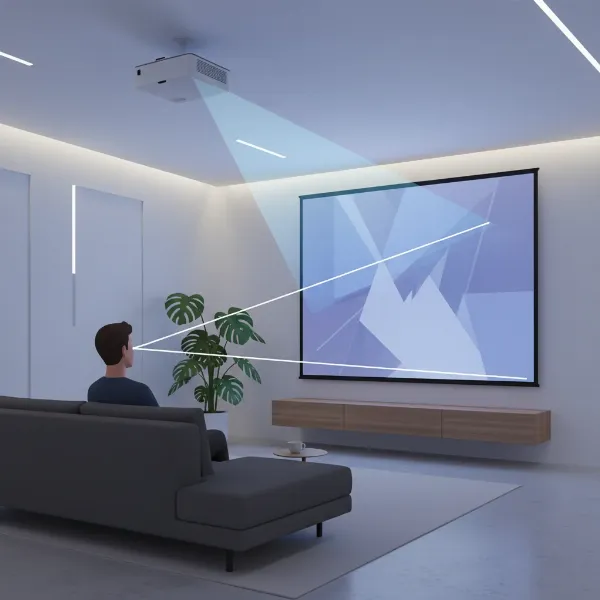 An illustration showing a viewer sitting at a distance from a projector screen, with lines indicating the horizontal viewing angle from the viewer's eyes to the edges of the screen, highlighting the concept of field of view and cinematic immersion.
Projector-Specific Calculation: Mastering the Throw Ratio
For projector users, the throw ratio is an indispensable piece of information. Unlike TVs, where the screen size is fixed, a projector’s image size is determined by its distance from the screen and its optical properties.
The Throw Ratio (D/W) is found in your projector’s specifications. It tells you how far (D) the projector needs to be from the screen to achieve a certain image width (W).
-
To find the required throw distance for a desired screen width:
Throw Distance = Throw Ratio × Desired Screen Width
If your projector has a throw ratio of 1.5:1 and you want a 70-inch wide screen, you’d need to place the projector 105 inches (1.5 × 70) away from the screen. -
To find the achievable screen width from a fixed throw distance:
Screen Width = Throw Distance / Throw Ratio
If your projector is fixed at 120 inches from the screen and has a throw ratio of 2.0:1, it will produce a 60-inch wide image (120 / 2.0).
Most projectors come with a zoom lens, which means they have a range of throw ratios (e.g., 1.3:1 to 1.8:1). This flexibility allows you to adjust the image size slightly without moving the projector, but there are limits. Always consult your projector’s manual for its specific throw ratio range.
Short-Throw (ST) and Ultra-Short-Throw (UST) Projectors have very low throw ratios (typically below 1.0:1 for ST, and below 0.4:1 for UST). These projectors can cast large images from a very short distance, often just inches or a couple of feet from the screen. This dramatically changes placement considerations, making them ideal for smaller rooms or situations where a traditional long-throw setup isn’t feasible. Understanding your projector’s throw ratio is crucial for both selecting the right screen size and planning your projector’s placement.
Step-by-Step Guide to Calculating Your Ideal Projector Screen Size
Now, let’s put it all together into a practical, step-by-step process to determine the perfect projector screen size for your setup.
-
Measure Your Viewing Distance Accurately:
Begin by measuring the precise distance from where your eyes will be when seated (your primary viewing position) to the location where your screen will be. Use a tape measure and record this distance in inches or feet. This is your foundation. -
Determine Your Desired Immersion Level and Content Type:
- Casual Viewing (TV/General Content): Focus on comfort and avoiding head movement. The “1/2 to 1/3 seating distance for screen width” rule is a good starting point here.
- Immersive Cinematic Experience (Movies): Aim for a wider field of view. The THX recommended 36-degree viewing angle will provide a highly engaging, theater-like feel.
- Detail-Oriented (4K Movies, Gaming): Consider the visual acuity distance to ensure you’re close enough to appreciate the pixel-level detail of high-resolution content.
-
Apply Viewing Angle Guidelines to Find Target Screen Width:
- For comfort/general viewing: Divide your seating distance by 2 and then by 3 to get a comfortable range for screen width.
- For cinematic immersion (THX): Use the formula
Ideal Screen Width = 2 × tan(Angle / 2) × Distancewith your chosen angle (e.g., 36 degrees) and measured distance. - For critical detail (4K): Research specific visual acuity recommendations for your content resolution to find a corresponding screen width. This will likely push you towards a larger screen or closer seating.
-
Factor in Aspect Ratio and Convert to Diagonal Size:
Once you have a target screen width, consider the aspect ratio of your content. Most modern content is 16:9. To convert your calculated screen width to the more commonly advertised diagonal size for a 16:9 screen, use:
Screen Diagonal (in inches) = Screen Width (in inches) / 0.871
If you’re dealing with a different aspect ratio, you’ll need a different conversion factor or a dedicated calculator. -
Consult Your Projector’s Throw Ratio:
This is where your projector’s unique capabilities come into play. Find your projector’s throw ratio specifications (e.g., 1.3:1 – 1.8:1 for zoom lenses).- If you know your desired screen width (from step 3): Calculate the required throw distance using
Throw Distance = Throw Ratio × Desired Screen Width. Ensure this distance fits your room. - If your projector’s position is fixed: Calculate the achievable screen width using
Screen Width = Throw Distance / Throw Ratio(use both min and max throw ratios if it has a zoom lens to find the range of possible screen sizes).
- If you know your desired screen width (from step 3): Calculate the required throw distance using
-
Adjust for Room Constraints and Personal Preference:
Finally, take into account your room’s physical limitations (wall space, ceiling height, furniture placement) and, most importantly, your personal comfort. The calculated “ideal” is a guideline; your actual ideal might be slightly larger or smaller based on what feels best to you. It’s often recommended to opt for the largest screen size you can comfortably accommodate while adhering to these guidelines and your budget.
Beyond Numbers: Practical Considerations for Your Projector Setup
Calculating the perfect screen size is a significant step, but a truly optimized projector setup involves more than just numbers. These practical tips will help you integrate your screen seamlessly into your viewing environment.
Room Environment:
- Ambient Light Control: Darker rooms allow for larger screens and lower brightness projectors. If you have ambient light, consider an Ambient Light Rejecting (ALR) screen, which can make a smaller screen appear brighter.
- Wall Color: Light-colored walls can reflect light and wash out the projected image. Darker walls and ceilings in a dedicated home theater can significantly improve contrast and image vibrancy.
Screen Material and Gain:
- Screen Gain: Refers to the reflectivity of the screen surface. A gain of 1.0 is neutral. Higher gain (e.g., 1.2 or 1.5) reflects more light, making the image brighter, but can narrow the viewing angle. Lower gain (e.g., 0.8) diffuses light more evenly, offering wider viewing angles but a dimmer image.
- Screen Type: Fixed frames, pull-down, motorized, and portable screens all have different installation requirements and aesthetic impacts. Consider your space and how frequently you’ll use the projector.
Personal Preference:
Ultimately, the “best” screen size is subjective. Some viewers prefer a slightly smaller screen for a relaxed, TV-like experience, while others crave the maximal immersion of a very large screen, even if it means sitting closer. Don’t be afraid to experiment within the recommended ranges to find what feels most comfortable and engaging for you.
Budget:
Larger screens generally come with higher price tags, particularly for specialized materials like ALR screens. Balance your ideal screen size with what’s financially feasible, remembering that a well-chosen, slightly smaller screen often outperforms an oversized, poorly matched one.
“The perfect projector screen isn’t just about maximizing size; it’s about harmonizing display dimensions with your room, projector capabilities, and most importantly, your personal viewing comfort for an truly engaging experience.” – Admin, Projectorcam.com, Projector Specialist
Conclusion
Determining the ideal projector screen size based on viewing distance is a multi-faceted process that blends simple rules of thumb with scientific principles of visual perception and the specific capabilities of your projector. By carefully measuring your viewing distance, considering your desired level of immersion through viewing angles (whether general comfort, cinematic THX standards, or 4K visual acuity), and understanding your projector’s crucial throw ratio, you can confidently select a screen that delivers an unparalleled visual experience. Remember that the ultimate goal is a balanced setup where comfort, clarity, and immersion converge, transforming your viewing space into a truly captivating environment.
What considerations are most important to you when imagining your perfect home theater or presentation setup?
Frequently Asked Questions
What is the ideal viewing angle for an immersive projector experience?
For a truly immersive, cinematic experience, a horizontal viewing angle of approximately 36 degrees is often recommended, as per THX standards. This angle allows the screen to fill a significant portion of your visual field, similar to sitting in the middle rows of a movie theater, pulling you deeper into the content without requiring excessive head movement.
Does 4K resolution require a different screen size calculation or viewing distance?
While the fundamental calculations for screen size based on distance remain the same, 4K resolution significantly impacts the optimal viewing distance. To fully appreciate the increased detail and sharpness that 4K offers, you need to sit closer to the screen. Sitting too far away can cause individual pixels to blend together, negating the benefits of the higher resolution.
How do you convert screen width to diagonal size for a 16:9 aspect ratio?
For screens with a standard 16:9 aspect ratio, you can convert the screen width to its diagonal size using the formula: Screen Diagonal = Screen Width / 0.871. For example, if you’ve determined that an 87.1-inch wide screen is ideal, its diagonal size would be 100 inches.
What is a short throw projector, and how does it affect screen size and distance?
A short throw projector is designed to project a large image from a very short distance, typically within a few feet or even inches (for ultra-short throw). This is due to its low throw ratio (often less than 1.0:1). It significantly changes the screen size calculation by allowing you to achieve large images in smaller rooms or where traditional projector placement is impossible, making throw ratio an even more critical factor for these specific devices.