Epson Home Cinema 2350 Review (2026)
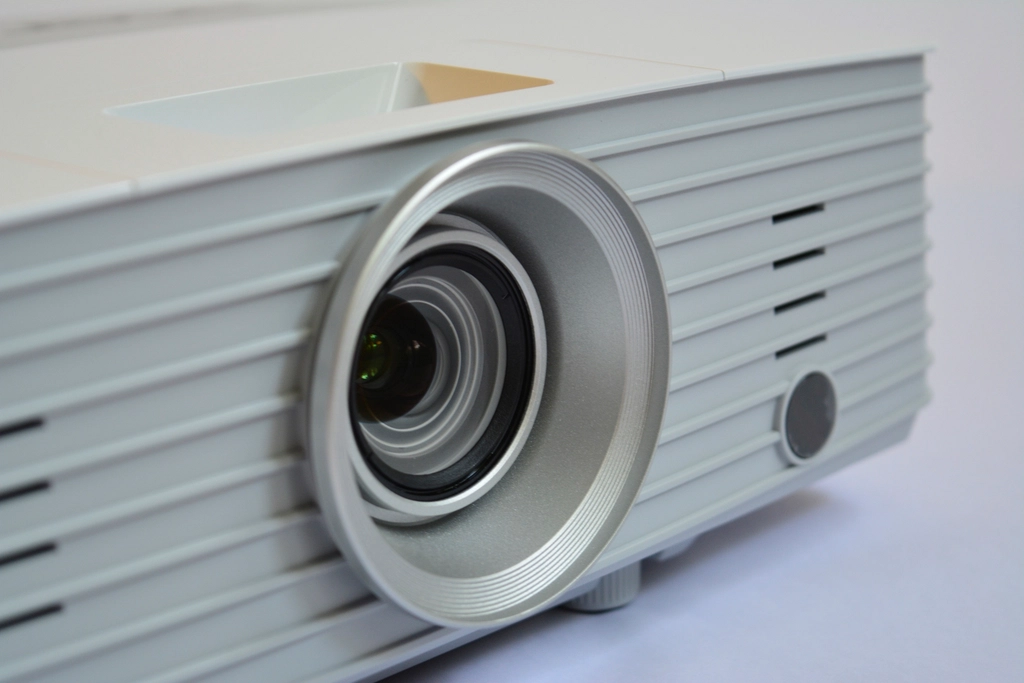
Quick Verdict: The Epson Home Cinema 2350 is one of the most widely recommended mid-range living-room projectors of the current generation, and the reasons are easy to understand on paper. It pairs Epson’s 3-chip 3LCD engine with 4K PRO-UHD pixel-shifting enhancement, a genuinely bright 2,800 lumens of both color and white output, and built-in Android TV for cord-free streaming. For buyers who want a big, bright picture in a room that isn’t pitch black — and who don’t want to fuss with an external streaming stick — it sits in a sweet spot that few competitors match at its roughly $1,099–$1,299 price. It is not a true native 4K projector and it is not a dark-room contrast champion, but for bright-room family viewing and casual gaming it is a sensible, well-rounded pick.
Why the Home Cinema 2350 Gets Recommended So Often
Step into any discussion of mid-priced home projectors and the Epson Home Cinema 2350 comes up again and again. The reason is that it solves the most common real-world problem buyers face: most people don’t have a dedicated, blacked-out home theater — they have a normal living room with windows, lamps, and family members who don’t want to sit in the dark. A huge number of projectors are designed for darkness and disappoint in those rooms. The 2350 is built for the bright, lived-in spaces where projectors are actually used, and it adds the conveniences (built-in streaming, easy placement, casual-gaming-friendly lag) that make it something a household will actually reach for night after night. It is less a spec-sheet champion than a practical, well-judged appliance — and that’s precisely why it earns its recommendations.
Epson Home Cinema 2350 Specifications at a Glance
| Specification | Epson Home Cinema 2350 |
|---|---|
| Display Technology | 3-chip 3LCD (4K PRO-UHD pixel-shifting) |
| Native Resolution | 1920 × 1080 (Full HD) with 4K enhancement |
| Brightness | 2,800 lumens color / 2,800 lumens white (ISO/IDMS) |
| Light Source | UHE lamp (rated up to ~7,500 hours in ECO) |
| Throw Ratio | 1.32:1 – 2.15:1 |
| Image Size | Approx. 40″ – 500″ |
| Optical Zoom / Lens Shift | 1.6x optical zoom, ±60% vertical lens shift |
| Dynamic Contrast | Up to 35,000:1 |
| HDR Support | HDR10, HLG |
| Input Lag | Under ~20ms (1080p @ 120Hz) |
| Smart Platform | Android TV (built-in) |
| Audio | 10W mono speaker, Bluetooth out |
| Connectivity | 2× HDMI (one ARC), USB, Wi-Fi, Bluetooth |
| Typical Price | $1,099 – $1,299 |
How We Researched the Epson Home Cinema 2350
This review synthesizes Epson’s published specification sheet with the consistent conclusions drawn by professional reviewers at outlets including ProjectorCentral and RTINGS, plus broad owner reception. The goal is an honest editorial overview: what the confirmed specifications mean in practice, where expert consensus lands, and who the projector genuinely suits. We did not run this unit on calibrated lab equipment ourselves, and we do not accept payment for placement. Numbers cited are manufacturer figures or measurements reported by independent reviewers.
Picture Quality: Bright, Punchy, Not Native 4K
The headline to understand is that the Home Cinema 2350 is a 1080p projector with 4K PRO-UHD enhancement. Epson’s pixel-shifting rapidly shifts each pixel diagonally to place more distinct points on screen than a static 1080p panel would, accepting and processing a 4K signal in the process. The result is noticeably sharper and more detailed than plain Full HD — but it is not the same as a native 4K (or even native pixel-shifted 0.47″ DLP true-4K) image. For typical living-room viewing distances and everyday content, the difference is modest; for pixel-peeping cinephiles seated close to a large screen, it is visible.
Where the 2350 genuinely shines is brightness. At 2,800 lumens of color brightness — and, crucially, an equal 2,800 lumens of white brightness thanks to the 3LCD design — it produces a vivid, saturated image that holds up in rooms with ambient light. This 3LCD trait (equal color and white output) is one of Epson’s longstanding advantages over single-chip DLP rivals, which often quote a high white number but deliver weaker color brightness. Colors look full and natural rather than washed out when the lights are on.
Contrast is the expected weak point. The native contrast of a 3LCD panel is modest, and while Epson quotes a dynamic figure up to 35,000:1, dark-room black levels are more grey than inky. In a dedicated blacked-out home theater, dedicated dark-room projectors and laser/UST rivals will look deeper. In a normal living room with some light, this matters far less.
HDR Performance
The 2350 supports HDR10 and HLG. As with most lamp-based projectors in this class, HDR here is about accepting and tone-mapping the signal rather than delivering the specular highlights and wide dynamic range you’d get from a high-nit TV. Expect richer color and a slightly more dynamic image than SDR, not a transformative HDR experience. Epson includes scene-adaptive processing to help balance bright and dark areas, which generally produces a pleasing, watchable result without heavy user tweaking.
Gaming Performance
For a non-gaming-branded projector, the 2350 is surprisingly capable for casual play. Input lag drops under roughly 20ms at 1080p/120Hz, which is responsive enough for most console and PC gaming short of hardcore competitive shooters. It will not match a dedicated gaming projector’s 4ms/240Hz figures, but for family game nights, sports, and single-player titles on a 100″+ screen, it is genuinely enjoyable.
3LCD Versus Single-Chip DLP: Why It Matters Here
Understanding why the 2350 looks the way it does means understanding 3LCD. In a single-chip DLP projector, a spinning color wheel flashes red, green and blue sequentially, and a portion of the wheel is often clear (white) to boost the headline brightness number. That can leave color brightness lower than the quoted white figure, and the sequential color is what produces the occasional “rainbow” flash that a minority of viewers find distracting. The Epson’s 3-chip 3LCD engine sidesteps both issues: red, green and blue are projected simultaneously through three dedicated panels, so color brightness equals white brightness and there is no rainbow effect whatsoever. For families — where one household member may be rainbow-sensitive — this is a meaningful, often-overlooked advantage. It also means that in a brightly lit room, the colors stay rich rather than desaturating, which is exactly the scenario this projector is built for.
The trade-off, as covered in the contrast section, is that 3LCD’s native contrast is lower than what laser-dimmed DLP rivals can post on a spec sheet. Epson’s dynamic iris and processing help, but if your single priority is the inkiest possible black in a blacked-out theater, this is not the projector to chase that with. The 2350 is unapologetically a bright-room, color-first design, and judged on those terms it excels.
Real-World Picture Modes and Calibration
Out of the box the 2350 offers the usual range of picture presets — typically Dynamic, Bright Cinema, Cinema, and Natural — that trade brightness for accuracy. Dynamic is the brightest and coolest (good for daytime sports with the blinds open), while Cinema and Natural rein in the color temperature and gamma for a more accurate, film-like look in a darkened room. Reviewers generally find the more accurate modes pleasingly close to the mark without professional calibration, which suits the target buyer who wants a good picture without paying for a calibrator. There are basic color and gamma controls for those who want to fine-tune, but the projector is designed to look good on defaults, and it largely does. Frame-interpolation (motion smoothing) is available for sports if you like the effect, and can be turned off for movies to avoid the “soap opera” look.
Setup, Placement, and Smart Features
Flexibility is a real strength. The 1.6x optical zoom plus ±60% vertical lens shift gives meaningful freedom in where you place the projector relative to the screen — you can shift the image up or down without keystone distortion, and the wide zoom range accommodates a variety of room depths. The 1.32:1–2.15:1 throw ratio is a standard mid-throw, so it lives on a shelf or ceiling mount several feet back, not right against the wall.
Built-in Android TV is the convenience headline. Netflix, Disney+, Hulu, YouTube and the wider Google Play catalog run natively (Netflix licensing on projectors has historically been finicky across brands, so confirm current app support), and the included remote drives everything. The 10W mono speaker is fine for casual use but underwhelming for movies; Bluetooth audio out lets you pair a soundbar or headphones easily.
How the Epson Home Cinema 2350 Compares to Key Rivals
| Model | Resolution | Brightness | Light Source | Throw | Price Tier |
|---|---|---|---|---|---|
| Epson Home Cinema 2350 | 1080p + 4K enhance | 2,800 lm | Lamp | Standard (1.32–2.15:1) | $$ |
| BenQ TK710STi | True 4K | 3,200 lm | Laser | Short (0.69–0.83:1) | $$$ |
| XGIMI Horizon Ultra | True 4K | 2,300 lm | Laser-LED | Standard (1.2–1.5:1) | $$$ |
| Anker Nebula Capsule 3 Laser | 1080p | 300 lm | Laser | Portable | $$ |
The takeaway: the 2350 is the brightness-per-dollar pick of this group for a standard living room, and the only one here that fully avoids the rainbow effect thanks to 3LCD. It gives up true 4K and a laser light source to the BenQ and XGIMI, and it can’t touch their dark-room contrast, but for a bright family room it offers the most lumens for the least money.
Value, Warranty, and Running Costs
At roughly $1,099–$1,299, the 2350 sits in the heart of the mainstream home-projector market, and its value case rests on brightness, color quality and built-in Android TV rather than cutting-edge specs. The main ongoing cost to factor in is the lamp: rated up to about 7,500 hours in ECO mode, it will eventually need replacing, with a genuine Epson lamp typically running well under $150. For a household watching a few hours a day, that’s a once-every-several-years expense. Epson’s standard limited warranty (commonly two years on home projectors, with rapid-replacement support) is among the more reassuring in the category, and the brand’s long track record in 3LCD reliability is a real part of the value proposition.
Strengths
- Bright 2,800-lumen output with equal color and white brightness — excellent for rooms with ambient light
- 3LCD engine avoids the rainbow artifacts some viewers see on single-chip DLP
- Generous placement flexibility: 1.6x zoom and ±60% vertical lens shift
- Built-in Android TV — no external streaming stick needed
- Low input lag (~20ms) makes casual gaming genuinely viable
- Bluetooth audio out and 4K signal acceptance with HDR10/HLG
Limitations
- Not native 4K — 1080p panel with pixel-shifting enhancement
- Modest native contrast; dark-room black levels look grey versus laser/UST rivals
- Lamp-based, so eventual lamp replacement is a cost laser projectors avoid
- Single 10W mono speaker is weak for serious movie audio
- HDR is tone-mapped, not high-impact like a bright HDR TV
Who Should Buy the Epson Home Cinema 2350
Best for: Families and casual viewers who want a big, bright, low-hassle picture in a normal living room, with streaming built in and casual gaming on the side.
Buy it if you: watch in a room that isn’t fully dark; value brightness and color punch over the deepest blacks; want Android TV without an extra dongle; and want flexible placement so the projector fits your existing furniture layout.
Skip it if you: have a dedicated blacked-out theater and crave inky contrast (consider a laser or UST projector); demand true native 4K detail; or want a lamp-free, maintenance-free light source.
Alternatives Worth Considering
BenQ TK710STi — For Gamers Who Want True 4K and Laser
If gaming responsiveness and a maintenance-free laser engine top your list, the BenQ TK710STi offers true 4K, 3,200 lumens, a 4ms response time at 1080p/240Hz, and a short-throw lens — at a higher price. It’s the more serious gaming and image-detail pick. See our best 4K projectors guide for more.
XGIMI Horizon Ultra — For Dolby Vision and Lamp-Free Living
The XGIMI Horizon Ultra adds a hybrid laser-LED light source, Dolby Vision support, and a sleek all-in-one design with strong built-in Harman Kardon speakers. It’s dimmer at 2,300 lumens but lamp-free and feature-rich, at a similar-to-higher price.
Frequently Asked Questions
Is the Epson Home Cinema 2350 true 4K?
No. It has a native 1080p panel and uses Epson’s 4K PRO-UHD pixel-shifting to accept and display a sharper-than-1080p image from a 4K source. It looks noticeably crisper than plain Full HD, but it is not a native 4K projector.
Does the Home Cinema 2350 work in a bright room?
Yes — this is one of its core strengths. With 2,800 lumens of both color and white brightness, it remains punchy and watchable with ambient light. For best contrast you’ll still want some light control, but it does not require total darkness like dimmer projectors.
Does it have Netflix built in?
It runs Android TV with native streaming apps. Netflix support on projectors has historically varied by firmware and licensing, so confirm current Netflix availability before buying; YouTube, Disney+, Hulu and the broader Google Play library are generally well supported, and you can always add a streaming stick if needed.
How long does the lamp last?
Epson rates the UHE lamp up to roughly 7,500 hours in ECO mode (less at full brightness). Lamp replacement is an eventual cost that laser-based projectors avoid, but at typical viewing hours the lamp lasts many years.
Is the 2350 good for gaming?
For casual gaming, yes. Input lag drops under about 20ms at 1080p/120Hz, which is responsive for console and single-player PC gaming. Competitive esports players who want the lowest possible lag should look at a dedicated gaming projector like the BenQ TK710STi.
Do I need a separate soundbar?
For movies, it’s recommended. The built-in 10W mono speaker is adequate for casual viewing but lacks bass and impact. Bluetooth audio out makes pairing a soundbar or wireless headphones straightforward.
How far does the projector need to be from the screen?
With a 1.32:1–2.15:1 throw ratio, a 100″ screen requires roughly 9.5 to 15.5 feet depending on where you set the 1.6x zoom. The wide zoom range and ±60% vertical lens shift give you considerable freedom to fit the projector to your room rather than rearranging your room around the projector. Always check Epson’s throw-distance chart against your exact screen size before mounting.
Can I mount the Home Cinema 2350 on the ceiling?
Yes. It supports ceiling mounting (with an image-flip setting) and standard projector mounts. Many owners ceiling-mount it for a clean install, though the generous lens shift also makes shelf placement easy. Either way, the placement flexibility is a genuine strength of this model.
Is the Epson Home Cinema 2350 good for sports?
Yes — this is one of its sweet spots. The 2,800-lumen brightness keeps daytime games looking vivid even with some light in the room, and optional frame interpolation can smooth fast motion if you prefer that look. Combined with a big screen, it makes a compelling game-day display.
Final Verdict
The Epson Home Cinema 2350 earns its popularity by being a well-balanced, low-fuss living-room projector. Its 3LCD engine delivers bright, color-rich images that survive ambient light, the placement flexibility is generous, and built-in Android TV removes a common annoyance. The trade-offs are honest and predictable for the class: it isn’t native 4K, its dark-room contrast is ordinary, and the lamp will eventually need replacing. For a bright family room where ease of use and a big, vivid picture matter more than reference-grade blacks, it remains a smart, sensible buy. Compare it against the alternatives above and current pricing to decide where it fits your room.
Last updated: June 2026
See our main guide: Best Projectors. Related: Best 4K Projectors · Best Home Theater Projectors.