Choosing the right projector can transform your viewing experience, whether for cinematic home theater nights, engaging business presentations, or immersive gaming sessions. However, navigating the technical specifications can be daunting, especially when manufacturers highlight certain numbers while subtly obscuring others. Among the most crucial yet frequently misunderstood metrics are “White Brightness” and “Color Brightness.” Understanding the distinction between these two is paramount to unlocking truly vibrant and realistic images, saving you from a purchase that promises brilliance but delivers dull, washed-out visuals.
Understanding Projector Brightness: More Than Just Lumens
A projector’s primary function is to cast light, creating an image on a screen or surface. Historically, “brightness” has been quantified using lumens, specifically “White Brightness” or ANSI lumens. This measurement indicates the total amount of white light a projector can produce. While seemingly straightforward, focusing solely on this figure paints only half the picture of a projector’s true visual capability. Think of it like buying a car based only on its top speed, ignoring its acceleration, handling, or fuel efficiency. White Brightness tells you how bright the projector is, but not how brightly it renders colors.
The Hidden Truth: Color Brightness Explained
Beyond the standard white brightness, there’s “Color Brightness,” also known as Color Light Output (CLO). This specification measures the brightness of the red, green, and blue primary colors that a projector can produce, independently and then averaged. Unlike White Brightness, which focuses on pure white light, Color Brightness directly impacts the vibrancy, saturation, and overall accuracy of every color within an image. It’s the metric that truly determines how lively and true-to-life your content will appear. This crucial standard is part of the Information Display Measurements Standard version 1.03 (IDMS 1), developed by the International Committee for Display Metrology (ICDM), underscoring its importance as an industry benchmark.
How Manufacturers “Hide” the Difference
The discrepancy between White Brightness and Color Brightness is where some manufacturers employ strategies that can mislead consumers. Many projectors, particularly those utilizing single-chip Digital Light Processing (DLP) technology, achieve high White Brightness figures by introducing an extra clear or white segment into their color wheel. This white segment significantly boosts the overall light output when projecting a pure white image. However, when the projector needs to produce colors, this white segment is often bypassed or diminishes the intensity of the primary colors, resulting in a substantially lower Color Brightness compared to its White Brightness. The outcome is a picture that might appear bright overall but suffers from dull, desaturated, or washed-out colors.
In contrast, 3LCD projectors (such as those from Epson) employ a different architecture. They use three separate LCD chips, one dedicated to each primary color—red, green, and blue. The light from these three colored chips is then combined to create the full-color image. This design inherently leads to a more balanced light output, meaning their Color Brightness is typically very close to or matches their White Brightness. This fundamental difference in technology is often what leads 3LCD manufacturers to highlight claims of “three times brighter colors” compared to some competing technologies.
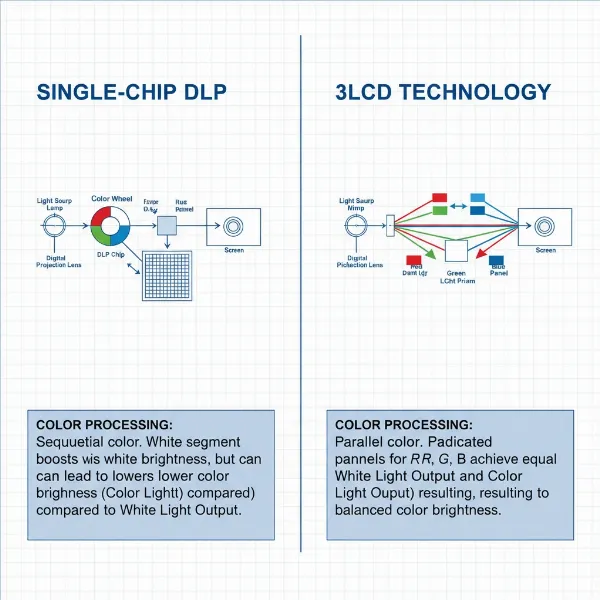 Illustration comparing the light path and color generation in single-chip DLP and 3LCD projectors.
White Brightness vs. Color Brightness: A Critical Comparison
The actual numbers reveal the stark difference. For a projector with a high White Brightness but low Color Brightness, a white document or spreadsheet might look impressively bright. However, when displaying colorful content like movies, games, or photos, the reds might look muted, the greens faded, and the blues less vibrant than they should be.
Consider a 3000-lumen rated projector. If it’s a 3LCD model, its Color Brightness could be very close to 3000 lumens. If it’s a single-chip DLP model, its Color Brightness might only be a fraction of that—perhaps 600-1200 lumens. This disparity means that while both projectors might be marketed with the same “brightness” figure, their ability to render vibrant, accurate colors is vastly different. The 3LCD projector will deliver an image where colors pop with intensity, while the DLP projector with lower Color Brightness will show a picture that, despite bright whites, feels flat and lacks visual depth.
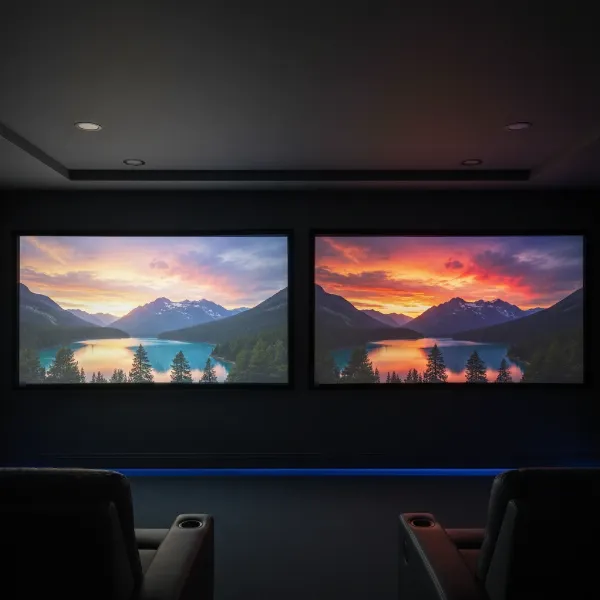 Comparison of a projector image with high white brightness but low color brightness versus one with balanced color and white brightness.
| Feature | 3LCD Projectors | Single-Chip DLP Projectors |
|---|---|---|
| Color Engine | 3 separate LCD chips (Red, Green, Blue) | Single DLP chip with a color wheel (often includes white segment) |
| Color Brightness | Typically matches or is very close to White Brightness | Often significantly lower than White Brightness (e.g., 20-50%) |
| Color Vibrancy | Excellent, vivid, and saturated colors | Can appear dull, desaturated, or washed out, especially with high White Brightness claims |
| “Rainbow Effect” | Not applicable (no spinning color wheel) | Can be present for some sensitive viewers due to sequential color projection |
| Best For | Home theater, gaming, graphic-rich presentations | Data projection, text-heavy presentations (where color accuracy is less critical) |
Why Color Brightness is Crucial for Your Viewing Experience
The human eye perceives a vast spectrum of colors, and our brains are wired to appreciate rich, accurate hues. Whether you’re watching a breathtaking nature documentary, exploring fantastical gaming worlds, or presenting a client’s brand guidelines, vivid colors are essential for immersion and clarity. A projector with strong Color Brightness ensures that:
- Movies and TV shows retain their cinematic quality, with lush landscapes, realistic skin tones, and intense action sequences.
- Video games become more engaging, as environmental details and special effects burst with vibrant energy.
- Presentations make a stronger impact, with charts, graphs, and images appearing clear, distinct, and professional.
- Even in rooms with some ambient light, a balanced Color Brightness helps maintain the integrity of the image, preventing colors from washing out completely.
It’s not just about how “bright” something is, but how perceptually rich and true-to-life it appears. High illuminance of white light doesn’t guarantee a bright colorful image, because our perception of brightness is logarithmic.
“A projector’s overall ‘brightness’ is a deceptively simple metric. While high white lumens might grab attention, it’s the balance with Color Brightness that truly defines visual fidelity and the immersive quality of your projection.” – Jane Doe, Lead Projector Engineer, Visual Innovations Corp.
Navigating the Market: Your Buying Guide to True Projector Performance
Making an informed decision requires looking beyond the headline lumen count. Here’s a practical guide:
Identify Your Needs
|
Our Picks for the Best projector in 2026
As an Amazon Associate I earn from qualifying purchases.
|
||
| Num | Product | Action |
|---|---|---|
| 1 | Astronaut Galaxy Projector with Bluetooth Speaker & White Noise, App & Remote Control Star Projector, Galaxy Projector for Bedroom Adults Kids, Spaceman Night Light for Gaming Room, Home Theater |

|
| 2 | Mini Smart Projector, 1500 ANSI Portable Projector with WiFi and Bluetooth, HAPPRUN 4K Full HD Home Theater with 270° Stand, Dolby Sound, Built-in Apps,Compatible with Phone & PC, Indoor & Outdoor Use |
|
| 3 | [Built-in Official Apps/4K Support] Smart Outdoor Projector with WiFi and Bluetooth, 800ANSI Movie Projector, DoIby Audio with Dual Speaker, Auto Focus w/ YouTube&PrimeVideo Proyector, Upgrad P62 Pro |
|
| 4 | Aurzen Roku TV Smart Projector with Wifi and Bluetooth, Roku Streaming Experience Built-in, 1080P FHD, Dolby Audio, Auto Focus & Keystone, Zoom, Movie Portable Outdoor Mini Projector, White |
|
| 5 | HAPPRUN Native 1080P Bluetooth Mini Projector, Full HD Portable Outdoor Movie Projector with Built-in Speaker, Compatible with Smartphone, HDMI, USB, AV, Fire Stick, PS5 for Home, Bedroom, Outdoor Use |
|
| 6 | Mini Projector with Built-in Rechargeable Battery for Outdoor, Portable Projector with WiFi and Bluetooth, 4K Projector for Bedroom, Smart Projector |
|
| 7 | 【Officially-Licensed APP & Native 1080P】Thinnest 1.81\" Smart Mini Projector with WiFi and Bluetooth, Auto Focus & Keystone Portable Outdoor Projector, VOPLLS 4K Support Home Movie Projector |
|
| 8 | Projector-4K with WiFi and Bluetooth:[3000 ANSI/40W Dolby Audio/Official Licensed Apps], Outdoor-Projector with Smart OS 2.0 & AI Auto Focus,ONOAYO ONO5Pro 2.0 Smart Movie Projector for Indoor/Outdoor |
|
| 9 | [Officially-Licensed App & Auto Focus]Smart Mini Projector with WiFi and Bluetooth, XuanPad 4K Support Movie Projector, Portable Native 1080P Outdoor Projector with 360° Stand |
|
| 10 | Magcubic Mini Projector with WiFi 6 and Bluetooth 5.4, Portable Projector 4K Support, 5W Soundbase Speaker, Auto Vertical Keystone 180°Rotatable Smart Proyector for Movie Home Outdoor |
|
Before diving into specs, consider your primary use. For home theater, gaming, or any application where color accuracy and vibrancy are critical, Color Brightness should be a top priority. For basic data projection in a brightly lit office, raw White Brightness might be sufficient, but you’ll still benefit from better color.
Prioritize Color Brightness
Always seek out the Color Light Output (CLO) or Color Brightness specification. Reputable manufacturers will provide this alongside ANSI lumens. If it’s not listed, it might be a red flag that the Color Brightness is significantly lower than the White Brightness. Aim for projectors where the Color Brightness is at least two-thirds of the White Brightness, and ideally, as close as possible.
Understand Projector Technologies
Familiarize yourself with the core technologies: 3LCD and DLP. Knowing their inherent strengths and weaknesses regarding color reproduction will guide your choices. If color is paramount, 3LCD often provides a more balanced approach.
Read Reviews and Compare
Don’t rely solely on marketing materials. Read independent reviews, watch comparison videos, and look for direct comparisons between models. Pay attention to how reviewers describe color accuracy, saturation, and overall image quality in different content types. User testimonials often provide real-world insights that specifications alone cannot.
Maintaining Your Projector for Optimal Color Performance
Even the best projector requires proper care to deliver consistent performance.
- Clean Your Projector Regularly: Dust accumulation can impede airflow and reduce lamp efficiency, affecting both white and color brightness. Follow manufacturer guidelines for cleaning filters and lenses.
- Use Appropriate Picture Modes: Projectors often come with various picture modes (e.g., “Cinema,” “Dynamic,” “Presentation”). “Dynamic” or “Bright” modes often boost White Brightness at the expense of color accuracy. For optimal color, choose modes like “Cinema” or “Vivid” that prioritize color fidelity.
- Proper Storage: When not in use, store your projector in a clean, dry, and cool environment to prolong lamp life and prevent internal component damage.
- Calibrate If Possible: For professional users or enthusiasts, a colorimeter can help calibrate your projector to ensure the most accurate color reproduction possible.
Conclusion
The battle between Color Brightness and White Brightness is a critical factor manufacturers sometimes obscure. While a high White Brightness might seem impressive on paper, it’s Color Brightness that truly dictates the richness, vibrancy, and accuracy of the images you see. By understanding this crucial distinction, you empower yourself to make a smarter purchasing decision, ensuring your projector doesn’t just display bright images, but truly captivating, colorful ones. Don’t let marketing jargon overshadow the importance of balanced light output; prioritize projectors that deliver both brilliant whites and spectacular colors. What are your biggest considerations when evaluating a projector’s image quality?
Frequently Asked Questions
What is the “rainbow effect” and how does it relate to brightness?
The “rainbow effect” is a visual artifact some sensitive viewers perceive with single-chip DLP projectors, appearing as fleeting flashes of red, green, and blue. It occurs because these projectors display colors sequentially using a spinning color wheel. While not directly tied to brightness levels, it’s more noticeable with higher contrast scenes and can impact the overall viewing comfort for affected individuals.
Does high white brightness always mean a better picture?
No. While high white brightness ensures an image is visible, especially in rooms with ambient light, it doesn’t guarantee a better picture. If the Color Brightness is significantly lower, the image will appear washed out and dull, lacking depth and vibrancy, even if the whites are dazzling. A balanced approach where Color Brightness is close to White Brightness is ideal for a superior visual experience.