Have you ever marveled at intricately decorated cookies or detailed art pieces and wondered how artists achieve such flawless precision? The secret weapon for many crafters and artists today isn’t just a steady hand; it’s a projector. These versatile devices have revolutionized the creative process, transforming ordinary designs into extraordinary masterpieces with unparalleled accuracy. Whether you’re a seasoned baker looking to pipe intricate royal icing patterns or an artist aiming to trace complex images onto canvas, a quality projector can significantly enhance your work, save time, and unlock new creative possibilities. This guide will delve into the world of projectors specifically tailored for cookie decorating and art tracing, exploring the essential features, top models, and practical tips to help you choose and use the perfect tool for your artistic endeavors.
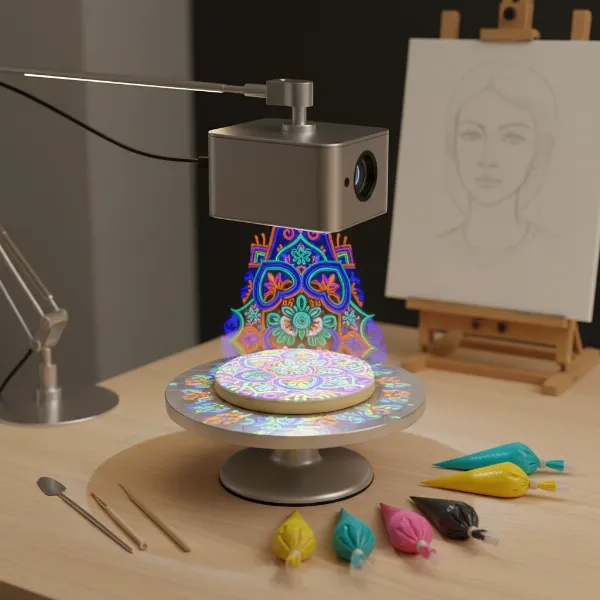 A mini projector casting a detailed design onto a cookie, with art supplies visible around it.
The Transformative Power of Projectors in Creative Arts
Projectors have evolved dramatically from bulky office equipment to compact, high-definition tools that empower creators. In the realm of cookie decorating and art tracing, their value lies in the ability to precisely replicate and scale designs. Imagine effortlessly transferring complex logos, delicate lace patterns, or beloved character portraits onto a cookie, or perfectly outlining a detailed sketch onto a large canvas. This level of precision, once requiring years of practice and an exceptionally steady hand, is now accessible to anyone with the right projection technology.
Historically, artists used early forms of projection like the Camera Obscura to aid in their work, long before modern optics existed. Today, digital projectors, especially mini and pico models, offer a level of convenience and accuracy that previous generations could only dream of. They act as a luminous guide, projecting any digital image directly onto your working surface, allowing you to trace, pipe, or paint with confidence and consistency. This not only speeds up the creation process but also ensures professional-quality results, making them an indispensable tool for both hobbyists and professional artists alike.
Essential Features for Crafting Precision
Choosing the right projector for detailed work like cookie decorating and art tracing involves understanding several key specifications. These features directly impact the clarity, usability, and overall performance of the device in a creative setting.
- Brightness (Lumens): Expressed in ANSI lumens, brightness determines how visible the projected image will be in different lighting conditions. While larger projectors might boast thousands of lumens, mini projectors suitable for this niche typically range from 50 to 200 ANSI lumens. For intricate work, especially when overhead lighting is present, a projector with sufficient brightness (e.g., above 25-50 ANSI lumens) is crucial to ensure the projected image is clear and distinguishable against your cookie or canvas.
- Resolution: Resolution dictates the sharpness and detail of your projected image. For fine lines and intricate patterns, higher resolution is always better. While some budget mini projectors offer WVGA (854×480) resolution, many excellent options provide 720p (HD) or even 1080p (Full HD) support. Crisp, detailed images ensure that your intricate designs transfer accurately without pixelation.
- Portability & Size: For cookie decorating, projectors are often mounted overhead, directly above the workspace. This requires a compact, lightweight device that is easy to position and store. Mini and pico projectors excel here, often fitting in the palm of your hand, making them ideal for small studio spaces or for decorators who need to transport their equipment.
- Connectivity: Modern projectors offer a variety of input options for seamless integration with your devices. Look for models with HDMI for connecting to laptops or tablets, USB ports for flash drives, and increasingly, wireless connectivity like Wi-Fi and Bluetooth for mirroring content from smartphones or tablets. Wireless mirroring is particularly convenient for quick adjustments and real-time changes.
- Contrast Ratio: This specification measures the difference between the brightest white and the darkest black a projector can display. A higher contrast ratio (e.g., 1000:1 or more) is important for defining the edges of your design, ensuring clear separation between lines and background, which is critical for precise tracing and piping.
- Battery Life: Many mini projectors come with a built-in rechargeable battery, offering the flexibility to work untethered. While extended battery life is a plus for portability, many users prefer to keep their projectors plugged in for continuous power during longer creative sessions.
- Ease of Use: An intuitive interface, straightforward setup, and adjustable focus (manual or auto-focus) are invaluable. Features like keystone correction, which allows you to correct distorted images if the projector isn’t perfectly aligned, also contribute to a smoother workflow.
- Throw Ratio: This indicates the distance a projector needs to be from the screen (or cookie/canvas) to produce a certain image size. While not always a primary concern for small-scale work, a flexible throw ratio allows you to adjust the projection size by simply moving the projector closer or further from your surface, which is useful in varied workspaces.
Understanding Projector Technologies for Precision Crafting
When it comes to projectors ideal for cookie decorating and art tracing, the market is dominated by compact, portable units. These mini and pico projectors primarily leverage two core technologies to deliver their visual output: DLP and LED light sources. Understanding how these work within the small form factor is key to appreciating their suitability for detailed creative tasks.
Mini and pico projectors are specifically favored for their small footprint and versatility. They are designed to project relatively small, clear images at close distances, making them perfect for illuminating a cookie on a tabletop or a small canvas on an easel. Their portability also means they can be easily mounted directly above the workspace, a common setup for decorators.
DLP (Digital Light Processing) Projectors
DLP technology is widely used in many pico and mini projectors. It relies on a Digital Micromirror Device (DMD) chip containing millions of tiny mirrors, each representing a pixel. These mirrors tilt rapidly to reflect light from the lamp through a color wheel and lens, creating the image on your surface.
- Advantages: DLP projectors are known for producing sharp, crisp images with excellent contrast, which is crucial for clearly defined lines and details in cookie designs or art tracing. They also tend to have a fast response time, reducing motion blur.
- Disadvantages: Some sensitive individuals might perceive a “rainbow effect” with single-chip DLP projectors, though this is less common with newer models and often negligible for static tracing.
- Best for: Tasks demanding high image clarity and sharp edges, making them excellent for intricate patterns on cookies and precise outlines for art.
|
Our Picks for the Best projector in 2026
As an Amazon Associate I earn from qualifying purchases.
|
||
| Num | Product | Action |
|---|---|---|
| 1 | [Built-in Official Apps/4K Support] Smart Outdoor Projector with WiFi and Bluetooth, 800ANSI Movie Projector, DoIby Audio with Dual Speaker, Auto Focus w/ YouTube&PrimeVideo Proyector, Upgrad P62 Pro |
![Check [Built-in Official Apps/4K Support] Smart Outdoor Projector with WiFi and Bluetooth, 800ANSI Movie Projector, DoIby Audio with Dual Speaker, Auto Focus w/ YouTube&PrimeVideo Proyector, Upgrad P62 Pro on Amazon](https://projectorcam.com/wp-content/plugins/amazon-tables/assets/images/buy.png)
|
| 2 | Astronaut Galaxy Projector with Bluetooth Speaker & White Noise, App & Remote Control Star Projector, Galaxy Projector for Bedroom Adults Kids, Spaceman Night Light for Gaming Room, Home Theater |
|
| 3 | Aurzen Roku TV Smart Projector with Wifi and Bluetooth, Roku Streaming Experience Built-in, 1080P FHD, Dolby Audio, Auto Focus & Keystone, Zoom, Movie Portable Outdoor Mini Projector, White |
|
| 4 | Mini Smart Projector, 1500 ANSI Portable Projector with WiFi and Bluetooth, HAPPRUN 4K Full HD Home Theater with 270° Stand, Dolby Sound, Built-in Apps,Compatible with Phone & PC, Indoor & Outdoor Use |
|
| 5 | Projector-4K with WiFi and Bluetooth:[3000 ANSI/40W Dolby Audio/Official Licensed Apps], Outdoor-Projector with Smart OS 2.0 & AI Auto Focus,ONOAYO ONO5Pro 2.0 Smart Movie Projector for Indoor/Outdoor |
|
| 6 | Mini Projector with Built-in Rechargeable Battery for Outdoor, Portable Projector with WiFi and Bluetooth, 4K Projector for Bedroom, Smart Projector |
|
| 7 | [Officially-Licensed App & Auto Focus]Smart Mini Projector with WiFi and Bluetooth, XuanPad 4K Support Movie Projector, Portable Native 1080P Outdoor Projector with 360° Stand |
|
| 8 | 【Officially-Licensed APP & Native 1080P】Thinnest 1.81\" Smart Mini Projector with WiFi and Bluetooth, Auto Focus & Keystone Portable Outdoor Projector, VOPLLS 4K Support Home Movie Projector |
|
| 9 | Magcubic Mini Projector with WiFi 6 and Bluetooth 5.4, Portable Projector 4K Support, 5W Soundbase Speaker, Auto Vertical Keystone 180°Rotatable Smart Proyector for Movie Home Outdoor |
|
| 10 | HAPPRUN Native 1080P Bluetooth Mini Projector, Full HD Portable Outdoor Movie Projector with Built-in Speaker, Compatible with Smartphone, HDMI, USB, AV, Fire Stick, PS5 for Home, Bedroom, Outdoor Use |
|
LED (Light Emitting Diode) Light Sources
Most modern mini and pico projectors utilize LED light sources rather than traditional lamps. LEDs offer significant benefits, especially for portable devices.
- Advantages: LED light sources boast exceptionally long lifespans (often 20,000 to 30,000 hours or more), meaning no costly lamp replacements. They are energy-efficient, generate less heat, and allow for smaller, lighter projector designs. LEDs also offer instant on/off capabilities and consistent color performance throughout their life.
- Disadvantages: Generally, LED projectors tend to have lower maximum brightness compared to traditional lamp-based projectors, though this is less of a concern for the close-up, dim-room applications of cookie decorating and art tracing.
- Best for: Ensuring a durable, low-maintenance, and compact projector that provides consistent performance over many years, perfectly suited for the creative enthusiast.
While you might encounter terms like “LCD” or “Laser” in broader projector discussions, these typically refer to larger, often more expensive units designed for home theater or business presentations. For the specific needs of cookie decorating and art tracing, the combination of DLP technology with an LED light source within a mini or pico form factor offers the ideal balance of portability, precision, and longevity.
Top Projectors for Cookie Decorating & Art Tracing
The market offers several excellent mini projectors that cater specifically to the needs of cookie decorators and artists. These models balance portability, image quality, and connectivity to provide an optimal creative experience.
Entry-Level & Versatile Options
These projectors offer a fantastic starting point for hobbyists and those seeking a reliable, user-friendly device without breaking the bank.
- AKASO WT50 Mini Pico Projector: The AKASO WT50 is a highly popular choice within the baking and crafting communities. It’s compact and offers good clarity, often around 50 ANSI lumens, with support for higher resolutions. Its versatility in connectivity, including HDMI, USB, and wireless mirroring, makes it easy to connect to various devices like smartphones, tablets, or laptops. It’s known for producing bright, clear designs, even in moderately lit environments, making it ideal for detailed tracing on cookies.
- KODAK Luma 75/150 Mini Pico Projector: Kodak’s Luma series, particularly the Luma 75 and 150, are praised for their crisp visuals and portability. The Luma 150, for instance, offers 60 ANSI lumens, 854 x 480 resolution, and a decent contrast ratio, delivering clear images essential for intricate work. These models often feature a built-in battery for untethered use and illuminated controls for convenience. Their user-friendly design makes them a great option for both beginners and experienced creators.
Advanced & Professional Choices
For those seeking enhanced performance, potentially higher brightness, or more robust features for frequent professional use, these options stand out.
- AAXA LED Pico+ MAX Mini Projector: The AAXA Pico projectors have historically been a top contender for cookie decorators due to their exceptional clarity, projection size, and robust build. While specific models like the Pico+ MAX can sometimes be hard to find or may have updated versions, AAXA’s offerings generally provide excellent resolution and brightness for precise work. They are often favored for their reliable performance and ability to project sharp, detailed images, making them a staple in many professional setups.
- ViewSonic M1+ Mini Plus Projector: The ViewSonic M1+ Mini Plus offers a compelling blend of portability and performance. It’s a smart Wi-Fi projector, providing excellent connectivity options, including USB-C for fast data transfer and charging. With a robust speaker and smart features, it can double as a versatile entertainment device when not being used for creative projects. Its image quality and ease of setup make it a strong candidate for those needing a dependable projector for both intricate crafting and general use.
These models represent a strong selection of projectors that consistently receive positive feedback from artists and decorators for their ability to deliver the precision and clarity needed for specialized creative tasks.
Setting Up Your Projector for Perfect Results
Acquiring the right projector is only the first step. Optimizing your workspace and employing effective projection techniques are equally important to achieve flawless results in cookie decorating and art tracing.
Choosing the Right Projector
When making your final decision, reconsider your primary use and budget. If you’re solely focused on cookie decorating, a highly portable pico projector with decent resolution and brightness will suffice. For artists needing to trace larger artworks, a projector with higher resolution and perhaps more powerful illumination might be beneficial. Think about:
- Your Needs: Will you be using it primarily for tiny cookie details or larger art pieces? Do you need it to be highly portable, or will it stay in a dedicated workspace?
- Your Budget: Projectors range in price. Entry-level models offer great value, while advanced options provide superior performance and features for a higher investment.
- Dual-Use Potential: Many mini projectors can double as portable entertainment devices, offering added value if you plan to use them for movies or presentations.
Optimizing Your Workspace
The environment in which you use your projector significantly impacts image quality and your ability to work accurately.
- Dim the Lights: Projectors work best in low-light conditions. Minimizing ambient light, whether by dimming room lights or using blackout curtains, will enhance the contrast and visibility of your projected image, making it easier to see fine details.
- Flat, Level Surface: Ensure your cookie or canvas is on a completely flat surface. The projector itself must also be perfectly level. Even a slight tilt can distort the image, making your tracing or piping appear inaccurate. A stable tripod or adjustable projector stand is essential for precise positioning.
- Stable Mounting: For cookie decorating, an overhead mount or a sturdy tripod that positions the projector directly above your workspace is ideal. This setup ensures a consistent projection angle and allows you to work comfortably.
Projecting and Tracing Techniques
With your projector set up, here are some tips to get the best results:
- High-Contrast Images: Always use dark-colored images on a white or light background for projection. This ensures maximum contrast against your cookie’s royal icing or your canvas, making the lines easy to see and follow. Light-colored projected images can be very difficult to discern.
- Focus and Scale: Take the time to properly focus the projector lens until the image is razor-sharp. Adjust the distance between the projector and your surface to achieve the desired size for your design.
- Trace Major Lines First: When tracing intricate designs, don’t try to capture every tiny detail immediately. Start by outlining the major shapes and critical reference points. You can fill in finer details manually or with careful, secondary tracing.
- Work Around Your Hand: Your hand and tracing tool will inevitably block part of the projection. Be prepared to shift your hand and trace from different angles to ensure you capture all necessary lines.
- Leave Projector Setup: If possible, leave your projector in position after initial tracing. This allows you to quickly turn it back on to re-trace any missed lines or to re-establish your guides if you accidentally paint or pipe over them.
- Choose the Right Tracing Tool: For art tracing on canvas, consider using acrylic markers (like burnt sienna or blue) as they offer strong contrast against the projected image and are water-resistant when dry, preventing bleeding through paint layers. For cookies, your royal icing outline will serve as your tracing medium.
> “A projector transforms a complex design challenge into a guided creative journey, allowing artists and decorators to focus on execution rather than struggling with initial setup.” – John Smith, Professional Cookie Artist
Maintenance Tips for Longevity
To ensure your projector remains a reliable tool for years to come, proper care and maintenance are essential.
- Regular Cleaning: Dust is the enemy of electronics. Regularly clean the projector’s lens with a soft, lint-free cloth designed for optics. Use compressed air to clear dust from vents, being careful not to spray too close or invert the can. Keep the projector covered when not in use to prevent dust accumulation.
- Proper Storage: When not in use, store your projector in a cool, dry place. If it’s a portable model, consider its original packaging or a padded carrying case to protect it from bumps and drops. Avoid extreme temperatures.
- Handle with Care: Mini projectors are robust but not invincible. Avoid dropping them or subjecting them to harsh impacts. Handle cables gently to prevent damage to the ports.
- Firmware Updates: Periodically check the manufacturer’s website for any firmware updates. These can improve performance, add new features, or fix bugs, keeping your projector running optimally.
- Battery Care (for models with batteries): If your projector has a rechargeable battery, follow the manufacturer’s recommendations for charging and discharging to maximize its lifespan. Avoid fully draining the battery repeatedly or leaving it fully charged for extended periods if you won’t be using it.
By following these simple maintenance tips, you can significantly extend the life and performance of your projector, ensuring it continues to be a valuable asset in your creative toolkit.
Conclusion
Projectors have emerged as indispensable tools for anyone passionate about precision in cookie decorating and art tracing. They bridge the gap between imagination and execution, allowing both novices and seasoned professionals to achieve intricate, accurate designs with remarkable ease. By understanding key features like brightness, resolution, portability, and connectivity, you can select a projector that perfectly aligns with your creative demands. Setting up your workspace optimally and employing smart tracing techniques will further enhance your results, turning every project into a showcase of flawless artistry.
Embrace the power of projection technology and elevate your creative endeavors. Are you ready to transform your detailed visions into stunning realities?
Frequently Asked Questions
What kind of projector is best for cookie decorating?
Mini or pico projectors are generally considered the best for cookie decorating. Their compact size allows for easy overhead mounting, and many models offer sufficient brightness and resolution for projecting intricate designs onto small cookies with clarity and precision.
How bright should a projector be for art tracing?
For art tracing, especially in a dimly lit room, a projector with around 50-100 ANSI lumens is often sufficient to provide a clear and visible image on your canvas or paper. Higher lumens can be beneficial if you need to work in a brighter environment.
Can I use my phone’s projector for tracing?
Some smartphones have built-in projectors or can connect wirelessly to mini projectors. While convenient, the image quality and brightness of phone projectors might be limited for very detailed tracing. External mini projectors generally offer better performance for dedicated art and decorating tasks.
Is it cheating to use a projector for art?
Using a projector for art is not considered cheating by many artists, but rather another tool in the creative process. Historically, artists have used projection techniques for centuries. It aids in composition, scaling, and precision, allowing artists to focus more on color, texture, and other artistic elements.
What connectivity options are most important for a projector for art?
HDMI is crucial for connecting to laptops and tablets, while USB ports are useful for flash drives. Wireless connectivity (Wi-Fi, Bluetooth) is highly valued for mirroring content from smartphones and tablets, offering flexibility and convenience for diverse image sources.