Stepping into the immersive world of 3D projection can transform your home entertainment, bringing movies and games to life with astonishing depth. But with two primary technologies—Active 3D and Passive 3D—it’s easy to feel overwhelmed. Choosing the right projector for your home theater involves understanding the core differences between these systems, from the glasses you wear to the image quality you experience. This comprehensive guide will break down Active 3D versus Passive 3D, helping you make an informed decision tailored to your viewing preferences and budget.
Understanding Projector 3D Technology
Three-dimensional (3D) projection technology aims to replicate natural binocular vision, where each eye perceives a slightly different image, which the brain then combines to create a sense of depth. For decades, engineers have sought to perfect this illusion, evolving from simple anaglyph (red/cyan) glasses to sophisticated systems that deliver a truly immersive experience. Both Active and Passive 3D methods achieve this by ensuring each of your eyes receives a distinct visual feed, tricking your brain into perceiving depth. While the underlying goal is the same, the execution, and consequently the viewing experience, differ significantly between the two.
Diving Deep into Active 3D Projectors
Active 3D technology, also known as active shutter 3D or powered 3D, is a widely adopted method for delivering three-dimensional visuals, particularly prevalent in home theater and gaming setups. It relies on a rapid synchronization between the projector and specialized glasses to create the illusion of depth.
How Active 3D Works
|
Our Picks for the Best projector in 2026
As an Amazon Associate I earn from qualifying purchases.
|
||
| Num | Product | Action |
|---|---|---|
| 1 | HAPPRUN Native 1080P Bluetooth Mini Projector, Full HD Portable Outdoor Movie Projector with Built-in Speaker, Compatible with Smartphone, HDMI, USB, AV, Fire Stick, PS5 for Home, Bedroom, Outdoor Use |

|
| 2 | Projector-4K with WiFi and Bluetooth:[3000 ANSI/40W Dolby Audio/Official Licensed Apps], Outdoor-Projector with Smart OS 2.0 & AI Auto Focus,ONOAYO ONO5Pro 2.0 Smart Movie Projector for Indoor/Outdoor |
|
| 3 | Mini Projector with Built-in Rechargeable Battery for Outdoor, Portable Projector with WiFi and Bluetooth, 4K Projector for Bedroom, Smart Projector |
|
| 4 | [Built-in Official Apps/4K Support] Smart Outdoor Projector with WiFi and Bluetooth, 800ANSI Movie Projector, DoIby Audio with Dual Speaker, Auto Focus w/ YouTube&PrimeVideo Proyector, Upgrad P62 Pro |
|
| 5 | Magcubic Mini Projector with WiFi 6 and Bluetooth 5.4, Portable Projector 4K Support, 5W Soundbase Speaker, Auto Vertical Keystone 180°Rotatable Smart Proyector for Movie Home Outdoor |
|
| 6 | Astronaut Galaxy Projector with Bluetooth Speaker & White Noise, App & Remote Control Star Projector, Galaxy Projector for Bedroom Adults Kids, Spaceman Night Light for Gaming Room, Home Theater |
|
| 7 | Mini Smart Projector, 1500 ANSI Portable Projector with WiFi and Bluetooth, HAPPRUN 4K Full HD Home Theater with 270° Stand, Dolby Sound, Built-in Apps,Compatible with Phone & PC, Indoor & Outdoor Use |
|
| 8 | 【Officially-Licensed APP & Native 1080P】Thinnest 1.81\" Smart Mini Projector with WiFi and Bluetooth, Auto Focus & Keystone Portable Outdoor Projector, VOPLLS 4K Support Home Movie Projector |
|
| 9 | Aurzen Roku TV Smart Projector with Wifi and Bluetooth, Roku Streaming Experience Built-in, 1080P FHD, Dolby Audio, Auto Focus & Keystone, Zoom, Movie Portable Outdoor Mini Projector, White |
|
| 10 | [Officially-Licensed App & Auto Focus]Smart Mini Projector with WiFi and Bluetooth, XuanPad 4K Support Movie Projector, Portable Native 1080P Outdoor Projector with 360° Stand |
|
At the heart of active 3D projection are battery-powered shutter glasses. The projector rapidly displays alternating frames—one image intended for your left eye, followed by an image for your right eye, and so on. The active shutter glasses contain liquid crystal lenses that quickly switch between transparent and opaque, synchronized precisely with the projector’s output. When the left-eye image is displayed, the right lens of your glasses becomes opaque, and vice versa. This extremely fast toggling happens so quickly that your brain merges the sequential images into a single, cohesive 3D picture.
Advantages of Active 3D
Active 3D offers several compelling benefits. Firstly, a major advantage is that each eye receives a full high-definition (HD) image, resulting in full resolution 3D. This means you don’t lose any detail compared to the original 2D content, leading to a potentially more immersive and sharper visual experience. Secondly, active 3D projectors are generally more common on the market, and importantly, they can utilize any standard projection surface, be it a white screen or even a plain wall, without requiring special reflective coatings. This flexibility can simplify setup and reduce initial costs related to the screen.
Disadvantages of Active 3D
Despite its benefits, active 3D comes with certain drawbacks. The glasses, while more affordable than in their early days, are still relatively expensive compared to passive glasses, often ranging from $15 to $100+ per pair. They are battery-powered, meaning they need to be charged regularly, and they can occasionally malfunction. A common complaint is the potential for noticeable flicker, especially if the projector’s refresh rate is not sufficiently high. This flicker can lead to eye strain, fatigue, and even headaches for some viewers. Additionally, the lenses of active shutter glasses are inherently darker, which can result in a slightly dimmer projected image.
Ideal Use Cases
Active 3D projectors are well-suited for users prioritizing maximum image resolution and are willing to manage battery-powered glasses. They are a popular choice for dedicated home theater enthusiasts and serious gamers who desire the sharpest possible 3D visuals. The versatility with screen types also makes them practical for various home setups.
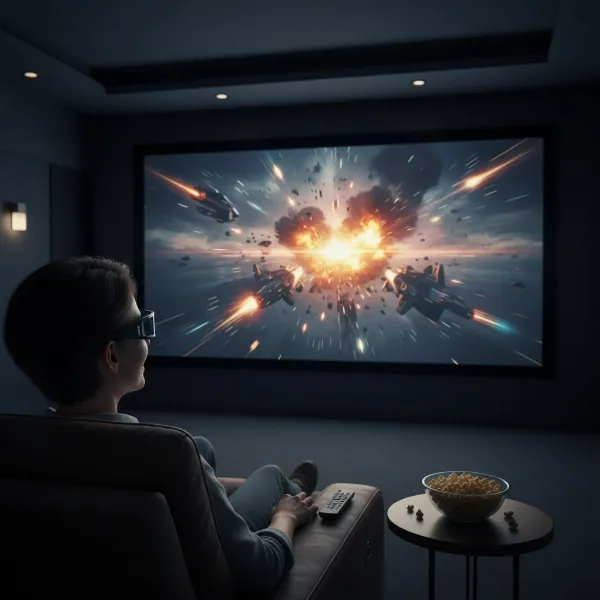 A person wearing active shutter 3D glasses watching a movie projected on a screen, with vivid 3D effects.
Exploring Passive 3D Projectors
Passive 3D technology offers an alternative approach to creating three-dimensional images, one that many people are familiar with from commercial cinemas. This method emphasizes viewer comfort and affordability in its glasses design, though it requires specific equipment for projection.
How Passive 3D Works
Passive 3D projection operates on the principle of light polarization. Unlike active 3D, which rapidly alternates images, passive 3D projectors display two images simultaneously, each polarized differently (e.g., one horizontally polarized for the left eye, one vertically polarized for the right eye, or using circular polarization). The passive 3D glasses contain polarized lenses that act as filters, allowing only the correctly polarized image to reach each eye. For instance, the left lens might only let through horizontally polarized light, while the right lens permits only vertically polarized light. Your brain then combines these distinct, simultaneously viewed images into a single 3D perception. Achieving this often requires either a specialized polarizing projector or a setup involving two projectors.
Advantages of Passive 3D
One of the most significant advantages of passive 3D is the glasses themselves. They are considerably cheaper, lighter, and more comfortable to wear than their active counterparts. Since they don’t contain any electronics, they don’t require batteries or charging, making them hassle-free and ideal for large groups or family viewing where multiple pairs are needed. Furthermore, passive 3D virtually eliminates flicker, as both images are displayed constantly, leading to a more comfortable and less fatiguing viewing experience, with less likelihood of inducing headaches. This also contributes to less “cross-talk,” where one eye inadvertently sees a faint image meant for the other.
Disadvantages of Passive 3D
The primary drawback of passive 3D projection, especially when using standard HD projectors, is a reduction in resolution for each eye. Because the projector splits the image across lines of pixels for each eye, each eye typically perceives only half of the vertical resolution. While a higher resolution projector (e.g., 4K) could mitigate this by effectively doubling the resolution for passive 3D, it still represents a compromise compared to active 3D’s full HD per eye. Another significant disadvantage is the requirement for a specialized projection screen, often a “silver screen” designed to properly reflect polarized light. These screens are considerably more expensive than standard white screens and are essential for the technology to work effectively, meaning you cannot simply project onto a wall. Additionally, tilting your head excessively can cause the 3D effect to diminish or disappear, particularly with linearly polarized setups. The initial setup can also be more complex and costly due to the need for specialized projectors or additional polarizing modules.
Ideal Use Cases
Passive 3D is particularly well-suited for environments where viewer comfort and the cost of glasses are paramount. It’s an excellent choice for family gatherings, parties, or educational settings where many people will be watching simultaneously. Enthusiasts willing to invest in specialized equipment, including a high-quality silver screen, might also prefer passive 3D for its flicker-free experience and comfortable glasses.
Key Factors to Consider When Choosing Your 3D Projector
Deciding between active and passive 3D projectors involves weighing several critical factors. Your ultimate choice should align with your specific viewing habits, room environment, and financial considerations.
-
Resolution and Image Quality: Active 3D typically delivers a full HD resolution to each eye, offering a sharper and more detailed 3D image. Passive 3D, while still providing a good experience, usually halves the vertical resolution for each eye, which might be noticeable to discerning viewers, though less so with higher native resolution projectors.
-
Glasses: Cost, Comfort, and Convenience: Passive 3D glasses are significantly cheaper, lighter, and don’t require batteries, making them ideal for large groups and extended viewing sessions. Active 3D glasses are more expensive, heavier, require charging, and can cause discomfort or pressure.
-
Screen Requirements: Active 3D projectors are highly versatile, working effectively with any standard white projector screen or even a painted wall. Passive 3D, however, mandates a specialized “silver screen” or another polarization-maintaining screen, which adds considerable expense and limits placement options.
-
Flicker and Eye Comfort: Passive 3D offers a virtually flicker-free experience, reducing eye strain and the potential for headaches. Active 3D, due to its rapid shuttering, can exhibit noticeable flicker for some individuals, especially with lower projector refresh rates, potentially leading to discomfort.
-
Total System Cost: While passive 3D glasses are cheap, the specialized projector and required silver screen can significantly increase the overall system cost. Active 3D projectors are generally more common and versatile with screens, but the recurring cost and maintenance of battery-powered glasses for multiple viewers should be factored in.
Active 3D vs. Passive 3D: A Detailed Comparison Table
To summarize the key differences and help you visualize the comparison, here is a detailed breakdown of Active 3D and Passive 3D projector technologies:
| Feature | Active 3D Projectors | Passive 3D Projectors |
|---|---|---|
| Technology | Shutter glasses, alternating frames | Polarized glasses, simultaneous polarized images |
| Image Resolution | Full HD per eye | Half HD vertical resolution per eye (typically) |
| Glasses Cost | More expensive (often $15-$100+ per pair) | Inexpensive (a few dollars per pair) |
| Glasses Comfort | Heavier, require batteries/charging, darker lenses, potential pressure | Lighter, no batteries/charging, comfortable for extended viewing |
| Flicker | Can be noticeable, especially at lower refresh rates, potential for eye strain/headaches | Virtually flicker-free, stable viewing experience, less eye strain |
| Cross-Talk | Can occur | Minimal |
| Screen Type | Any standard screen (white, gray) or wall | Requires specialized silver screen |
| Projector Type | Most “3D Ready” projectors are active-compatible | Requires specialized polarizing projector or dual projector setup |
| Setup Complexity | Generally simpler for projector unit | Can be more complex due to specialized screen and/or projector |
| Head Tilt | Generally tolerant | Can lose 3D effect if head is tilted too much |
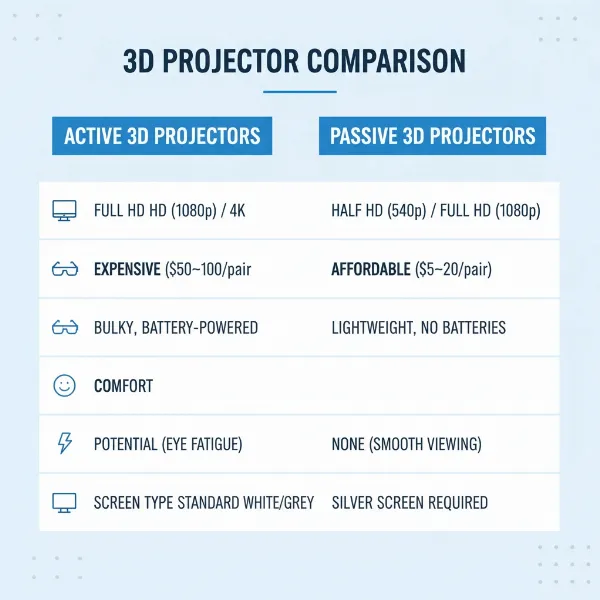 A visually appealing comparison table highlighting features of active vs. passive 3D projectors.
Top Considerations for Buying a 3D Projector
When you’re ready to invest in a 3D projector, beyond the active vs. passive debate, there are several practical steps to ensure you choose the best system for your needs.
-
Identify Your Primary Use: Are you mainly looking to watch 3D movies, play 3D games, or host group viewing parties? If cinematic quality and sharpness are paramount for a single viewer or a small dedicated audience, active 3D might appeal. For larger gatherings where comfort and affordability of glasses are key, passive 3D could be better.
-
Determine Your Total Budget: Don’t just budget for the projector. Consider the cost of multiple pairs of 3D glasses and, critically for passive systems, the significant expense of a specialized silver screen. For active 3D, factor in the cost of charging accessories or replacement batteries for glasses.
-
Assess Your Room Environment: Consider the ambient light in your viewing space. While silver screens for passive 3D can reflect more light, projectors generally perform best in dark rooms. Also, think about your seating arrangement and viewing angles, particularly if head tilt sensitivity is a concern for passive 3D.
-
Research Specific Models and Read Reviews: Once you have a clearer idea of your preferred technology, dive into reviews of specific 3D-capable projectors. Pay attention to user feedback regarding flicker, cross-talk, picture brightness, and overall 3D immersion.
-
Purchase from Reputable Retailers: Ensure you buy your projector and accessories from established vendors that offer good warranty policies and customer support. This provides peace of mind for your investment.
Maximizing Your 3D Projector Experience
Once you’ve made your choice and set up your 3D projector, a few practices can help ensure you get the best possible performance and longevity from your system.
-
Calibration for Optimal Image: Proper calibration of your projector can significantly enhance the 3D experience. Adjust brightness, contrast, color temperature, and sharpness to suit your room’s lighting and screen type. Some projectors offer specific 3D modes that fine-tune these settings automatically.
-
Maintenance Tips for Projector and Glasses: Regularly clean your projector’s lens with a microfiber cloth to prevent dust from clouding your image. For active 3D glasses, keep them charged and stored safely to protect the sensitive lenses. For passive glasses, simply keep them clean and scratch-free.
-
Troubleshooting Common 3D Issues: If you encounter issues like ghosting (seeing a faint double image), flicker, or a lack of depth, check your connections and projector settings. Ensure your glasses are properly synced (for active 3D) or that your viewing angle is optimal (for passive 3D). Sometimes, adjusting the projector’s 3D depth or parallax settings can also help fine-tune the effect.
Conclusion
Choosing between Active 3D and Passive 3D projectors ultimately comes down to a balance of image quality, cost, and viewing comfort. Active 3D excels with its full HD resolution per eye and versatility with screens, making it a strong contender for those seeking the sharpest detail. However, its more expensive, battery-powered glasses and potential for flicker can be drawbacks. Passive 3D, with its affordable, lightweight glasses and flicker-free experience, offers superior comfort for extended and group viewing, though it typically sacrifices some resolution and demands a specialized, costly screen. Both technologies offer a gateway to thrilling 3D content, allowing you to bring the magic of immersive visuals into your own home theater. Which 3D projector technology will bring your entertainment dreams to life?
Frequently Asked Questions
What is the main difference in image quality between Active 3D and Passive 3D on projectors?
The primary difference lies in resolution per eye. Active 3D delivers a full HD image to each eye, offering maximum sharpness and detail. Passive 3D typically halves the vertical resolution for each eye, which means a slight reduction in perceived detail compared to active 3D, especially on lower resolution projectors.
Can I use any projector screen for 3D content?
For Active 3D projectors, you can generally use any standard white or gray projector screen, or even a plain wall. However, Passive 3D projectors require a specialized “silver screen” that is designed to maintain light polarization, which is significantly more expensive and crucial for the 3D effect to work correctly.
Do 3D projectors cause eye strain or headaches?
Some individuals may experience eye strain, fatigue, or headaches with 3D projection, particularly with active 3D due to its rapid shuttering and potential for flicker. Passive 3D is generally considered more comfortable and less prone to flicker, which often reduces the likelihood of such discomfort during extended viewing sessions.