Transforming your home into a personal golf sanctuary hinges on one crucial component: the projector. Imagine stepping up to the tee, ready to drive down a virtual fairway, only to be met with a dim, pixelated, or shadowed image. The projector is the visual heart of your golf simulator, responsible for bringing courses to life and making every swing feel real. Choosing the right one can elevate your indoor golf experience from a simple practice session to an immersive journey through the world’s most renowned golf courses.
This comprehensive guide, informed by over a decade of hands-on experience in projection technology, will demystify the choices and help you select the perfect projector that aligns with your space, budget, and desired level of immersion. We’ll explore everything from the fundamental aspects of projector technology to crucial buying factors, comparisons of popular types, and top recommendations to ensure your home golf simulator delivers an unparalleled visual experience.
Understanding Projectors for Golf Simulators
At its core, a projector is an optical device that projects an image or moving images onto a projection screen or other surface. In a golf simulator, it takes the digital output from your launch monitor and software, displaying it as a large-scale, dynamic image on an impact screen. This visual feedback is paramount for realism, allowing you to track ball flight, navigate virtual courses, and truly feel immersed in the game.
The concept of projection dates back centuries, but modern projectors have evolved dramatically. From early slide projectors to the sophisticated digital devices we use today, technology has continually pushed the boundaries of image quality and versatility. For golf simulators, this evolution means access to projectors capable of handling specific demands that go beyond typical home theater needs. Unlike standard entertainment projectors, golf simulator projectors must perform under unique conditions, including tight throw distances, potentially varied ambient light, and the need for consistent, distortion-free visuals during the fast motion of a golf swing.
Key Factors When Choosing a Golf Simulator Projector
Selecting the ideal projector for your home golf simulator involves evaluating several technical specifications to ensure compatibility with your setup and optimal performance.
Brightness (Lumens)
Projector brightness, measured in lumens, is critical for image clarity, especially in environments with ambient light. While a completely dark room might get by with fewer lumens, most home golf simulators are in garages, basements, or multi-purpose rooms where some light is present.
- 1,500-2,000 lumens: Minimum for dedicated, very dark rooms.
- 2,200-2,500 lumens: Ideal for most indoor setups with some light control.
- 3,000+ lumens: Best for brighter spaces, garages, or multi-purpose rooms with significant ambient light.
|
Our Picks for the Best projector in 2026
As an Amazon Associate I earn from qualifying purchases.
|
||
| Num | Product | Action |
|---|---|---|
| 1 | Projector-4K with WiFi and Bluetooth:[3500 ANSI/60W Dolby Audio/Official Licensed Apps], Outdoor-Projector with Smart OS 2.0 & AI Auto Focus,ONOAYO ONO5Pro 2.0 Smart Movie Projector for Indoor/Outdoor |
![Check Projector-4K with WiFi and Bluetooth:[3500 ANSI/60W Dolby Audio/Official Licensed Apps], Outdoor-Projector with Smart OS 2.0 & AI Auto Focus,ONOAYO ONO5Pro 2.0 Smart Movie Projector for Indoor/Outdoor on Amazon](https://projectorcam.com/wp-content/plugins/amazon-tables/assets/images/buy.png)
|
| 2 | Epson Pro EX9270 Wireless 1080p 3LCD Projector 4,100 Lumens Color and White Brightness, Apple AirPlay, Miracast, Stream from Phone or Laptop, 2 HDMI Ports, 1.6x Optical Zoom, Built-In Speaker |
|
| 3 | Aurzen Roku TV Smart Projector with Wifi and Bluetooth, Roku Streaming Experience Built-in, 1080P FHD, DoIby Audio, Auto Focus & Keystone, Zoom, Movie Portable Outdoor Mini Projector, White |
|
| 4 | HAPPRUN Native 1080P Bluetooth Mini Projector, Full HD Portable Outdoor Movie Projector with Built-in Speaker, Compatible with Smartphone, HDMI, USB, AV, Fire Stick, PS5 for Home, Bedroom, Outdoor Use |
|
| 5 | Epson Pro EX11000 3-Chip 3LCD Full HD 1080p Wireless Laser Projector, 4,600 Lumens Color/White Brightness, Miracast, 2 HDMI Ports, USB Power for Streaming, Built-in 16W Speaker |
|
| 6 | 【Official Licensed Google TV】4K Smart Projector with WiFi and Bluetooth, VOPLLS Outdoor Projectors with Dolby/Auto Focus, Portable Movie Phone Wireless Gaming Wifi Proyector for Bedroom/Home/Celling |
|
| 7 | 【Officially-Licensed APP & Native 1080P】Thinnest 1.81\" Smart Mini Projector with WiFi and Bluetooth, Auto Focus & Keystone Portable Outdoor Projector, VOPLLS 4K Support Home Movie Projector |
|
| 8 | [Built-in Official Apps/4K Support] Smart Outdoor Projector with WiFi and Bluetooth, 800ANSI Movie Projector, DoIby Audio with Dual Speaker, Auto Focus w/ YouTube&PrimeVideo Proyector, Upgrad P62 Pro |
|
| 9 | [3500 ANSI/ Official Apps/65W Audio] Outdoor 4K Projector with WiFi and Bluetooth, Auto Focus, Auto Keystone Smart Projector Support DoIby Audio, 2026 Upgrade GO2 Short Throw Projector with 360°Stand |
|
| 10 | 1500 ANSI Official Licensed Google TV Smart Projector, HAPPRUN 4K Full HD Home Theater with Auto Focus, Dolby Sound, Wi-Fi Bluetooth, Built-in Apps, Compatible with Phone & PC, Indoor & Outdoor Use |
|
A good rule of thumb is to aim slightly higher than you think you need, as you can always reduce brightness settings, but you cannot increase a projector’s maximum output.
Resolution
Resolution refers to the number of pixels in the projected image, directly impacting its sharpness and detail.
- 1080p (Full HD): (1920×1080) is widely considered the standard for excellent image quality in golf simulators. It provides crisp, clear visuals that are more than sufficient for an immersive experience.
- 4K (UHD): (3840×2160 or similar) offers significantly more detail, making graphics appear incredibly sharp and lifelike. While luxurious and impressive, 4K projectors are more expensive and require a powerful PC to run smoothly. For screens 3.6 meters wide or larger, the difference between 1080p and 4K is very noticeable.
Contrast Ratio
The contrast ratio defines the difference between the brightest whites and the darkest blacks a projector can produce. A higher contrast ratio results in more vibrant colors, greater depth, and more realistic shadow detail, enhancing the overall visual quality of your golf course simulations.
Light Source (Lamp Life)
The light source is a major factor in both performance and maintenance.
- Traditional Lamps: Generally more affordable upfront but have a shorter lifespan (typically 2,000-4,000 hours) and require periodic, sometimes costly, bulb replacements. Their brightness also degrades faster over time.
- LED Projectors: Offer longer lifespans (up to 20,000 hours) and are energy-efficient, producing pure, saturated colors. However, they traditionally offer lower brightness compared to lamp or laser models, which might be a limitation in brighter simulator rooms.
- Laser Projectors: Represent the pinnacle of light source technology, boasting exceptionally long lifespans (20,000-30,000+ hours), consistent brightness output over their lifetime, and virtually instant on/off capabilities. Laser engines also often have sealed designs, eliminating the need for filters and reducing maintenance. While they come with a higher initial cost, their longevity and minimal upkeep can provide long-term value.
Throw Ratio & Distance
The throw ratio is a crucial specification that determines how far the projector needs to be from the screen to produce a given image size.
- Short-Throw Projectors: These are highly recommended for golf simulators, typically having a throw ratio between 0.4:1 and 0.8:1. They can project a large image from a very short distance (e.g., 6-8 feet from the screen), which is ideal for avoiding shadows from your swing and fitting into smaller room depths common in home setups.
- Standard-Throw Projectors: Require a much greater distance (10-15 feet or more) to fill the screen, making them generally unsuitable for most home golf simulator installations where space is limited.
Aspect Ratio
The aspect ratio describes the shape of the projected image (width to height). Your projector’s aspect ratio should ideally match your impact screen’s shape for an undistorted image. While 16:9 (widescreen) is common for movies, many golf simulator screens are designed with a 4:3 aspect ratio to better simulate the vertical field of view of a golf course. Some projectors offer flexibility, supporting both.
Keystone Correction vs. Lens Shift
These features help square the image if the projector isn’t perfectly aligned with the screen.
- Keystone Correction: A digital adjustment that corrects skewed images. Most projectors offer vertical and sometimes horizontal keystone. However, extreme digital keystone correction can subtly degrade image clarity.
- Lens Shift: An optical mechanism that physically moves the lens to adjust the image position without tilting the projector. This method is superior as it preserves image sharpness and is found in higher-end models.
Connectivity
Modern projectors typically offer a range of connectivity options:
- HDMI: The most common and recommended for high-definition video and audio.
- VGA: Older analog connection, generally avoided for best image quality.
- USB: Useful for direct media playback from a flash drive or for power.
- Wireless (Wi-Fi/Bluetooth): Offers convenience for streaming or connecting accessories.
Input Lag
For a dynamic experience like golf simulation, low input lag (the delay between your computer sending a signal and the projector displaying it) is important. Aim for projectors with input lag under 50ms for the most responsive gameplay.
Dedicated Golf Mode
Some projectors feature a “Golf Mode” or similar setting, which uses smart algorithms to boost environmental colors and enhance greens and blues, making virtual courses appear more vibrant and realistic.
Comparing Projector Technologies
The core technology a projector uses to create an image significantly impacts its performance characteristics.
DLP Projectors
Digital Light Processing (DLP) projectors use millions of tiny mirrors on a chip to reflect light, creating the image.
- Pros: Known for smooth motion handling, deep black levels, and high contrast ratios. They are often durable and, particularly with sealed laser engines, can be very low maintenance. Many golf simulator-specific projectors utilize DLP technology. DLP projectors are recommended for extended use (over 12 hours a day).
- Cons: Some budget DLP models can exhibit a “rainbow effect” (a fleeting colored artifact) for sensitive viewers, though this is less common in higher-end units.
LCD Projectors
Liquid Crystal Display (LCD) projectors use three separate LCD panels (one for red, green, and blue) to create and combine the image.
- Pros: Excel at producing bright, accurate, and vivid colors with no “rainbow effect.” They tend to have excellent color brightness.
- Cons: Some users might notice a subtle “screen door effect” where individual pixels are visible. Many LCD lamp projectors require regular filter cleaning or replacement, which can be an additional maintenance task.
LED Projectors
LED projectors use Light Emitting Diodes as their light source.
- Pros: Offer very long lifespans (up to 20,000-30,000 hours), are energy-efficient, and produce rich, pure colors. They are also known for quick startup times.
- Cons: Generally, LED projectors have lower lumen output compared to lamp or laser projectors, making them less suitable for brighter golf simulator environments where high brightness is paramount.
Laser Projectors
Laser projectors utilize laser diodes as their light source, often in conjunction with phosphor wheels.
- Pros: Boast exceptional lifespans (20,000+ hours), incredibly consistent brightness over their operational life, and require virtually no maintenance thanks to sealed, filter-free designs. They offer quick on/off functionality and excellent color reproduction.
- Cons: The primary drawback is their higher initial purchase price compared to lamp-based or even many LED projectors.
Detailed Comparison Table of Projector Types
| Feature | DLP Projector | LCD Projector | LED Projector | Laser Projector |
|---|---|---|---|---|
| Light Source | Lamp or Laser | Lamp or Laser | LED | Laser |
| Lifespan | 2,000-4,000 hrs (lamp), 20,000+ hrs (laser) | 2,000-4,000 hrs (lamp), 20,000+ hrs (laser) | 20,000-30,000 hrs | 20,000-30,000+ hrs |
| Brightness | Excellent (can be very high with lamp/laser) | Excellent (good color brightness) | Moderate (often lower lumen output) | Excellent (consistent high brightness) |
| Color Accuracy | Very good, but some may see rainbow effect | Excellent (vibrant, natural colors) | Excellent (pure, saturated colors) | Excellent (vibrant, stable colors) |
| Contrast | High contrast, deep blacks | Good contrast | Good contrast | Excellent contrast, dynamic range |
| Cost | Moderate to High | Moderate to High | Moderate | High |
| Maintenance | Lamp replacement (if applicable), generally low | Lamp replacement (if applicable), filter cleaning | Very low | Very low (sealed engines, no filters) |
| Motion | Smooth | Good | Good | Excellent |
| Best For | Extended use sims, general golf simulation | Home theater, accurate color enthusiasts | Portable setups, low ambient light | Premium builds, low maintenance, long-term investment |
Top Projectors for Home Golf Simulators
Based on current trends and expert reviews, here are some highly-regarded projectors, categorized by price range, that excel in home golf simulator environments.
Budget-Friendly Projectors (Under $1500)
For golfers looking to get into home simulation without breaking the bank, these models offer excellent value.
- BenQ TH671ST: This short-throw projector is frequently praised for its performance relative to its price. It offers Full HD 1080p resolution and a solid 3,000 lumens of brightness, making it suitable for many indoor setups. Its short-throw ratio (0.69-0.83) is perfect for preventing shadows.
- Optoma EH200ST: Merging performance with affordability, this short-throw projector delivers high resolution and bright output, making it an ideal choice for budget-conscious enthusiasts.
Mid-Range Projectors ($1500 – $3000)
These projectors offer enhanced features, higher brightness, or improved resolution for a more refined experience.
- BenQ TK710STi 4K Golf Simulator Projector: A popular choice, this projector provides 4K resolution for sharper visuals on impact screens, combined with short-throw flexibility and balanced brightness.
- BenQ AH700ST: This short-throw laser projector offers 4000 lumens with 1080p resolution and a dustproof, laser light source for worry-free use, ensuring a bright picture even in ambient light.
- NEC NP-PE455UL: Standing out as an excellent HD projector, it boasts 4,500 lumens and WUXGA (1920×1200) resolution for sharper images than standard 1080p. As a laser LCD projector, it also offers 4K compatibility.
- Panasonic PT-VMZ51: This model is recognized for its overall performance and image correction capabilities, featuring 5,200 lumens, a 16:10 native aspect ratio, and a 20,000-hour laser light source.
Premium Projectors (Above $3000)
For those seeking the ultimate golf simulator experience with top-tier performance, these projectors deliver exceptional clarity, brightness, and advanced features.
- BenQ LK936ST 4K UHD Golf Projector: Highly regarded in the golf simulator community, this 4K laser projector offers 5,100 lumens and a short-throw lens. It’s designed for dedicated simulator spaces, providing incredible picture quality for both golf and home theater.
- LG ProBeam BU53RG: A premium option that brings high brightness and advanced features, suitable for a sophisticated golf simulation setup.
- Appotronics MK625B Golf Simulator Projector: Known for high performance, offering excellent brightness and clarity for discerning users.
Golf Simulator Projector Buying Guide
Making the right choice involves a methodical approach, ensuring your investment enhances your golfing journey.
- Assess Your Space: Crucially, measure your room’s dimensions (height, width, depth). Consider the ideal distance from your hitting mat to the impact screen (typically 10-15 feet) and where your projector can be mounted to avoid shadows. The amount of ambient light in the room will dictate the necessary lumen output.
- Determine Your Budget: Projectors range significantly in price. Balance your desired features with what you’re willing to spend, remembering that higher-end models often offer greater longevity and performance.
- Match Projector to Screen: Ensure the projector’s aspect ratio (e.g., 4:3) and throw ratio are compatible with your impact screen’s dimensions and placement.
- Read Reviews and Ask for Recommendations: Leverage community forums, expert reviews, and trusted retailers. Fellow golf simulator enthusiasts and specialists can provide invaluable insights based on real-world experience.
- Consider Mounting Options: Most home setups utilize a ceiling mount to keep the projector out of the swing path. Floor-mounted enclosures are also an option, offering protection from errant shots.
- Understand Warranty and Support: Check the manufacturer’s warranty and customer support options, especially for high-value purchases.
> “The projector is the visual engine of your golf sim. It’s not where you want to skimp. Make sure it matches your screen, fits your room, and provides enough light for crisp, consistent results.” – The Smart Home Hookup, Golf Sim Projector Expert
Maintenance Tips for Your Golf Simulator Projector
Proper maintenance extends the life and maintains the performance of your projector.
- Cleaning: Regularly clean the projector lens with a soft, lint-free cloth designed for optics. For the exterior, use a dry or slightly damp cloth. Pay attention to vents, ensuring they remain clear for optimal airflow. Projectors with sealed laser engines often require less internal cleaning as they are designed to be dust-resistant.
- Filter Maintenance (for LCDs): If your projector uses a lamp and has an air filter (common in LCD models), check and clean it regularly according to the manufacturer’s instructions. A clogged filter can lead to overheating and reduced performance.
- Proper Shutdown: Allow lamp-based projectors to cool down properly before unplugging or moving them, as the cooling fan continues to run briefly after shutdown to protect the lamp. Laser projectors, with their instant on/off capabilities, are less sensitive to this.
- Storage: When not in use for extended periods, store your projector in a cool, dry place, ideally in its original packaging or a protective case, to shield it from dust and potential damage.
Conclusion
Choosing the best projector for your home golf simulator is a significant decision that profoundly impacts your immersive golf experience. By understanding key factors like brightness, resolution, light source, and throw ratio, you can confidently select a projector that transforms your space into a professional-grade golf simulation environment. Whether you prioritize cutting-edge 4K visuals, long-lasting laser technology, or a budget-friendly yet capable option, there’s a perfect projector out there for you. With the right visual engine, every swing will feel like you’re on the course, making practice sessions more engaging and rounds more exhilarating. What will your next golf simulator round look like with the ideal projector?
Frequently Asked Questions
What is a short throw projector and why is it important for golf simulators?
A short-throw projector can display a large image from a very close distance, typically 6-8 feet from the screen. This is crucial for golf simulators as it prevents golfers from casting shadows on the impact screen during their swing, ensuring an uninterrupted and immersive visual experience in confined spaces.
How many lumens do I need for a golf simulator projector?
The ideal lumen count depends on your room’s ambient light. For very dark rooms, 1,500-2,000 lumens might suffice. Most indoor setups benefit from 2,200-2,500 lumens. For brighter rooms, garages, or multi-purpose spaces, 3,000 lumens or more are recommended to ensure a clear and vibrant image.
Is 4K resolution necessary for a home golf simulator?
While 1080p resolution provides crisp and clear visuals that are perfectly adequate for most golf simulators, 4K offers superior detail and realism. It’s a luxury that significantly enhances image sharpness, especially on larger impact screens, but it comes at a higher cost and requires a more powerful computing setup.
DLP vs. LCD: Which is better for a golf simulator?
Both DLP and LCD projectors can work well. DLP projectors are often favored for golf simulators due to their smoother motion handling and durability for extended use. LCD projectors are known for bright, accurate colors. Advancements in both technologies mean that specific models from either type can be excellent choices, but for heavy, prolonged use, DLP with a laser light source is often recommended.
How can I prevent shadows on my golf simulator screen?
The most effective way to prevent shadows is by using a short-throw projector. Its ability to project a large image from a close distance means it can be positioned above or very near the hitting area without light being blocked by your swing. Proper mounting and throw ratio calculations are essential.
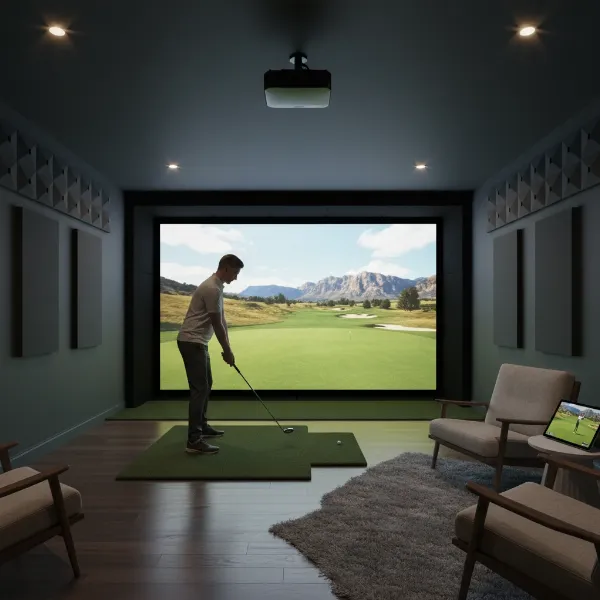 An overhead shot of a short-throw projector mounted in a home golf simulator setup, projecting a vibrant course image onto an impact screen with a golfer preparing to swing.
How often do I need to replace a projector lamp in a golf simulator setup?
For lamp-based projectors, typical lamp life is 2,000 to 4,000 hours. This means replacement might be needed every 1-2 years with regular simulator use. In contrast, LED and laser projectors offer significantly longer lifespans, often exceeding 20,000 to 30,000 hours, virtually eliminating the need for lamp replacement.