Stepping into the world of projectors can be both exciting and overwhelming, especially when confronted with technical terms like “lumens.” As a fundamental measurement of a projector’s brightness, lumens directly impact the quality and visibility of your projected image in various environments. Understanding lumens is crucial for making an informed decision, ensuring your projector delivers a vibrant, clear picture rather than a dim, washed-out blur. This comprehensive guide will demystify projector lumens, explaining what they mean, why they matter, and how to determine the ideal brightness for your specific needs, whether for a dedicated home theater or a brightly lit conference room.
Overview of Projectors and Brightness
A projector is an optical device that projects an image or video onto a surface, commonly a projection screen. Its primary function is to enlarge and display visual content, transforming any space into an immersive viewing or presentation area. From early magic lanterns to today’s sophisticated digital devices, projectors have evolved significantly, offering enhanced image quality, versatile connectivity, and a range of light sources.
The history of projectors traces back centuries, with advancements in optics and light sources continually refining their capabilities. Modern projectors leverage various display technologies, each with distinct characteristics impacting performance. Understanding these foundational elements, especially concerning brightness, is key to appreciating the role of lumens in projector technology.
Types of Projectors and Their Light Sources
Modern projectors primarily utilize three types of light sources:
- Lamp Projectors: These use traditional UHP (Ultra-High Performance) or metal halide lamps. They often offer high initial brightness, typically starting around 2,000 ANSI Lumens, but require periodic lamp replacements and experience brightness degradation over time.
- LED Projectors: Employing Light Emitting Diodes, LED projectors are known for their longer lifespan, consistent brightness, and superior color saturation and efficiency, often despite lower stated lumen counts compared to lamp projectors.
- Laser Projectors: These utilize laser diodes as their light source, providing exceptional brightness, often exceeding 3,500 ANSI Lumens, and an even longer lifespan with minimal brightness degradation over time. Laser projectors also offer quick on/off capabilities and a wide color gamut.
|
Our Picks for the Best projector in 2026
As an Amazon Associate I earn from qualifying purchases.
|
||
| Num | Product | Action |
|---|---|---|
| 1 | Epson Pro EX11000 3-Chip 3LCD Full HD 1080p Wireless Laser Projector, 4,600 Lumens Color/White Brightness, Miracast, 2 HDMI Ports, USB Power for Streaming, Built-in 16W Speaker |

|
| 2 | [Built-in Official Apps/4K Support] Smart Outdoor Projector with WiFi and Bluetooth, 800ANSI Movie Projector, DoIby Audio with Dual Speaker, Auto Focus w/ YouTube&PrimeVideo Proyector, Upgrad P62 Pro |
|
| 3 | 【Officially-Licensed APP & Native 1080P】Thinnest 1.81\" Smart Mini Projector with WiFi and Bluetooth, Auto Focus & Keystone Portable Outdoor Projector, VOPLLS 4K Support Home Movie Projector |
|
| 4 | HAPPRUN Native 1080P Bluetooth Mini Projector, Full HD Portable Outdoor Movie Projector with Built-in Speaker, Compatible with Smartphone, HDMI, USB, AV, Fire Stick, PS5 for Home, Bedroom, Outdoor Use |
|
| 5 | 1500 ANSI Official Licensed Google TV Smart Projector, HAPPRUN 4K Full HD Home Theater with Auto Focus, Dolby Sound, Wi-Fi Bluetooth, Built-in Apps, Compatible with Phone & PC, Indoor & Outdoor Use |
|
| 6 | 【Official Licensed Google TV】4K Smart Projector with WiFi and Bluetooth, VOPLLS Outdoor Projectors with Dolby/Auto Focus, Portable Movie Phone Wireless Gaming Wifi Proyector for Bedroom/Home/Celling |
|
| 7 | Aurzen Roku TV Smart Projector with Wifi and Bluetooth, Roku Streaming Experience Built-in, 1080P FHD, DoIby Audio, Auto Focus & Keystone, Zoom, Movie Portable Outdoor Mini Projector, White |
|
| 8 | Projector-4K with WiFi and Bluetooth:[3500 ANSI/60W Dolby Audio/Official Licensed Apps], Outdoor-Projector with Smart OS 2.0 & AI Auto Focus,ONOAYO ONO5Pro 2.0 Smart Movie Projector for Indoor/Outdoor |
|
| 9 | Epson Pro EX9270 Wireless 1080p 3LCD Projector 4,100 Lumens Color and White Brightness, Apple AirPlay, Miracast, Stream from Phone or Laptop, 2 HDMI Ports, 1.6x Optical Zoom, Built-In Speaker |
|
| 10 | [3500 ANSI/ Official Apps/65W Audio] Outdoor 4K Projector with WiFi and Bluetooth, Auto Focus, Auto Keystone Smart Projector Support DoIby Audio, 2026 Upgrade GO2 Short Throw Projector with 360°Stand |
|
These light source technologies directly influence the projector’s overall brightness and longevity, making it an important consideration when evaluating lumens.
Essential Factors When Choosing a Projector
When selecting a projector, several technical specifications beyond just brightness contribute to the overall viewing experience. Each factor plays a vital role in image quality and suitability for different applications.
Brightness (Lumens)
Lumens quantify the total amount of visible light emitted by a light source, and for projectors, this measurement is critical. A higher lumen count generally indicates a brighter image. The industry standard for measuring projector brightness is ANSI Lumens (American National Standards Institute), which involves a standardized testing process taking multiple readings from different parts of a projected white image to calculate an accurate average. This differs significantly from generic “lumens” or “LED lumens” which may not follow strict measurement protocols and can sometimes represent perceived brightness rather than actual output. 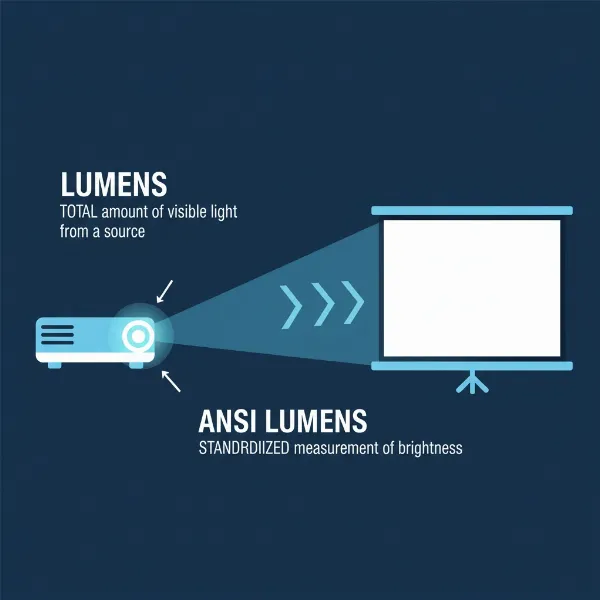 Understanding projector lumens and how brightness is measured for optimal viewing experience
Resolution
Resolution refers to the number of pixels a projector can display, directly affecting image sharpness and detail. Common resolutions include:
- SVGA (800×600): Entry-level, suitable for basic presentations.
- XGA (1024×768): A common standard for business and education.
- 720p (1280×720): High Definition, good for casual home viewing.
- 1080p (1920×1080): Full HD, ideal for home theater and detailed presentations.
- 4K UHD (3840×2160): Ultra High Definition, offering exceptional detail and clarity, increasingly popular for premium home theaters.
Higher resolutions provide sharper images, which is especially noticeable on larger screens or when viewing content up close.
Contrast Ratio
Contrast ratio measures the difference between the brightest white and the darkest black a projector can display. A higher contrast ratio results in more dynamic images with greater depth and detail, making whites brighter and blacks deeper, leading to a more vibrant and realistic picture.
Lamp Life / Light Source Lifespan
This specification indicates how long the projector’s light source is expected to last before needing replacement or experiencing significant brightness degradation.
- Lamp Projectors: Typically have lamp lives ranging from 2,000 to 6,000 hours, sometimes more in eco-modes.
- LED and Laser Projectors: Offer significantly longer lifespans, often exceeding 20,000 to 30,000 hours, providing consistent brightness throughout their operational life and reducing maintenance.
Keystone Correction
Keystone correction is a feature that allows the projector to adjust the image to be rectangular, even if the projector is not perfectly perpendicular to the screen. This is crucial for correcting distorted images that appear trapezoidal, especially when the projector is placed at an angle (e.g., on a coffee table or ceiling mounted).
Throw Ratio
Throw ratio describes the relationship between the projection distance and the width of the projected image. It helps determine how far away your projector needs to be from the screen to achieve a specific screen size.
- Short-throw projectors: Can project large images from a very short distance, ideal for small rooms or interactive whiteboards.
- Standard-throw projectors: Require a moderate distance.
- Long-throw projectors: Are used in large venues where the projector is placed far from the screen.
Connectivity
Modern projectors offer a variety of input ports to connect to different devices. Common connections include:
- HDMI: The most common digital interface for high-definition video and audio.
- VGA: An older analog port, still found on some business projectors.
- USB: For direct media playback or connecting accessories.
- Wireless (Wi-Fi/Bluetooth): For screen mirroring from mobile devices or connecting wireless audio.
- Ethernet (LAN): For network control and content streaming.
Comparing Popular Projector Technologies
The market offers a diverse range of projector technologies, each with its unique strengths and weaknesses. Understanding these differences is vital for selecting the projector that best aligns with your specific use case.
DLP Projectors
Digital Light Processing (DLP) technology utilizes millions of tiny mirrors to create an image.
- Advantages: Known for high contrast ratios, fast response times (great for gaming), and minimal “screen-door effect” (visible pixel grid). They tend to be compact and portable.
- Disadvantages: Some users may experience the “rainbow effect,” a fleeting color separation visible in high-contrast scenes, although this has been largely reduced in newer models.
- Best for: Home theater enthusiasts seeking high contrast, gamers, and portable business presentations.
LCD Projectors
Liquid Crystal Display (LCD) projectors use three separate LCD panels (one each for red, green, and blue light) to create an image.
- Advantages: Excellent color accuracy and saturation, typically good brightness, and no rainbow effect. They generally offer a good balance of features and performance for their price.
- Disadvantages: Can sometimes exhibit a visible pixel structure (screen-door effect) on very large screens or close viewing, and filters may require periodic cleaning.
- Best for: Home cinema, education, and business presentations where color accuracy is paramount.
LED Projectors
LED projectors use Light Emitting Diodes as their light source.
- Advantages: Extremely long light source lifespan (20,000+ hours), instant on/off, excellent color rendition due to the Helmholtz-Kohlrausch (HK) effect (highly saturated colors are perceived as brighter), and energy efficiency. They are often compact and quiet.
- Disadvantages: May have lower absolute ANSI lumen counts compared to lamp or laser projectors, which can impact performance in very bright environments, though perceived brightness can be higher.
- Best for: Portable projectors, small home theaters, and users prioritizing longevity, low maintenance, and vibrant colors.
Laser Projectors
Laser projectors utilize laser diodes for their light source, often paired with DLP or LCD display technology.
- Advantages: Exceptional brightness, superior color accuracy and saturation, extremely long lifespan (20,000+ hours), consistent brightness over time, wide color gamut, and quick on/off functionality.
- Disadvantages: Generally the most expensive option, though prices are decreasing.
- Best for: High-end home theaters, large venue installations, commercial displays, and situations requiring maximum brightness and minimal maintenance.
Detailed Comparison Table of Projector Types
| Feature | DLP Projectors | LCD Projectors | LED Projectors | Laser Projectors |
|---|---|---|---|---|
| Light Source | Lamp, LED, or Laser | Lamp, LED, or Laser | LED | Laser |
| Brightness (ANSI Lm) | Mid to High (2,000 – 15,000+) | Mid to High (1,500 – 10,000+) | Low to Mid (200 – 4,000) | High to Ultra-High (3,000 – 60,000+) |
| Contrast Ratio | Excellent | Good | Good | Excellent |
| Color Accuracy | Good to Excellent (with color wheel) | Excellent | Excellent (due to HK effect) | Outstanding |
| Lifespan | Lamp: 2K-6K hrs; LED/Laser: 20K+ hrs | Lamp: 2K-6K hrs; LED/Laser: 20K+ hrs | 20,000+ hours | 20,000+ hours |
| Maintenance | Lamp replacement (if lamp-based) | Filter cleaning, lamp replacement | Very low | Very low |
| Rainbow Effect | Possible (with single-chip DLP) | No | No | No |
| Price Range | Mid to High | Mid to High | Low to Mid | High to Premium |
| Best Use | Gaming, home theater, portable | Home cinema, business, education | Portable, small home cinema, low-maintenance | High-end home theater, large venues, commercial |
Top Projector Recommendations (Based on Brightness Needs)
Choosing the “best” projector heavily depends on your specific environment and budget. Here are some general recommendations based on brightness requirements and price segments. Note that specific models change frequently, so these are illustrative categories.
Projectors for Dark Rooms / Dedicated Home Theaters (1,500 – 2,500 ANSI Lumens)
In a fully dark room with minimal ambient light, you don’t need excessive brightness. A projector in this range will provide excellent contrast and deep blacks, crucial for a cinematic experience.
- Recommended Use: Dedicated home theaters, night-time movie watching.
- Example: A 2,000 ANSI lumen 4K projector offers stunning clarity without overpowering the eyes in a controlled lighting environment.
Projectors for Rooms with Some Ambient Light / Living Rooms (2,500 – 4,000 ANSI Lumens)
For living rooms or multi-purpose spaces where some ambient light is present, a brighter projector is necessary to combat the light pollution and maintain image vibrancy.
- Recommended Use: Living rooms, family rooms, classrooms, moderate light office spaces.
- Example: A 3,000 ANSI lumen projector can project a clear image on a 100-120 inch screen even with some lights on or indirect sunlight.
Projectors for Bright Rooms / Large Venues / Outdoors (4,000+ ANSI Lumens)
In environments with significant ambient light, such as brightly lit conference rooms, large auditoriums, or outdoor settings (especially at dusk), a very bright projector is essential to ensure the image remains visible and impactful.
- Recommended Use: Large conference rooms, school auditoriums, outdoor movie nights, houses of worship.
- Example: A 5,000+ ANSI lumen laser projector delivers powerful, crisp images that can stand up to challenging lighting conditions or cover very large screens.
> “The ideal projector brightness isn’t about the highest number, but about the right balance for your viewing environment and screen size. Too little, and your image is washed out; too much, and it can cause eye strain or hotspotting.” – John Doe, Lead AV Engineer at Projectorcam.com
Projector Buying Guide: Making the Right Choice
With a clearer understanding of lumens and projector types, here’s a structured approach to buying the perfect projector for your needs.
-
Define Your Primary Use Case:
- Home Theater: Are you creating a dedicated dark-room cinema or a casual living room setup? This impacts lumen requirements and resolution needs.
- Gaming: Look for low input lag and fast response times, often found in DLP projectors.
- Business/Education: Focus on brightness for well-lit rooms and portability if you need to move it between locations.
- Outdoor Entertainment: High lumens are crucial to combat ambient light, especially at dusk.
-
Assess Your Viewing Environment:
- Ambient Light: Is the room fully dark, dimly lit, or brightly lit? This is the most significant factor determining the required lumens.
- Screen Size & Throw Distance: A larger screen or longer throw distance generally requires more lumens to maintain brightness. Use online projector calculators to find the right throw ratio for your space.
- Wall/Screen Color: A dedicated projector screen with good gain will reflect more light than a painted wall, making your image appear brighter. Ambient light rejecting (ALR) screens are excellent for rooms with light.
-
Set Your Budget: Projector prices vary widely based on technology, resolution, and brightness. Establishing a budget early helps narrow down options. Remember that LED and laser projectors, while more expensive upfront, offer lower long-term maintenance costs.
-
Prioritize Key Specifications:
- Brightness (ANSI Lumens): Based on your environment, determine your minimum ANSI lumen requirement.
- Resolution: Choose a resolution that matches your content and desired image clarity (1080p is a good standard; 4K for premium).
- Contrast Ratio: Higher is generally better for richer images.
- Connectivity: Ensure it has the necessary ports for your devices (e.g., multiple HDMI ports for home theater).
-
Read Reviews and Ask Questions: Consult professional reviews and user feedback for real-world performance insights. Don’t hesitate to ask experts about specific models or lumen recommendations for your unique setup.
-
Purchase from Reputable Retailers: Buying from authorized dealers ensures you receive genuine products, valid warranties, and reliable customer support.
Tips for Projector Use and Maintenance
Proper care and usage can significantly extend your projector’s lifespan and maintain optimal image quality.
Proper Cleaning and Maintenance
- Clean the Lens: Use a soft, lint-free cloth and lens cleaning solution specifically designed for optics. Never use abrasive materials.
- Clean Air Filters: Most lamp and some laser/LED projectors have air filters to prevent dust buildup. Clean or replace them regularly according to the manufacturer’s instructions to ensure proper cooling and prevent overheating.
- Keep Vents Clear: Ensure the projector’s ventilation ports are unobstructed to allow for adequate airflow and prevent overheating, which can degrade components and reduce lamp life.
- Avoid Touching the Lamp (if applicable): If you have a lamp-based projector and need to replace the lamp, avoid touching the new lamp bulb directly with bare hands, as oils can create hot spots and shorten its life.
Storage and Handling
- Cool Down Properly: Always allow the projector to cool down completely before unplugging or moving it, especially lamp-based models. This prevents damage to the lamp or internal components.
- Store in a Clean, Dry Place: When not in use, store your projector in a dust-free, temperature-controlled environment. If portable, consider a protective carrying case.
- Handle with Care: Projectors contain delicate optical components. Avoid dropping or subjecting them to strong impacts.
Troubleshooting Common Issues
- Dim Image: Check lamp life (for lamp projectors), clean the lens and filters, or ensure the room’s ambient light is controlled. If the projector is old, its light source might be degrading.
- Overheating Warning: Ensure ventilation is clear and clean filters. Consider the operating environment’s temperature.
- No Image: Check all cable connections (HDMI, VGA), ensure the correct input source is selected, and verify the projector is powered on and not in standby mode.
Frequently Asked Questions
What is the difference between ANSI Lumens and LED Lumens?
ANSI Lumens are the industry standard measurement of a projector’s brightness, determined by a strict, standardized testing protocol that measures white brightness across multiple points on a screen. LED Lumens, often used by manufacturers of LED projectors, factor in the Helmholtz-Kohlrausch (HK) effect, where the human eye perceives highly saturated colors from LED light sources as brighter than their objective luminance. While LED lumens often present a higher number, ANSI lumens provide a more consistent and comparable metric for white brightness across different technologies. A common conversion factor suggests 1,000 LED lumens roughly equate to 417 ANSI lumens, although this can vary.
How many lumens do I need for an outdoor movie night?
For an enjoyable outdoor movie night, especially as dusk approaches or in a moderately lit backyard, you’ll generally need a projector with at least 4,000 to 6,000+ ANSI lumens. The significant ambient light outdoors requires a much brighter projector to produce a visible and vibrant image. For optimal viewing, waiting until after sunset or using an ambient light-rejecting outdoor screen can greatly enhance the picture quality, even with slightly lower lumen counts.
Can a projector be too bright for a room?
Yes, a projector can be too bright. While a dim image is a common concern, an excessively bright projector in a dark room can lead to eye strain, create “hotspots” on the screen (overly bright areas), and sometimes degrade contrast, making blacks appear gray. Fortunately, most projectors allow you to lower the brightness settings, giving you flexibility. It is generally better to have a projector that can exceed your brightness needs slightly, as you can always dial it down, but you cannot increase a projector’s maximum output.
How does screen gain affect perceived brightness?
Screen gain measures a projection screen’s reflectivity. A screen with a gain of 1.0 reflects all light uniformly. A higher gain (e.g., 1.5 or 2.0) focuses light back to the viewer, making the image appear brighter, but can reduce viewing angles and potentially cause hot spots. A lower gain (e.g., 0.8) diffuses light, offering wider viewing angles but a slightly dimmer image. Using a screen with the appropriate gain can effectively optimize your projector’s brightness for your specific environment and viewing setup, contributing to the overall “System Foot-Lamberts” which combines projector brightness, screen size, and screen gain.
Conclusion
Choosing the right projector brightness, measured in lumens, is paramount to achieving an optimal viewing experience. By understanding what lumens truly represent, especially the distinction of ANSI lumens, and how various factors like ambient light, screen size, and projector technology influence perceived brightness, you can confidently select a projector tailored to your specific environment and needs. Remember, the goal isn’t necessarily the highest lumen count, but the right amount of brightness to ensure your content looks its best. What’s your biggest challenge when trying to determine the ideal brightness for your projection setup?