Stepping into the world of projection can be transformative, offering immersive visuals far beyond traditional television sets. Yet, the projector is only half the equation; the screen material you choose is equally, if not more, critical to achieving that cinematic magic. Many enthusiasts invest heavily in a high-end projector only to overlook the surface it projects onto, unknowingly compromising image quality, color accuracy, and overall viewing pleasure. The right screen material acts as a canvas, optimizing your projector’s capabilities and transforming a good image into an exceptional one, tailored precisely to your viewing environment and preferences.
Understanding Projector Screen Materials
A projector screen is more than just a white surface; it’s a finely engineered canvas designed to reflect light from your projector back to your eyes in the most optimal way. While early projection simply used painted walls or bedsheets, modern technology has introduced a diverse array of specialized materials, each with unique properties to enhance specific aspects of your projected image. These advancements aim to combat common challenges like ambient light, poor contrast, and narrow viewing angles. From the versatile matte white to sophisticated ambient light rejecting (ALR) surfaces, understanding these materials is the first step toward unlocking your projector’s full potential.
Historically, screens evolved from simple reflective surfaces to complex multi-layered fabrics. The key function remains consistent: to evenly distribute light, maintain color fidelity, and provide a smooth, flat surface for projection. Today, the market offers a spectrum of materials, including matte white, various shades of gray, acoustically transparent options, and advanced ALR and Fresnel screens, each developed to address different environmental and performance needs.
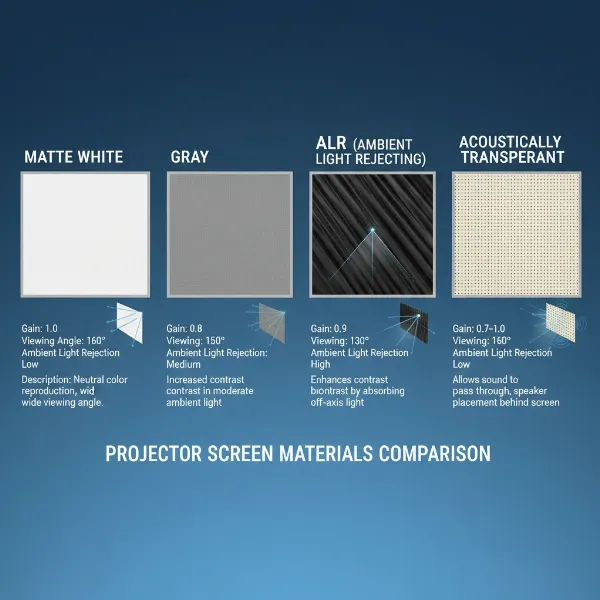 Illustration showing different types of projector screen materials and their characteristics
Key Factors When Selecting Projector Screen Material
Choosing the ideal projector screen material requires a thoughtful assessment of several critical factors. Your room’s characteristics, your projector’s specifications, and your personal viewing habits all play a pivotal role in this decision.
Room Environment and Ambient Light
The amount of uncontrolled light in your viewing area is perhaps the most significant factor.
- Controlled Lighting: If you have a dedicated home theater where you can achieve complete darkness, a simpler screen material like matte white will perform exceptionally, delivering accurate colors without interference.
- Uncontrolled Lighting: For living rooms or multi-purpose spaces with windows or ambient light sources, materials designed to combat glare and wash-out become essential. Ambient Light Rejecting (ALR) screens, for instance, are engineered to absorb light from other sources while reflecting only the projector’s light.
- Viewing Distance and Angles: Consider where your audience will be seated. Materials with wider viewing angles ensure consistent brightness and color for everyone, while narrower angles might be fine for a single, central viewer.
Projector Specifications
Your projector’s capabilities should directly influence your screen choice.
- Brightness (Lumens): A brighter projector might not need a high-gain screen, which could lead to “hot-spotting” (uneven brightness). Conversely, a lower lumen projector can benefit from a higher-gain screen to boost perceived brightness.
- Resolution (1080p, 4K): For standard 1080p projectors, smooth screen surfaces work well. However, to fully appreciate the detail and crispness of a 4K projector, some materials offer a subtly textured surface to enhance image depth.
- Contrast Ratio: Projectors with lower native contrast ratios (like some LCD models) can greatly benefit from high-contrast gray screens, which help darken black levels and improve perceived image depth.
- Projector Technology (DLP, LCD, LED, Laser): Different projector technologies have varying characteristics. For example, some LCD projectors benefit more from gray screens to enhance black levels, while laser-DLP projectors, being very bright, also pair well with gray screens to maintain color accuracy.
- Throw Ratio (Standard, Short Throw, Ultra-Short Throw): Ultra-short throw (UST) projectors, placed very close to the screen, require specialized screens, often Fresnel ALR types, designed to reflect light optimally from such a steep angle without producing hot spots or ghosting effects.
Desired Viewing Experience & Purpose
What will you primarily use your projector for?
- Home Theater: For movies and gaming, you’ll prioritize color accuracy, contrast, and immersion. Features like acoustically transparent screens, which allow speakers to be placed behind them, can create a truly cinematic soundstage.
- Business Presentations: Brightness and wide viewing angles might be more important for larger audiences in a well-lit conference room.
- Outdoor Use: Portability and durability are key here, with materials like polyester being a popular choice for their resilience and ease of maintenance.
Screen Gain
Gain is a measure of a screen’s reflectivity, indicating how much light it reflects compared to a perfectly diffuse white surface (which has a gain of 1.0).
- A screen with a gain of 1.0 reflects light uniformly across a wide viewing angle.
- Higher gain (e.g., 1.5) means the screen reflects more light, resulting in a brighter image, but often at the expense of a narrower viewing angle and potential hot-spotting.
- Lower gain (e.g., 0.8) means the screen absorbs more light, which can deepen black levels and improve contrast, particularly beneficial in rooms with some ambient light.
Choosing the right gain depends heavily on your projector’s brightness and your room’s lighting conditions.
Viewing Angle
The viewing angle refers to how wide an area around the screen maintains consistent brightness and color.
- A wide viewing angle ensures that viewers seated off-center still experience a good image. Matte white screens are known for their wide viewing angles.
- Materials designed for ambient light rejection or very high gain often have narrower viewing angles, meaning the image quality degrades more noticeably as you move away from the central axis. Consider your seating arrangement and audience size when evaluating this factor.
Screen Size and Aspect Ratio
The size and shape of your screen should complement both your room and your projector.
- Screen Size: This should be determined by your viewing distance and room dimensions. Ensure your projector can comfortably fill the chosen screen size without sacrificing image quality.
- Aspect Ratio: This refers to the screen’s width-to-height ratio (e.g., 16:9 for most TV/movies, 2.4:1 for widescreen cinema). It should match your projector’s native aspect ratio or the content you primarily watch to avoid black bars or image cropping.
Budget and Maintenance
Projector screens vary widely in price, from a few hundred to several thousand dollars, depending on material, size, and features.
- Budget: While it’s tempting to save on the screen, remember it’s a long-term investment that significantly impacts picture quality. Allocate a realistic portion of your budget.
- Maintenance: Most indoor screens require minimal maintenance, usually a light dusting or gentle wipe. Some coated or multi-layered screens might require more specific care to avoid damage. Polyester-based screens, often used outdoors, are known for being easy to clean and wrinkle-free.
Detailed Comparison of Popular Projector Screen Materials
The market offers a variety of projector screen materials, each with distinct characteristics tailored for specific environments and viewing preferences.
Matte White Screens
Matte white is the most classic and widely used projector screen material, known for its versatility and balanced performance.
- Pros: Delivers natural color rendering and boasts very wide viewing angles (up to 180 degrees), making it suitable for rooms where viewers are spread out. It’s generally the most affordable option.
- Cons: Performs best in completely dark or controlled lighting environments. It does not actively reject ambient light, making images appear washed out in brighter rooms.
- Ideal Use Cases: Dedicated home theaters, classrooms, or boardrooms where ambient light can be fully controlled. It’s an excellent choice when color accuracy is paramount and light interference is minimal.
High Contrast Gray Screens
Gray screens, often referred to as “high contrast screens,” are designed to improve perceived black levels and overall contrast.
- Pros: Significantly enhances contrast in environments with moderate ambient light by making dark areas appear deeper and more realistic. They also offer a degree of ambient light rejection.
- Cons: Can slightly reduce overall image brightness compared to matte white. Viewing angles might be slightly narrower than matte white screens.
- Ideal Use Cases: Living rooms, multi-purpose media rooms, or any space where you can’t achieve total darkness but still want improved black levels. They are particularly beneficial for LCD projectors, which sometimes struggle with true black reproduction.
Ambient Light Rejecting (ALR) Screens
ALR screens are at the forefront of screen technology, engineered to deliver exceptional image quality even in well-lit rooms.
- Pros: Multi-layered construction specifically designed to reject off-axis ambient light while efficiently reflecting light from the projector. This results in vibrant colors, deep blacks, and excellent contrast in bright environments. High-end ALR screens can reject 75% or more of ambient light.
- Cons: Generally more expensive than matte white or gray screens. They often have narrower optimal viewing cones, meaning image quality can diminish if viewed from extreme angles. Some are specifically designed for either standard-throw or ultra-short-throw projectors, requiring careful selection.
- How They Work: ALR screens feature a specialized optical filter or multi-layered coating that directs light from the projector (which comes from a specific angle) towards the viewer, while absorbing or deflecting light coming from other directions (like ceiling lights or windows).
- Specialized Types like Fresnel: Fresnel screens are a type of ALR screen optimized for ultra-short throw (UST) projectors. They feature concentric, semicircular patterns that precisely capture and redirect light from the very short throw distance into the viewing area, preventing light waste and ghosting effects on ceilings or floors.
- Ideal Use Cases: Living rooms, family rooms, or conference rooms where ambient light cannot be fully controlled but a premium, bright, and high-contrast image is desired. Essential for UST projector setups.
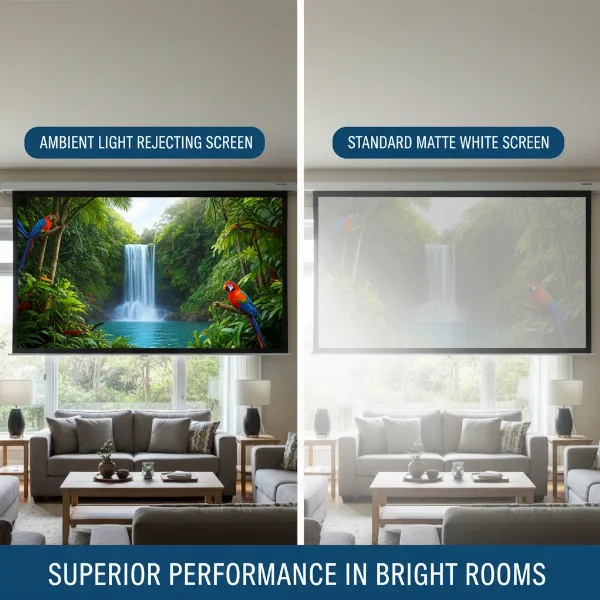 Side-by-side comparison of ALR screen vs. regular screen in a bright room
Acoustically Transparent Screens
These screens are designed to allow sound waves to pass through them without significant distortion.
- Pros: Enables the placement of speakers directly behind the screen, creating a truly immersive, cinema-like audio experience where sound appears to emanate directly from the on-screen action. This also allows for a cleaner, more integrated aesthetic by hiding speakers and cables.
- Cons: Can be more expensive and may require careful speaker calibration. Some perforated vinyl types might have a slightly less smooth image surface compared to solid screens. Woven fabrics are generally better for sound quality, while perforated vinyl offers a smoother image.
- Ideal Use Cases: High-end home theaters where audio immersion is a top priority and an invisible speaker setup is desired.
Other Materials: Glass Beaded, 3D Silver, DIY Options
While less common for modern primary setups, these materials serve niche purposes:
- Glass Beaded: These screens feature tiny glass beads that create a highly retro-reflective surface, offering very high gain (2.5 or more). While producing extremely bright images, they are prone to “hot-spotting” with brighter projectors and have very narrow viewing angles. They are best suited for lower-lumen projectors (under 1000 lumens) and are considered an older technology.
- 3D Silver: Specifically designed for passive 3D projection, these screens utilize polarizing and color-differential methods. They require a 3D-capable projector for optimal use.
- DIY Options (Blackout Cloth, Spandex, etc.): For budget-conscious users, materials like blackout cloth (white fabric with a black backing) can serve as a temporary or entry-level screen. While cost-effective, they generally don’t offer the same picture quality, contrast enhancement, or ambient light rejection as professionally engineered screens.
Comparative Table: Projector Screen Material at a Glance
| Feature / Material | Matte White | High Contrast Gray | ALR (Ambient Light Rejecting) | Acoustically Transparent |
|---|---|---|---|---|
| Gain | ~1.0 | 0.8-1.0 | Varies, often 0.6-1.2+ | Varies |
| Ambient Light Rejection | Poor | Moderate | Excellent | Varies, typically moderate |
| Contrast Enhancement | Natural | Good | Excellent | Good |
| Viewing Angle | Wide (up to 180°) | Moderate | Moderate to Narrow | Wide |
| Color Accuracy | Excellent | Good | Good | Good |
| Cost | Low | Medium | High | High |
| Best For | Dark, controlled rooms | Rooms with moderate ambient light | Bright rooms, UST projectors (Fresnel) | Hidden speakers, immersive audio |
Top Considerations: A Buying Guide
Choosing the right projector screen material doesn’t have to be daunting. By systematically evaluating your needs, you can confidently select the best canvas for your projection setup.
- Assess Your Viewing Environment: Start by analyzing your room. How much ambient light is present (windows, lights)? Can you control it completely? This is the primary determinant for whether you need a matte white, gray, or ALR screen. Consider your seating arrangement – do you need a wide viewing angle for a large audience?
- Match with Your Projector’s Capabilities: Understand your projector’s brightness (lumens), native contrast ratio, and resolution. A bright projector in a dark room might be perfectly served by a 1.0 gain matte white screen, while a less bright projector in a moderately lit room might benefit from a gray screen. If you have a 4K projector, ensure the screen material can render its fine details. For ultra-short throw projectors, a dedicated Fresnel ALR screen is often essential.
- Define Your Primary Use: Is it for immersive home cinema, casual gaming, bright presentations, or outdoor movie nights? Each purpose may lead you to a different material. For movie buffs prioritizing audio, an acoustically transparent screen could be a game-changer.
- Consider Audio Setup: If you dream of an invisible speaker setup, an acoustically transparent screen is a must-have, allowing you to place your speakers directly behind the screen for a truly integrated soundstage.
- Set a Realistic Budget: Projector screens range widely in price. While a high-end ALR screen can be a significant investment, it can profoundly improve the viewing experience in challenging environments. Balance your desired performance with what you’re willing to spend.
- Read Reviews and Seek Expert Advice: Before making a final decision, consult professional reviews and, if possible, see different screen materials in action. Retailers specializing in home theater can often provide personalized recommendations based on your specific setup.
Tips for Projector Screen Material Care and Maintenance
Proper care and maintenance will extend the life of your projector screen and ensure it continues to deliver optimal image quality.
- Regular Cleaning: Most indoor screens benefit from a light dusting with a soft, lint-free cloth or a microfiber duster. For smudges or fingerprints, use a very lightly dampened cloth with distilled water or a mild, screen-specific cleaning solution, always wiping gently in one direction. Avoid harsh chemicals, abrasive materials, or excessive pressure, as these can damage the screen’s delicate surface or coating.
- Protection from Damage: Handle screens with care, especially retractable or portable models. Avoid touching the viewing surface directly. When not in use, retractable screens should be fully retracted into their casing to protect them from dust and physical damage.
- Environmental Control: Minimize exposure to direct sunlight or extreme temperature fluctuations, which can degrade the screen material over time. For outdoor screens, ensure they are thoroughly dry before storing to prevent mold or mildew.
- Troubleshooting Common Issues: If you notice “hot-spotting” (uneven bright areas), your screen gain might be too high for your projector’s brightness, or your projector might be placed too close. If colors appear washed out, it could indicate too much ambient light for your screen type, suggesting a need for better light control or an ALR screen. Ghost images on the ceiling might indicate incorrect screen-to-ceiling distance, especially with non-Fresnel screens.
“The screen is not just a passive reflector; it’s an active component that significantly shapes the final image. Ignoring its importance is like buying a high-performance sports car and putting bicycle tires on it.” – John Smith, Lead Home Theater Engineer
Conclusion
Choosing the right projector screen material is a cornerstone of achieving an exceptional viewing experience. It’s a decision that, when made thoughtfully, elevates your projector’s performance, bringing vibrant colors, deep contrasts, and crystal-clear images to life. By considering your room’s unique characteristics, your projector’s specifications, and your personal viewing preferences, you can unlock the full potential of your home theater or presentation setup. Don’t let your investment in a quality projector be undermined by an incompatible screen. Take the time to understand the differences, and you’ll be rewarded with visuals that truly captivate. What kind of viewing experience are you hoping to create in your space?
Frequently Asked Questions
What is projector screen gain and why is it important?
Projector screen gain measures how much light the screen reflects compared to a standard white surface (gain 1.0). It’s crucial because it affects image brightness and viewing angle. Higher gain screens boost brightness but can narrow viewing angles and cause hot-spotting, while lower gain screens enhance contrast in ambient light.
Can I use a regular white wall as a projector screen?
While technically possible, a regular white wall will not deliver optimal image quality. It lacks the uniform reflectivity, specific coatings, and flatness of a dedicated projector screen, often resulting in lower contrast, duller colors, and visible imperfections that distract from the viewing experience.
Are Ambient Light Rejecting (ALR) screens worth the extra cost?
ALR screens are often worth the investment if you plan to use your projector in a room with significant ambient light that you cannot control. They dramatically improve contrast and color saturation by rejecting off-axis light, delivering a much clearer and more vibrant image than conventional screens in bright environments.
What’s the difference between perforated and woven acoustically transparent screens?
Both types allow sound to pass through for hidden speaker placement. Perforated screens use tiny holes in a solid material (often PVC) for a smoother image, while woven screens use a fabric weave. Woven screens generally offer better sound transparency, whereas perforated screens might block light more effectively and avoid weave-related image issues.
How do I clean my projector screen material without damaging it?
For most screens, use a soft, lint-free microfiber cloth for light dusting. For smudges, dampen the cloth slightly with distilled water and gently wipe in one direction. Avoid harsh chemicals, abrasive materials, or excessive pressure, as these can permanently damage the screen’s delicate surface coatings. Always check the manufacturer’s cleaning recommendations.